RAG Explained: How to Give an LLM Access to Your Own Knowledge
Introduction
Large Language Models (LLMs) have changed how we interact with information. We can ask questions in natural language, generate code, summarize documents, and even build AI assistants.
But there is one important limitation.
What happens when an LLM doesn't know about the information you want it to use?
Imagine building an AI assistant for a company. The company has thousands of internal documents containing employee policies, technical documentation, product information, and customer support instructions.
You cannot expect a general-purpose LLM to know all this private information.
One possible solution is to train or fine-tune a model, but that isn't always necessary or practical.
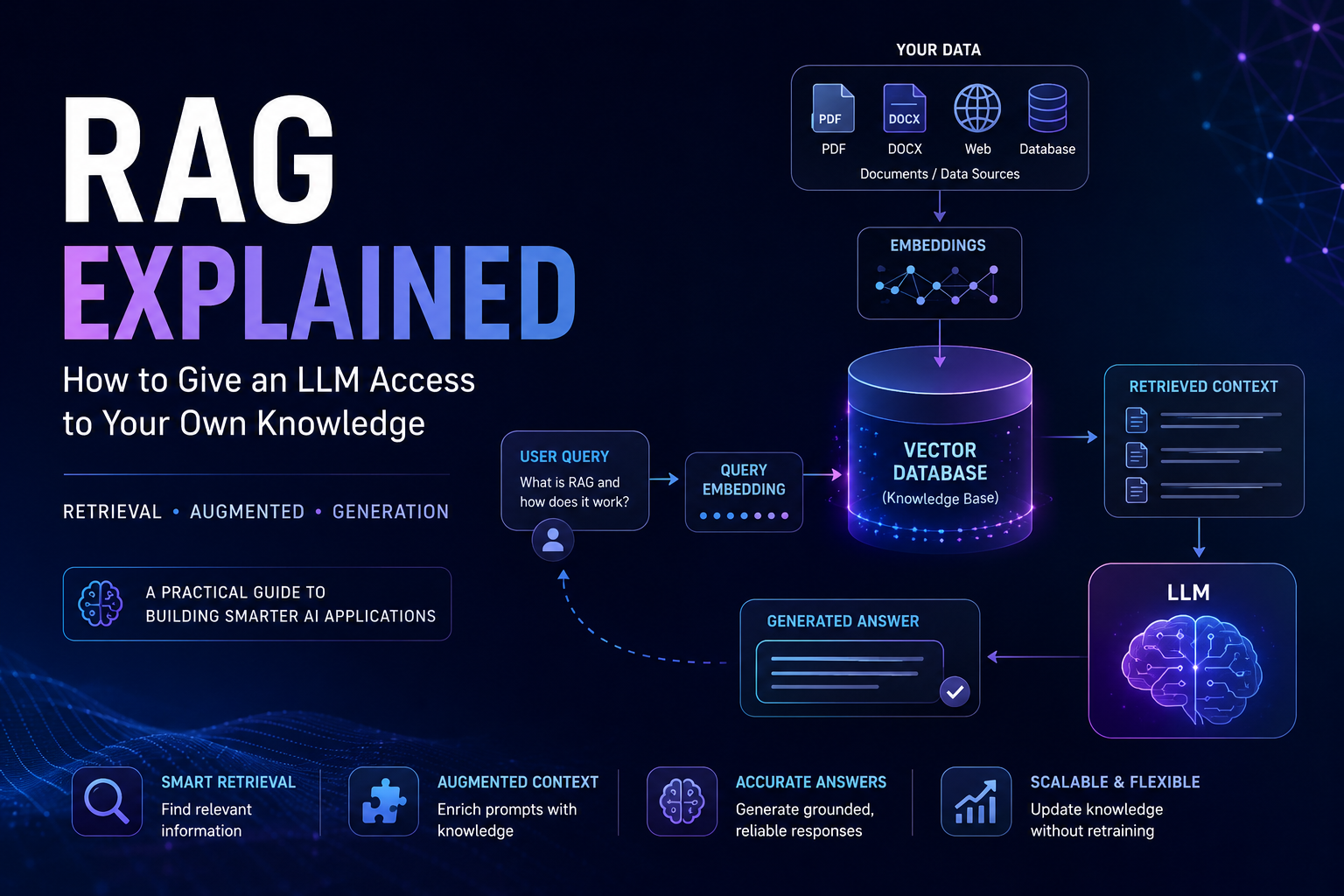
Instead, we can use something called Retrieval-Augmented Generation (RAG).
RAG allows an LLM to retrieve relevant information from an external knowledge source and use that information when generating an answer.
Let's understand how it works from an engineering perspective.
1. What is Retrieval-Augmented Generation?
Retrieval-Augmented Generation is an architecture that combines information retrieval with the text-generation capabilities of an LLM.
Rather than depending entirely on the knowledge encoded in its model parameters, an LLM receives relevant external information at inference time.
There are three fundamental operations:
Retrieval: Find information relevant to the user's question.
Augmentation: Add the retrieved information to the model's input.
Generation: Let the LLM generate an answer using the supplied context.
Think about building a chatbot that answers questions using your PDF documents.
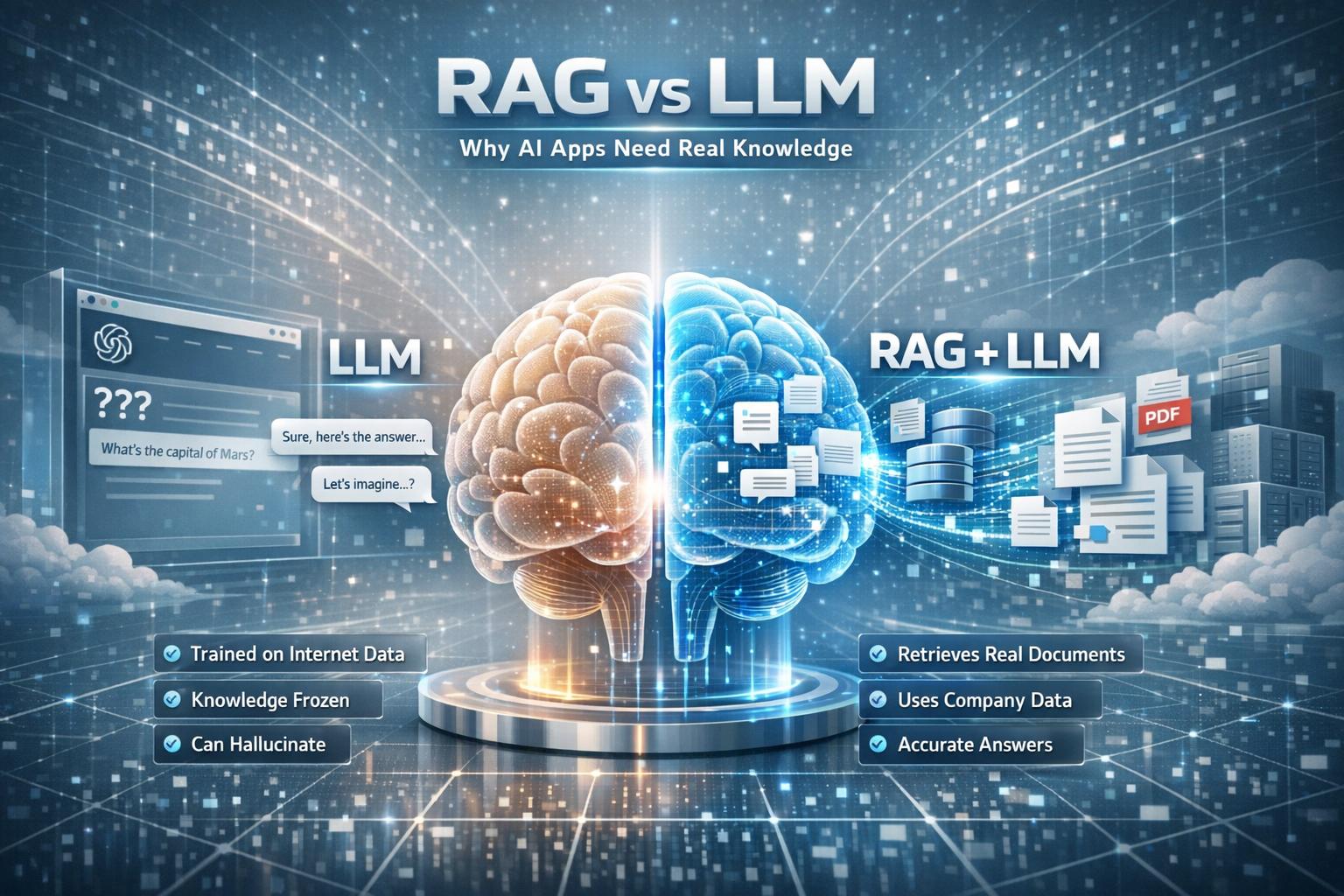
Without RAG, the model might not know anything about your documents.
With RAG, your application searches those documents, extracts relevant information, and provides it to the model before asking it to answer.
The LLM doesn't need to memorize the entire document collection.
2. Understanding the RAG Architecture
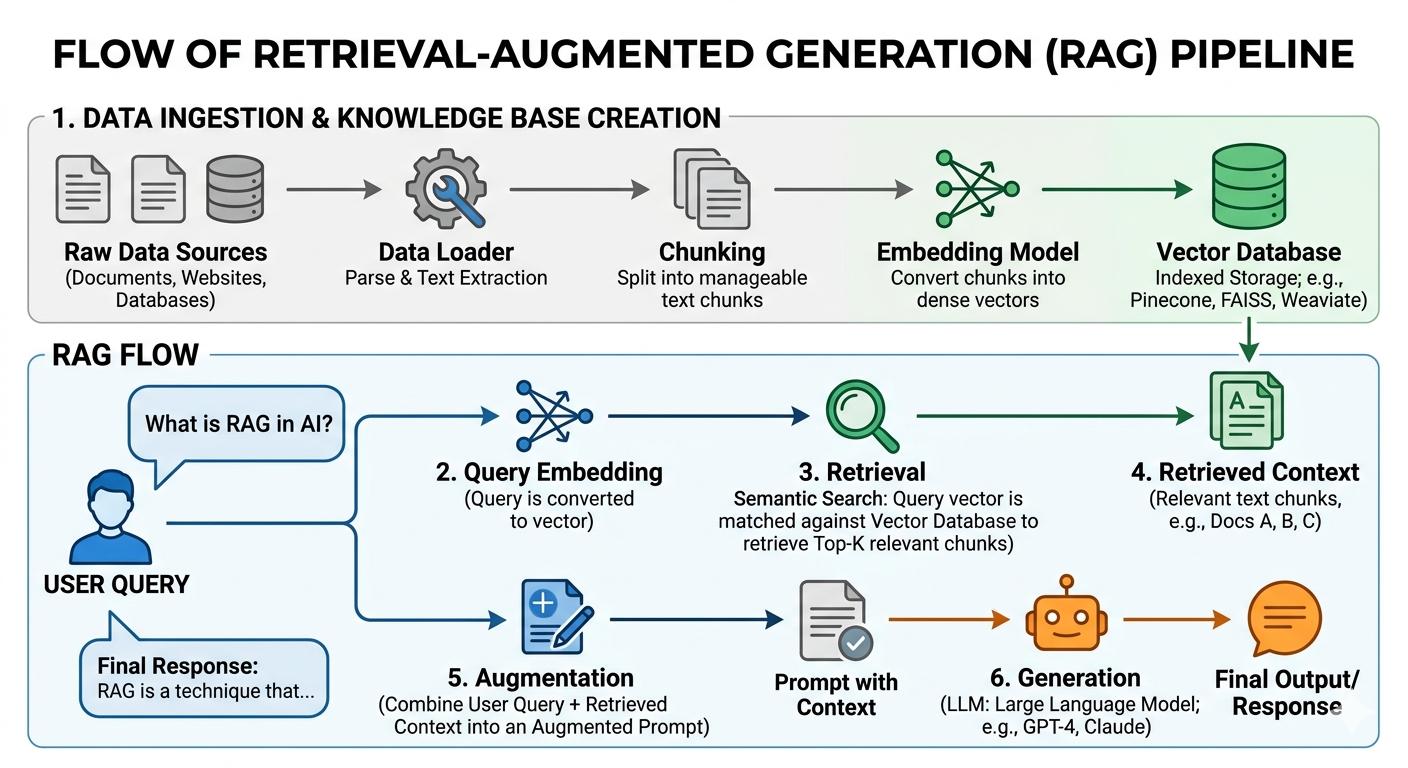
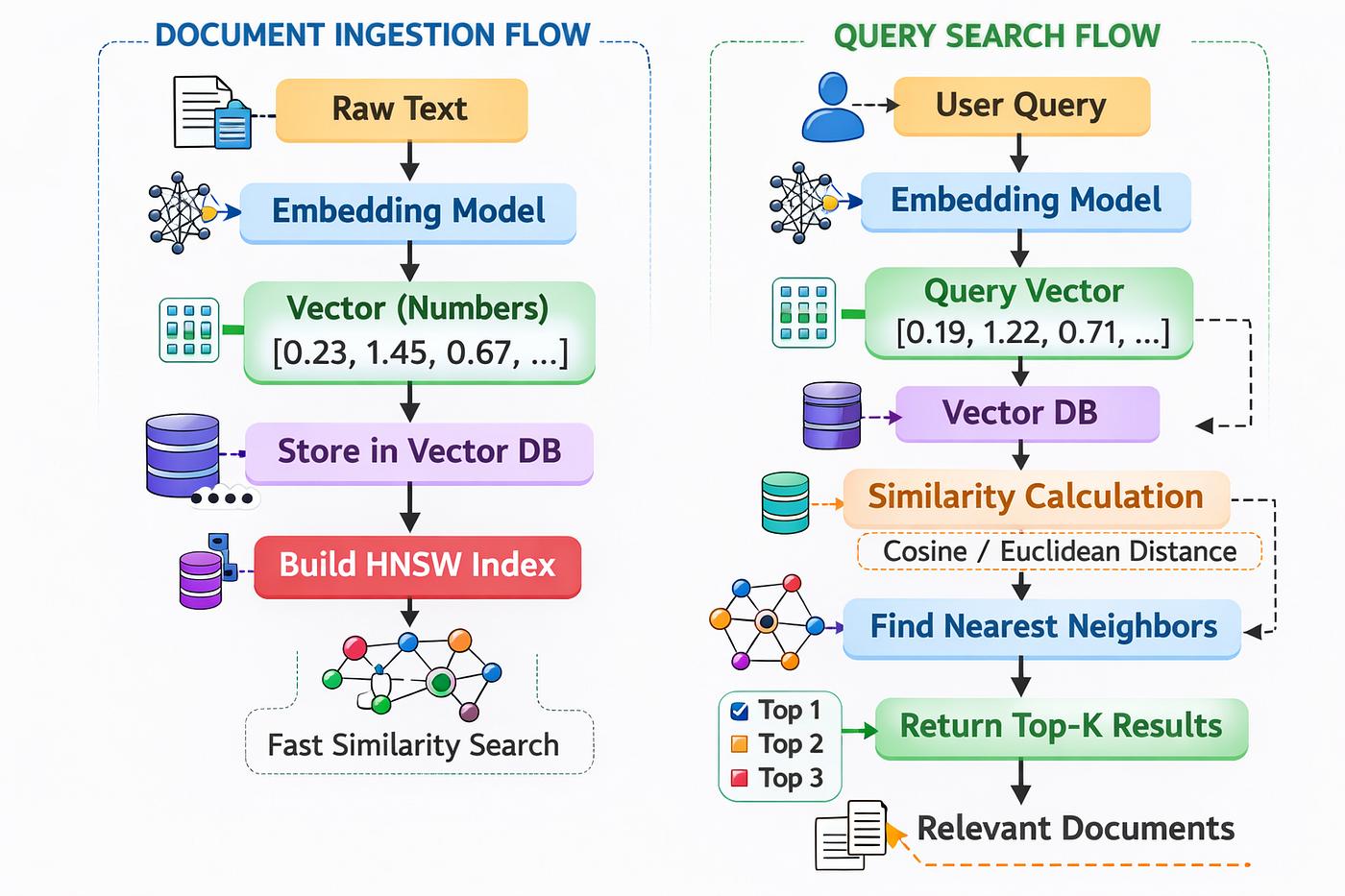
A RAG application generally has two major workflows:
Document ingestion (preparing the knowledge base).
Query processing (answering user questions).
Let's examine both.
A. Document Ingestion Pipeline
Before users can ask questions, we need to prepare our documents.
Step 1: Document Loading
First, collect information from different sources, such as:
PDF files
Text documents
Markdown files
Websites
Databases
The objective is to extract usable text and associated metadata.
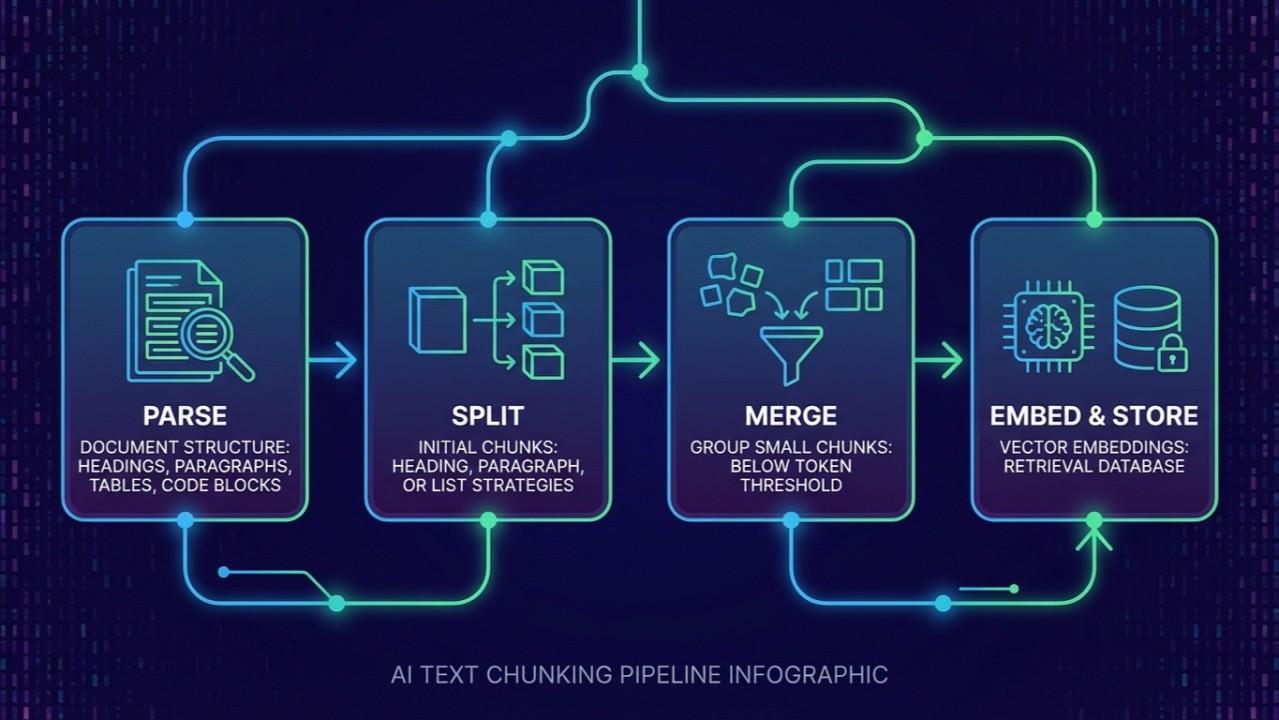
Step 2: Text Chunking
Imagine having a document containing 100 pages.
Passing the entire document to an LLM for every question would be inefficient and could exceed its context window.
Instead, we divide the document into smaller pieces called chunks.
For example:
Original document:
"Machine learning is a field of artificial intelligence. It enables computers to learn patterns from data..."
After chunking:
Chunk 1: Introduction to machine learning.
Chunk 2: Types of machine learning.
Chunk 3: Supervised learning algorithms.
Chunking is an important engineering decision.
If chunks are too small, they may lose meaningful context. If they are too large, retrieval may return irrelevant information alongside useful content.
Step 3: Generating Embeddings
Now we need a way to search these chunks based on their meaning rather than just matching exact words.
This is where embeddings become useful.
An embedding model converts text into a numerical vector representing its semantic characteristics.
For example:
"How can I train a neural network?"
And:
"What are the steps involved in training a deep learning model?"
These sentences use different words but have similar meanings.
An embedding model can represent them as vectors that are relatively close in the embedding space.
This makes semantic search possible.
Step 4: Vector Database
After generating embeddings, we store them in a vector index or vector database.
Alongside each vector, we typically store:
Original text chunk
Document identifier
Page number
Metadata
Other information needed for citations
Examples of vector databases and search systems include:
FAISS
Chroma
Qdrant
Pinecone
Now our knowledge base is ready for retrieval.
B. Query Processing Pipeline
Once the documents have been indexed, users can start asking questions.
Step 1: User Query
Suppose a user asks:
"Which machine learning algorithm is suitable for predicting house prices?"
We convert this question into an embedding using the same compatible embedding model.
Step 2: Similarity Search
We compare the query embedding against stored document embeddings.
A similarity function, such as cosine similarity, can help identify vectors representing semantically related content.
The retrieval system returns the most relevant chunks.
For example:
Chunk 12: Linear regression.
Chunk 18: Decision tree regression.
Chunk 24: Random forest regression.
Step 3: Context Augmentation
We combine the retrieved information with the original question.
A simplified prompt could look like this:
"You are an AI assistant. Answer the question using the provided context.
Context:
[Retrieved document chunks]
Question:
Which machine learning algorithm is suitable for predicting house prices?
If the provided context does not contain enough information, clearly say so."
The retrieved context gives the LLM additional information to work with.
Step 4: Response Generation
Finally, the LLM processes the question and retrieved context to generate a response.
The answer is now grounded in the information retrieved from the knowledge base.
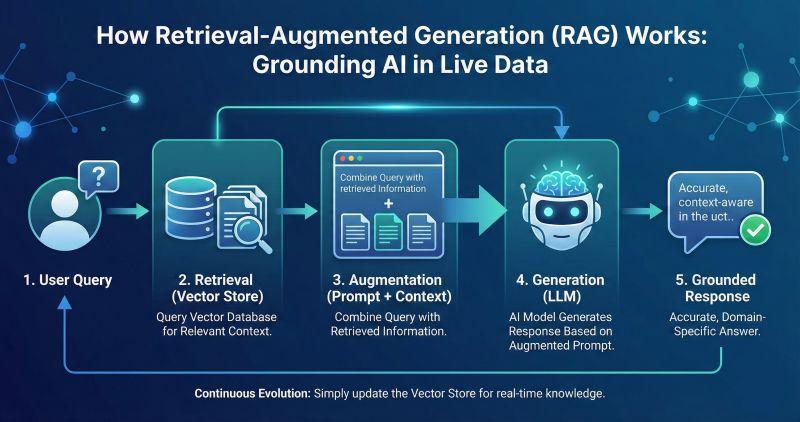
That's the basic RAG pipeline.
3. Building a Working RAG Application Using Python and FAISS
Understanding the architecture is useful, but let's implement it.
We'll build a small RAG application using:
FAISS: For storing and retrieving document embeddings.
Sentence Transformers: For converting text into embeddings.
Ollama: For generating answers using a locally running LLM.
NumPy: For handling numerical vectors.
The implementation will use sample documents directly in Python, so you can run it without downloading a dataset.
Step 1: Install the dependencies
Install the required Python libraries:
pip install faiss-cpu sentence-transformers numpy requestsInstall Ollama from https://ollama.com/.
Download the language model:
ollama pull llama3.2:3bMake sure Ollama is running before executing the Python program.
Step 2: Complete implementation
Create a file named rag_faiss.py.
import faiss
import numpy as np
import requests

from sentence_transformers import SentenceTransformer


# ---------------------------------
# 1. Sample Knowledge Base
# ---------------------------------

documents = [
    {
        "source": "machine_learning.txt",
        "text": """
        Machine learning is a branch of artificial
        intelligence that enables computers to learn
        patterns from data without explicitly
        programming every rule.

        Supervised learning uses labeled datasets
        to train models. Common algorithms include
        linear regression, decision trees,
        random forests and support vector machines.
        """
    },
    {
        "source": "deep_learning.txt",
        "text": """
        Deep learning is a subset of machine learning
        that uses neural networks with multiple layers.

        Convolutional Neural Networks (CNNs) are
        commonly used in image processing and
        computer vision.

        Recurrent Neural Networks are designed
        to process sequential information.
        """
    },
    {
        "source": "nlp.txt",
        "text": """
        Natural Language Processing (NLP) enables
        computers to understand and process human
        language.

        Common NLP applications include sentiment
        analysis, text classification, machine
        translation and question answering.
        """
    }
]


# ---------------------------------
# 2. Text Chunking
# ---------------------------------

def create_chunks(text, chunk_size=300, overlap=50):

    chunks = []
    start = 0

    while start < len(text):

        end = start + chunk_size

        chunks.append(text[start:end])

        start += chunk_size - overlap

    return chunks


texts = []
metadata = []

for document in documents:

    chunks = create_chunks(document["text"])

    for chunk in chunks:

        texts.append(chunk)

        metadata.append({
            "source": document["source"],
            "text": chunk
        })


# ---------------------------------
# 3. Generate Embeddings
# ---------------------------------

print("Loading embedding model...")

embedding_model = SentenceTransformer(
    "sentence-transformers/all-MiniLM-L6-v2"
)

embeddings = embedding_model.encode(
    texts,
    convert_to_numpy=True,
    normalize_embeddings=True
)

embeddings = np.asarray(
    embeddings,
    dtype="float32"
)


# ---------------------------------
# 4. Create FAISS Index
# ---------------------------------

dimension = embeddings.shape[1]

index = faiss.IndexFlatIP(dimension)

index.add(embeddings)

print(f"Indexed {index.ntotal} document chunks.")


# ---------------------------------
# 5. Retrieve Relevant Documents
# ---------------------------------

def retrieve(query, top_k=3):

    query_embedding = embedding_model.encode(
        [query],
        convert_to_numpy=True,
        normalize_embeddings=True
    )

    query_embedding = np.asarray(
        query_embedding,
        dtype="float32"
    )

    k = min(top_k, index.ntotal)

    scores, indices = index.search(
        query_embedding,
        k
    )

    results = []

    for score, idx in zip(scores[0], indices[0]):

        if idx == -1:
            continue

        result = metadata[idx].copy()

        result["score"] = float(score)

        results.append(result)

    return results


# ---------------------------------
# 6. Generate Answer Using Ollama
# ---------------------------------

def generate_answer(query, retrieved_docs):

    context = "\n\n".join(
        f"Source: {doc['source']}\n{doc['text']}"
        for doc in retrieved_docs
    )

    prompt = f"""
    You are a helpful AI assistant.

    Answer the question using only the
    information provided in the context.

    If the answer is not present in the
    context, say that you don't have
    enough information.

    Context:
    {context}

    Question:
    {query}

    Answer:
    """

    response = requests.post(
        "http://localhost:11434/api/generate",
        json={
            "model": "llama3.2:3b",
            "prompt": prompt,
            "stream": False
        },
        timeout=120
    )

    response.raise_for_status()

    return response.json()["response"]


# ---------------------------------
# 7. Run the RAG Pipeline
# ---------------------------------

if __name__ == "__main__":

    query = input("\nAsk a question: ")

    print("\nSearching knowledge base...")

    retrieved_docs = retrieve(query)

    print("\nRetrieved Documents:")

    for doc in retrieved_docs:

        print(
            f"\nSource: {doc['source']}"
            f"\nSimilarity: {doc['score']:.4f}"
            f"\nContent: {doc['text']}"
        )

    print("\nGenerating answer...")

    answer = generate_answer(
        query,
        retrieved_docs
    )

    print("\nFinal Answer:")
    print(answer)
Step 3: Run the application
python rag_faiss.pyTry asking:
What is the difference between machine
learning and deep learning?
The application will:
Convert your question into an embedding.
Search the FAISS index.
Retrieve the most relevant document chunks.
Construct a prompt containing the retrieved context.
Send the prompt to Ollama.
Display the generated answer.
Step 4: Understanding the FAISS implementation
There is an interesting detail in this implementation:
index = faiss.IndexFlatIP(dimension)
index.add(embeddings)
IndexFlatIP performs exact inner-product similarity search.
But why are we using inner product instead of directly implementing cosine similarity?
Look at this part:
normalize_embeddings=TrueWe normalize both document embeddings and query embeddings.
For normalized vectors, their inner product is equal to cosine similarity
Because both vectors are normalized to have the same length, we can calculate their cosine similarity simply by taking their dot product.
This means FAISS can perform cosine similarity search using IndexFlatIP.
We also use:
scores, indices = index.search(
    query_embedding,
    k
)
This returns the similarity scores and indices of the nearest document vectors.
We use those indices to retrieve the original text chunks and their metadata.
Important: This is a small educational implementation. It uses exact similarity search, a simple character-based chunking strategy, and an in-memory FAISS index. A production application would need better document parsing, persistence, more sophisticated chunking, retrieval evaluation, and possibly reranking.
4. Why Does RAG Matter?
RAG solves several practical problems associated with building LLM applications.
Access to private information
An application can retrieve information from internal company documents without requiring that information to be part of the original model training data.
Updating knowledge
When documents change, we can update the knowledge base and its index instead of retraining the entire language model.
Source attribution
Because retrieved chunks can retain document metadata, applications can provide references to the original documents.
Reduced dependence on model memory
The model receives relevant external information instead of relying exclusively on what it learned during training.
However, RAG does not guarantee factual accuracy. Its effectiveness depends heavily on retrieval quality and generation behavior.
5. Is RAG a Perfect Solution?
No. Building a working RAG application is relatively straightforward. Building a reliable RAG application is much harder.
Here are some common problems.
Poor chunking strategy
If important information is divided incorrectly, the retrieval system may return incomplete context.
Incorrect retrieval
A vector database can return semantically similar content that does not actually answer the question.
Hallucinations
Even when relevant context is provided, an LLM can generate incorrect information or introduce unsupported details.
Context limitations
Retrieving too many chunks can increase token consumption, latency, and the amount of irrelevant information given to the model.
This is why production RAG systems often need additional techniques such as:
Hybrid search
Query rewriting
Metadata filtering
Reranking
Retrieval evaluation
These techniques improve different parts of the retrieval pipeline.
6. Where Should You Go After Learning Basic RAG?
Once you understand the basic architecture, there are several interesting areas to explore.
Advanced RAG: Improving chunking, retrieval, and context construction.
Hybrid Search: Combining keyword-based search with vector similarity search.
Reranking: Reordering retrieved documents using a more sophisticated relevance model.
Agentic RAG: Allowing an AI agent to decide when and how to retrieve additional information.
RAG Evaluation: Measuring retrieval quality and the factual relevance of generated answers.
These are important steps when moving from a simple document chatbot to a more sophisticated AI application.
Conclusion
Retrieval-Augmented Generation is more than just connecting a vector database to an LLM.
It is an architectural approach that combines information retrieval and language generation to build applications that can work with external knowledge.
Understanding the complete pipeline—from document ingestion and chunking to embeddings, retrieval, and generation—is essential for anyone interested in developing practical LLM applications.
The interesting engineering challenge isn't simply making an LLM answer questions.
It's making sure that the information provided to the LLM is relevant, reliable, and useful.
That is where good RAG engineering begins.
Further Reading
Edited by Rajat Chauhan. How articles here are written and edited.
0 comments
Sign in to join the discussion.
Loading comments…