An API, short for application programming interface, is a set of rules that lets one program ask another for data or an action, and get a predictable answer back. Your weather app doesn't measure the weather. It asks a weather service's API, then shows you the reply.
That is the one-line answer to what is an API. It skips the part that makes APIs click, though: what a request looks like, what comes back, and what happens when it goes wrong. So this guide sends real requests to real APIs and shows the responses exactly as they arrived on September 25, 2026.
What does API stand for?
API stands for application programming interface. Each word does work:
Application: any software with a job to do, from a bank's ledger to a weather service.
Programming: the interface is meant for code to use, not a person clicking buttons.
Interface: the agreed surface between two systems. You can use what is exposed, and nothing behind it.
The last word matters most. An API is a promise about the outside of a system. The inside can be rewritten from scratch, and as long as the interface stays the same, every program that depends on it keeps working.
What is an API in simple terms?
Think of a cash machine. You never walk into the bank's vault or read its books. You use a short list of operations the bank chose to offer: check a balance, withdraw cash, change your PIN. Each expects particular input and gives a particular kind of answer. And the machine turns you away if your card is wrong or you have hit your daily limit.
An API works the same way. The parallels are close enough to learn the vocabulary from:
At the cash machine | In an API | What it's called |
|---|---|---|
Choosing "withdraw" or "balance" | Calling a particular URL | Endpoint |
Your card and PIN | A secret sent with each request | API key or token |
The daily withdrawal limit | A cap on requests per hour | Rate limit |
"Insufficient funds" on the screen | A numbered error in the reply | Status code |
The receipt | The data sent back, usually JSON | Response body |
How does an API work?
Almost every API you will meet on the web follows the same exchange. A client, such as your app, your browser or a script, sends a request to a server. The server does the work and sends back a response. Each request names up to four things:
The endpoint: the URL of what you want, such as a code repository or a city's forecast.
The method: what you want done.
GETreads,POSTcreates,PUTorPATCHupdates,DELETEremoves.Headers: details about the request, including who you are when the API needs to know.
A body, sometimes: the data you are sending when you create or change something.
One round trip, request and response, is called an API call. The response comes back with a status code saying how it went, its own headers, and usually a body in JSON, a text format that people and programs can both read. The full set of methods is in MDN's HTTP reference.
A real request, and what came back
Here is a request to GitHub's public REST API asking about the Next.js repository. You can paste it into any terminal:
curl -i https://api.github.com/repos/vercel/next.jsGitHub answered with status 200, meaning success, and a JSON body with over a hundred fields. These are the ones worth reading:
{
  "full_name": "vercel/next.js",
  "description": "The React Framework",
  "language": "JavaScript",
  "stargazers_count": 142432,
  "forks_count": 32950,
  "open_issues_count": 3487,
  "license": { "key": "mit", "name": "MIT License" }
}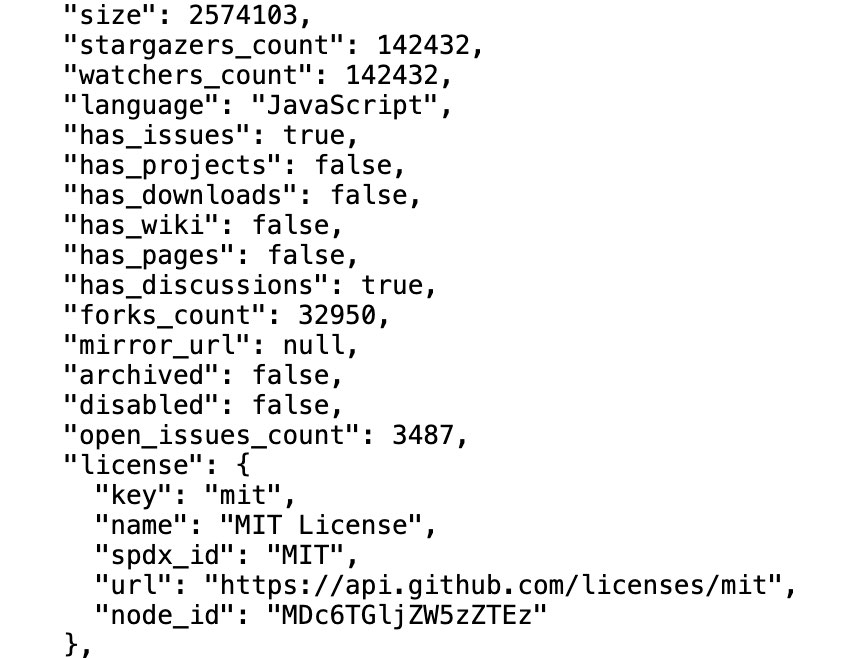
The same request opened in a browser on September 25, 2026, indented for reading. This is 22 of the response's 149 lines. The counts change as people star and fork the repository.
Two things stand out. First, nobody at GitHub wrote that reply. A program looked the repository up and formatted the answer, which is how a dashboard can show live star counts for thousands of projects at once. Second, the response headers carried this:
x-ratelimit-limit: 60
x-ratelimit-remaining: 59
x-ratelimit-used: 1
That is a rate limit announcing itself. Without signing in, GitHub allows 60 requests an hour; with a personal access token, it allows 5,000. Most public APIs have some version of this, and it is the main reason apps that call an API heavily need keys.
How to call an API yourself in 30 seconds
You don't need a terminal to try one. A browser's address bar sends a GET request, so any API that needs no key can be opened like a web page. Open-Meteo runs a free weather API that works this way. This address asks for current conditions in New Delhi:
https://api.open-meteo.com/v1/forecast?latitude=28.61&longitude=77.21¤t=temperature_2m,relative_humidity_2m,wind_speed_10m&timezone=Asia/KolkataAt 5:45 p.m. India time on September 25, 2026, it answered with this, trimmed to the part that matters:
{
  "timezone": "Asia/Kolkata",
  "current": {
    "time": "2026-09-25T17:45",
    "temperature_2m": 29.8,
    "relative_humidity_2m": 57,
    "wind_speed_10m": 6.2
  }
}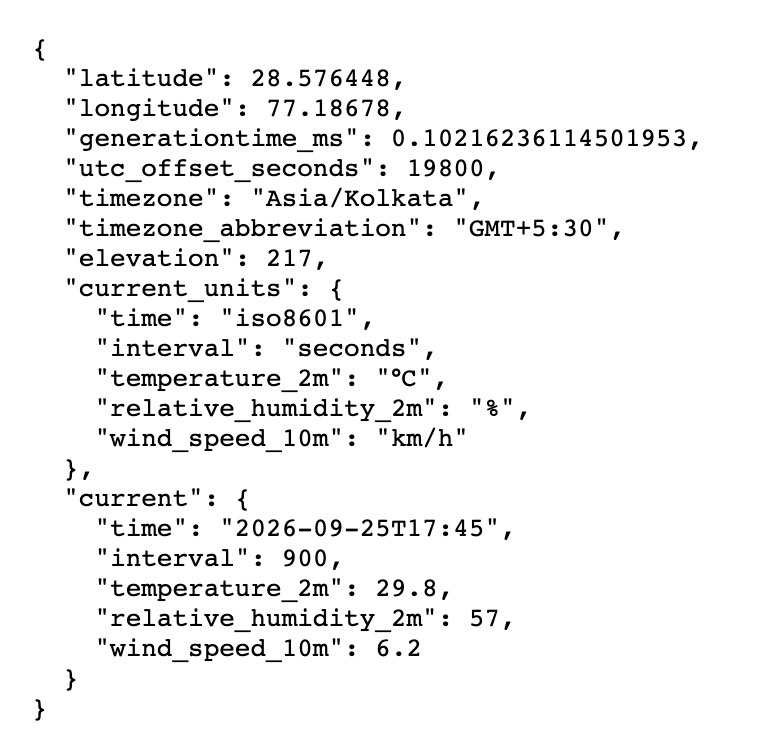
The full response, untrimmed, in a browser at 5:45 p.m. IST on September 25, 2026. The coordinates come back slightly different from the ones asked for because the API answers for the nearest point on its weather grid. An interval of 900 seconds means the reading refreshes every 15 minutes, so yours will differ.
Everything after the ? is a query parameter, the API's version of filling in a form. Change the latitude and longitude and you have asked about a different city. This is the same exchange your phone's weather app makes, with a nicer screen on top.
What happens when an API request fails?
Failure is part of the interface too. Ask GitHub about a repository that doesn't exist and it replies with status 404 and a body saying why:
{
  "message": "Not Found",
  "documentation_url": "https://docs.github.com/rest/repos/repos#get-a-repository",
  "status": "404"
}
That is what a well-built API does when something goes wrong: a numbered status, a readable message, and a pointer to the documentation. These are the status codes you will see most. All of them are defined in the HTTP standard and listed in MDN's status code reference.
Code | Meaning | Usually because |
|---|---|---|
200 OK | It worked | Everything was right |
201 Created | Something new now exists | A successful |
400 Bad Request | The request was malformed | A missing field or the wrong format |
401 Unauthorized | You didn't prove who you are | No key, or an expired one |
403 Forbidden | You are known but not allowed | Missing permission, or a rate limit on some APIs |
404 Not Found | Nothing exists at that address | A typo in the URL, or a deleted resource |
409 Conflict | The request clashes with current data | A username that is already taken |
429 Too Many Requests | You hit the rate limit | Too many calls too quickly |
500 Internal Server Error | The server failed | A bug on their side, not yours |
The 409 row hides a classic bug. Checking "is this name free?" and then saving it, in two separate steps, can still collide, because another request can slip in between. The reliable fix is to let the database's unique constraint decide, as explained in why your database is the only thing that knows if a value is taken.
What is an API key?
An API key is a long secret string that identifies whoever is calling. The server uses it to decide what you are allowed to do, to count your requests against your limit, and, for paid APIs, to bill you. Many modern APIs use short-lived tokens instead, often issued through OAuth 2.0, the standard behind "Sign in with Google" buttons. The job is the same: proving who is asking.
In larger systems, an API gateway sits in front of the services and does this checking in one place: it validates the key, applies the rate limit, then passes the request on. Keys also come with one rule that people break constantly. Never put a secret key in code that runs in someone else's browser or ships inside a mobile app, because anyone can read it there. Keys belong on a server you control, in environment variables, and out of your Git history. Some services also issue a separate key designed to be public, such as Stripe's publishable key, but the secret one still stays on the server.
What are the different types of APIs?
APIs get sorted two ways: by who is allowed to use them, and by the style they are built in.
By who can use them
Public or open APIs are available to anyone, sometimes with a free key. GitHub's and Open-Meteo's, used above, are both public.
Partner APIs are shared with specific businesses under an agreement, such as a bank letting an approved app initiate payments.
Private or internal APIs connect a company's own systems. They are the ones you never see, and a large company runs far more of them than public ones.
Composite APIs bundle several calls into one, so a mobile app can load a whole screen in a single round trip.
By the style they are built in
Style | How it works | Where you will meet it |
|---|---|---|
REST | Resources at URLs, standard HTTP methods, usually JSON | Most public web APIs, including GitHub's |
GraphQL | One endpoint; the client asks for exactly the fields it wants | Apps with nested data; GitHub offers one too |
SOAP | Strict XML messages with a formal contract | Banking, government and older enterprise systems |
gRPC | Fast binary calls between services, defined by a schema | Traffic between a company's own services |
WebSocket | A connection that stays open so the server can push updates in real time | Chat, live scores, collaborative editors |
REST is an architectural style, not a product. The term comes from Roy Fielding's 2000 doctoral dissertation. An API is called RESTful when it follows the style's constraints: resources identified by URLs, standard methods, and every request carrying everything the server needs to answer it. GraphQL and gRPC each fix something REST handles awkwardly. GraphQL stops the client from downloading fields it will never use, and gRPC trades human readability for speed.
API vs SDK vs webhook: what's the difference?
An API is the interface itself: the endpoints, the rules and the responses.
An SDK, or software development kit, is a library a company publishes so you can call its API from your programming language without writing HTTP requests by hand. An SDK is a convenience layer, and the API is still underneath.
A webhook reverses the direction. Instead of asking an API "has anything changed?" every few minutes, you give the other service a URL, and it calls you the moment something happens, such as a payment going through.
An endpoint is one address inside an API. GitHub's API has hundreds;
/repos/vercel/next.jsis one of them.
Why do APIs matter?
APIs are why software can be assembled instead of built from nothing. A small team can ship an app with maps, payments, sign-in and AI features in a few weeks because each of those is someone else's API. Four things make that work:
Reuse. Nobody rebuilds a mapping system or a payment network. You call a third-party API that already exists.
Separation. The team behind an API can rewrite its internals without breaking the apps that use it, as long as the interface holds.
Control. A company exposes exactly the operations it chooses, with keys and limits attached, instead of opening its database.
Combination. New products come from API integrations, joining existing services the way a travel site searches dozens of airlines in one go.
An API is only as usable as its documentation. Good API documentation means clear reference pages, working examples and honest error descriptions, and it decides whether developers adopt an API or give up. Writing those well is its own craft, covered in our guide to technical writing for engineers.
Real-world API examples you already use
Signing in with Google or GitHub on another site: an OAuth API confirms who you are without that site ever seeing your password.
Paying online: the shop sends your payment to a processor such as Stripe through its API, and gets back approved or declined.
Maps inside delivery and ride apps: the app asks a mapping API for routes and travel times rather than drawing its own maps.
Travel comparison sites: one search fans out to many airlines' and hotels' systems at once.
Weather in every app: the request you made above, at scale.
AI features: an app that adds a chatbot is usually sending your messages to a model provider's API and showing you the reply.
Is ChatGPT an API?
No. ChatGPT is an application: the chat window you use in a browser or on your phone. OpenAI sells access to its models separately, through the OpenAI API, which developers call from their own software and pay for by usage. Claude works the same way. There is the Claude app, and there is the Claude API. When a product says it is powered by GPT or built on Claude, it means that product sends requests to one of those APIs.
How to explain an API in an interview
Interviewers want to hear that you understand the contract, not a memorised definition. A strong answer fits in three sentences:
"An API is a defined interface that lets one piece of software request data or actions from another without knowing how it works inside. On the web, that is usually a client sending an HTTP request to an endpoint, with a method, headers and sometimes a body, and getting back a status code and a JSON response. A weather app calling a forecast API with a location, then showing what comes back, is the everyday example."
Then add one detail that shows you have used one: how you handled a 401, what a rate limit did to your app, or when you would pick GraphQL over REST.
Frequently asked questions
What is an API in simple terms?
A way for one program to ask another for something, following agreed rules, and get a predictable answer. Like a cash machine: a fixed menu of operations, a card to prove who you are, and a clear reply either way.
Is an API the same as a server?
No. The server is the machine that answers. The API is the set of rules for asking it. One server can host many APIs, and one API can run across hundreds of servers.
Do APIs cost money?
Many public APIs are free up to a limit, including both used in this guide. Commercial APIs for payments, maps and AI models usually charge per request or per amount of data, which is one reason they require keys.
What is the difference between an API and an endpoint?
An endpoint is one address inside an API, such as /repos/vercel/next.js. The API is the whole set of endpoints plus the rules for using them.
How do you explain an API to a child?
It is like a TV remote. You press a button for what you want, and the TV does it. You don't need to know how the TV works inside, and you can only use the buttons the remote has.
Do I need to know how to code to use an API?
Not to try one: the weather link above works in any browser. Building with APIs means writing some code, but tools such as Postman let you explore an API first by filling in forms.
Every request in this guide was sent on September 25, 2026, and the responses are quoted as they arrived. Live figures, such as GitHub's star count and New Delhi's temperature, will have changed by the time you read this.
The Writeouts editorial desk for developer tools: cheat sheets, references and tool comparisons you can keep open while you work, checked against official documentation. From the Writeouts editorial team.
See everything by @devtools-desk
0 comments
Sign in to join the discussion.
Loading comments…