Here is how to hide followers on Instagram, as far as Instagram allows it: make your account private. There is no separate "hide followers" setting, and going private hides less than most guides claim. Your follower and following counts stay public, and so do the public accounts on both lists, according to Instagram's own Help Center.
This guide covers what each privacy setting actually hides, where the popular tips go wrong, and what to do when you want your lists hidden from one person rather than everyone. Every step was checked against Instagram's Help Center on September 25, 2026.
What each Instagram setting hides, at a glance
Setting | Hides your lists from | Good to know |
|---|---|---|
Private account | Everyone you haven't approved, with one big exception (see below) | Your follower and following counts stay public |
Remove a follower | That one person, on a private account | They aren't notified, and they can send a new follow request |
Block | That one person | They aren't notified. You can also block other accounts they have or create |
Restrict | No one | Hides their new comments from others and your online status from them |
Limit interactions | No one | Hides new chats and comments from groups of accounts, for up to four weeks at a time |
Close Friends | No one | Chooses who sees a post, note, reel or story |
Can you hide followers on Instagram without going private?
No, and Instagram says so itself. Its own answer page on the question reads: "Instagram does not offer a direct setting to hide your following list from followers. The only way to hide both followers and following from non-followers is to set your account to private."
On a public account, anyone on Instagram can follow you and open your lists. The one tool that works person by person is blocking, covered below. Removing a follower isn't a real option on a public account: Instagram's Help Center describes it only for private accounts, and the person could follow you again straight away, because anyone can.
How to hide followers on Instagram by going private
In the Instagram app on iPhone or Android, the steps from Instagram's Help Center are:
Tap your profile picture in the bottom right to go to your profile.
Tap the menu icon (three lines) in the top right.
Below Who can see your content, tap Account privacy.
Turn on Private account.
Tap Switch to private to confirm.
On a computer, click More in the bottom left, then Settings, then Account Privacy, and turn on Private account.
Three things are worth knowing before you switch:
Your current followers stay. Going private changes who can follow you from now on. Everyone already following you keeps seeing your posts and both of your lists. To shut someone out, remove them afterwards.
Business profiles can't be private. Instagram says to switch back to a personal account first, which also means leaving the business tools behind.
Don't flip the public/private switch back and forth. Instagram may put a temporary limit on your account, including on approving follow requests, if you switch between public and private too often.
If you're under 18, this is already done for you. Instagram makes teen accounts private by default, and teens under 16 need a parent's or guardian's permission to switch to public.
What does a private Instagram account still show?
This is the part most guides skip. Instagram's Help Center keeps a list of profile details that are public on every account, private or not, and it says plainly that they can't be hidden:
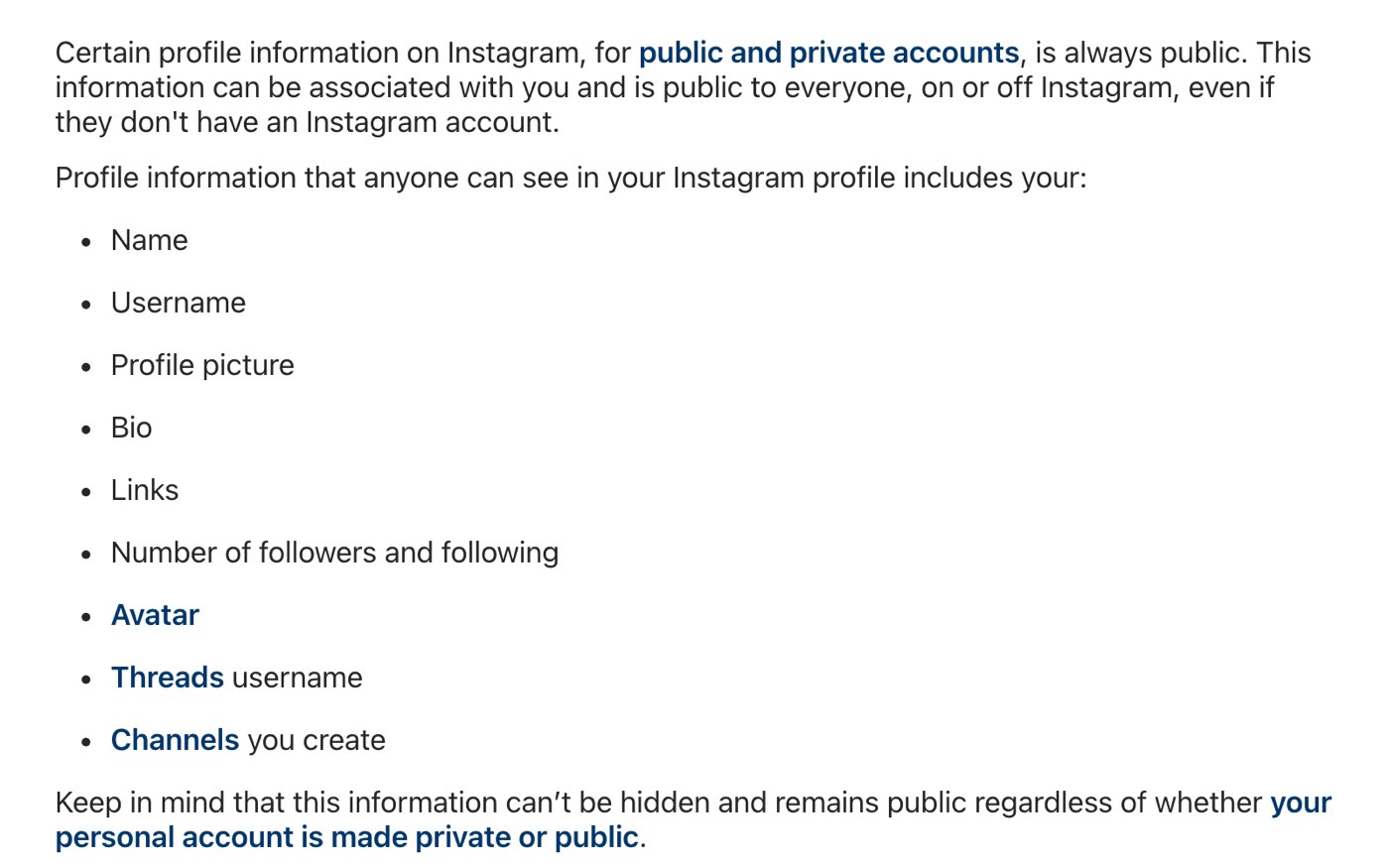
Instagram's Help Center on September 25, 2026. The number of followers and following is on the list of details that stay public on private accounts too.
So a private account still shows how many people follow you and how many accounts you follow. What it can hide is who they are, and it hides only part of that.
The public accounts on your lists stay visible
Instagram's comparison of public and private accounts has a row most people never read. It asks who can see "public accounts you follow and who follow you". For a private account, the answer is the same as for a public one: anyone on Instagram and Threads.
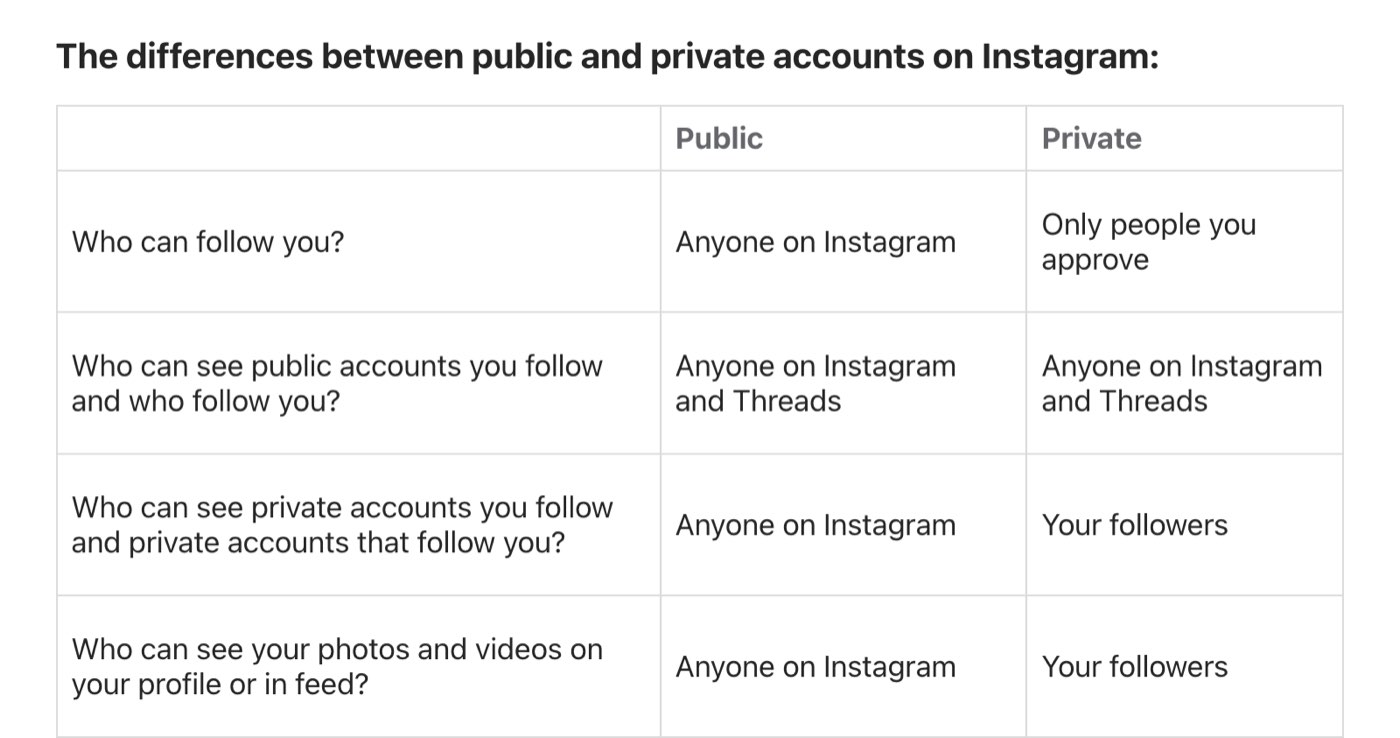
Instagram's comparison of public and private accounts, captured September 25, 2026. Going private limits only the private accounts on your lists to your followers.
The simplest way to see why: every public account you follow has its own followers list, and your username sits in it. Anyone who opens a brand's, a creator's or a friend's public followers list can find you there, whether your own account is private or not. It works the other way too. A public account that follows you lists you under its following.
What going private does protect is the private accounts on your lists. If you follow a friend whose account is also private, Instagram limits that part of your lists to your own followers.
What do you give up by going private?
The same Help Center table lists what changes for your posts, and it's more than your lists. On a private account:
Only your followers see your photos and videos, and they drop out of search results, Explore, and hashtag and location pages.
Links to your posts stop showing up in search engines like Google.
No one can download your reels, remix your videos or embed your posts on other websites.
Your name, username, profile photo and bio stay public, as before.
For a personal account, that is usually the point. For anyone trying to grow an audience, it's the real trade-off between keeping an account public or private: new people can't find your posts, and every new follower has to be approved by hand.
If you use Threads, check it separately
Threads profiles have their own public or private setting, so going private on Instagram doesn't cover them. On a public Threads profile, Instagram's Help Center says the profiles you follow and the profiles that follow you can be seen by anyone on or off Threads, including on Facebook, and on the fediverse if you've turned on sharing to it. On a private Threads profile, only your approved Threads followers can see them.
How to hide your following list on Instagram
People who search for this usually want one of two things: to stop strangers browsing everyone they follow, or to keep one particular follow from being noticed.
For the first, going private is the answer, with the limit above. It hides the private accounts you follow, not the public ones. For the second, no setting helps. If you follow a public account, you appear in its followers list for anyone to see. The only fix is not to follow that account from your main profile: unfollow it, or follow it from a second account. Instagram lets you add more than one account to the app and switch between them.
You'll also find tutorials promising to hide your following list without a private account. They describe settings that don't exist or don't do this, as the section on tips below shows.
How do you hide your followers from one person?
If the goal is one ex, one coworker or one relative, you don't need to lock the whole account. There are two options, and neither one notifies the other person.
Remove them (private accounts)
Go to your profile and tap Followers.
Tap the X next to the person, then tap Remove.
On a computer, click your profile picture, click Followers, then click Remove next to the person and confirm. They stop seeing your posts and lists, and they aren't told. They can send a new follow request, which you can simply leave unanswered.
Block them
Blocking works on public and private accounts alike. Go to your profile, tap the menu icon, tap Blocked below Who can see your content, then tap the add button, search for the person, tap Block and confirm. According to Instagram's Help Center:
They aren't notified.
You can choose to block their other existing accounts and any new ones they create.
Their likes and comments are removed from your posts, and unblocking doesn't bring them back.
They can still see your likes and comments on posts by public accounts, or by accounts they follow.
Restrict is the tool people often reach for instead, but it doesn't touch your lists. It hides their new comments from everyone else and stops them seeing when you're online or have read their messages.
Which tips don't hide your followers?
"Limit interactions, then Only me"
A tip that keeps circulating in Reels says you can go to Limit interactions and set your followers and following list to "Only me". Instagram's Help Center describes Limits in full, and nothing on the page mentions your lists. Limits quiets groups of accounts, such as everyone who started following you in the last week, for up to four weeks at a time:
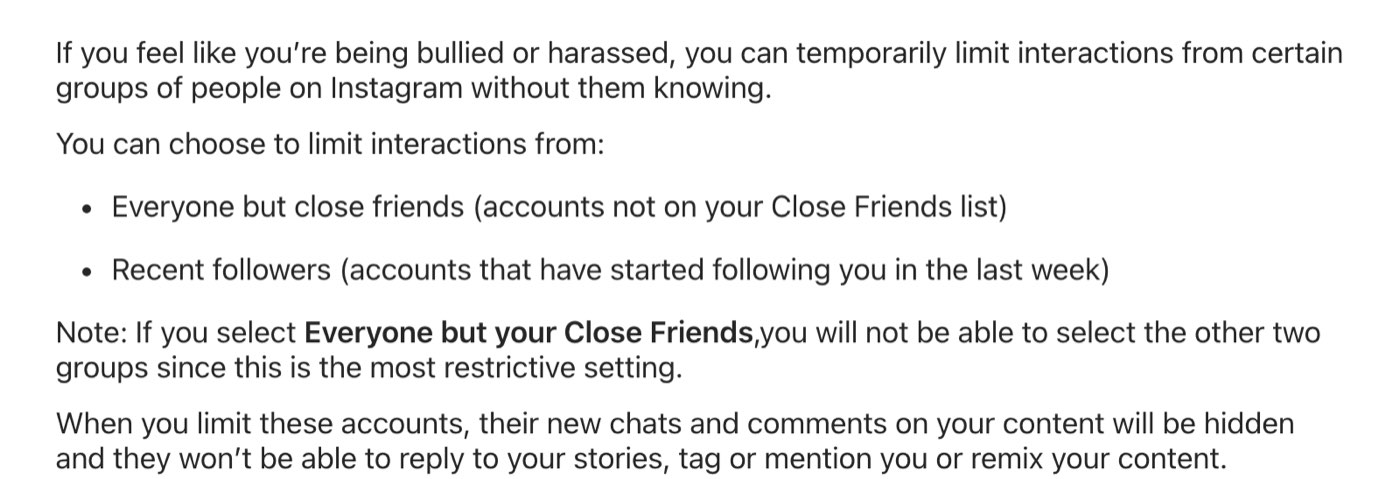
How Instagram's Help Center described Limits on September 25, 2026. It covers chats, comments, story replies, tags, mentions and remixes, and nothing on the page mentions your followers or following list.
Close Friends
Close Friends decides who sees a story, post, note or reel you share. It doesn't change who can open your lists.
Apps that promise to hide your followers
Only Instagram decides what your profile shows. An outside app can't change it, and one that asks for your Instagram password is asking for your account.
Is Instagram testing a way to hide follower lists?
Possibly, but it isn't confirmed. Since July 2025, posts on Instagram and blogs have described a limited test, reported in Turkey among other places, that hides both lists while leaving the counts visible. Meta hasn't announced it, and none of the Help Center pages in this guide mentioned it on September 25, 2026. Until Instagram documents a setting, treat screenshots of a "hide followers" toggle as unconfirmed.
Two settings that make your connections less visible
Neither of these hides a list, but both cut down how often your network is put in front of other people.
Account suggestions. When someone taps Follow on your profile, Instagram suggests similar profiles, such as mutual friends. You can turn this off from a web browser only: go to your profile, click Edit profile, turn off Show account suggestions on profiles and click Submit. You'll also stop appearing as a suggestion on other people's profiles.
Activity status. People you follow and anyone you message can see when you were last active. In the app, open the menu, tap Messages and story replies, then Show activity status, and turn it off. The catch: you stop seeing other people's status too.
What if spam accounts are the problem?
Sometimes the aim isn't hiding the list but cleaning it. On public accounts, Instagram flags followers it thinks are spam, bots or irrelevant, if the feature has reached your account. Go to your profile, tap Followers and look for Flagged for review, where Remove all clears them in one go. The removed accounts aren't notified, and they come off your follower count as well as your list.
Troubleshooting: why can people still see your followers?
If you've gone private and someone can still see who follows you, one of these is almost always the reason:
They followed you before you switched. Existing followers keep full access. Remove them from your Followers list.
They found you on someone else's list. Public accounts you follow, or that follow you, show the connection to anyone.
They're reading your counts. The numbers stay public on every account.
They're using another account. When you block someone, choose the option that also blocks their other accounts and any new ones.
The Private account switch is missing
You're probably on a business profile, which Instagram doesn't allow to be private. Switch back to a personal account first, and the Private account switch appears under Account privacy.
Which option should you use?
Keep strangers out of your lists: make your account private, and accept that public accounts on your lists stay visible.
Shut out one person: remove them if you're private, or block them either way.
Keep one follow quiet: unfollow the account, or follow it from a second account.
Clean out bots: use Flagged for review in your Followers list.
Stop someone contacting you, not viewing you: Restrict them, or turn on Limit interactions.
Frequently asked questions
Can I hide my followers on Instagram if my account is public?
No. A public account's lists are open to anyone on Instagram. You can block individual people, but hiding the lists from strangers means going private.
Can you hide your friends list on Instagram?
Instagram doesn't have a friends list. It has a followers list and a following list, and both work the same way: hidden from non-followers on a private account, except for the public accounts on them.
Can people see my follower count if my account is private?
Yes. Instagram lists the number of followers and following among the profile details that stay public on every account.
Can my followers see who I follow if my account is private?
Yes. Approved followers see your posts and both of your lists. Going private only closes them to people you haven't approved.
Does going private remove my followers?
No. Everyone who already follows you stays, with full access. Going private only means new followers need your approval, so remove anyone you want out.
Does Instagram tell someone when I remove or block them?
No. Instagram's Help Center says people aren't notified in either case.
Why can't I see the followers of someone I follow?
If you've only requested to follow a private account, the lists stay closed until they approve you. If they have approved you, Instagram documents no setting that hides the lists from approved followers, so it isn't something they turned on. A loading problem, or the unconfirmed test described above, could explain it.
How this guide was checked
Every step and claim here was checked against Instagram's Help Center on September 25, 2026, and the screenshots come from those pages. Instagram renames menus often, so if a label in your app looks different, search your settings for the feature's name. This guide was written by the Writeouts Tech Desk and follows our editorial standards.
The Writeouts editorial desk for everyday tech: guides and comparisons of AI tools, social media tools and the software people use to get work done. From the Writeouts editorial team.
See everything by @tech-desk
0 comments
Sign in to join the discussion.
Loading comments…