An operating system (OS) is the software that runs a computer's hardware and gives every other program a safe, shared way to use it. It decides which program gets each processor core, which memory each may touch, how files are stored and how devices are reached. Windows, macOS, Linux, Android and iOS are operating systems. On the Mac this was written on, one was running 637 programs on 8 cores.
What is an operating system, in simple words?
A computer is a processor, some memory, a disk, a screen, a keyboard and a network port. None of them knows what a file, a window or a program is. The operating system is the program that is loaded first and stays running, owning all of that hardware. Every other program asks it for what it needs: some memory, a turn on the processor, the contents of a file, a packet sent. Without one, every application would have to carry its own disk driver, its own keyboard handler and its own rules for sharing the processor with the application next to it.
Textbooks give the OS two purposes, and both are true. For the person at the keyboard, it makes the machine convenient: the same way of opening a file whether the file is on a disk, a USB stick or a network. For the hardware, it makes the machine efficient: while one program waits for a slow disk, another gets the processor, so nothing sits idle. Think of it as layers. At the bottom is hardware. Above it is the kernel, the core of the OS, which alone touches the hardware. Above that are system programs, the shell and the window manager, and above those the applications you use.
The OS and its kernel can even carry different names and version numbers. The Mac used for this article reports itself as macOS 26.6.2, while its kernel, Darwin, reports 25.6.0; Android phones run the Linux kernel underneath a system Google wrote. The kernel is one component, and the operating system is the whole working set.
What are the components and functions of an operating system?
Every course lists the same functions, and every one of them can be seen running on the machine in front of you. The figures below are from a MacBook with an Apple M2 chip, 8 cores and 8 GB of memory, measured on 9 October 2026 with a short Python script described at the end. The same measurements work on Linux and, with small changes, on Windows.
1. Process management
A process is a running program with its own memory and its own place in line for the processor. While this article was written, the Mac had 637 processes and 3,108 threads alive, on 8 cores. The first process, PID 1, was /sbin/launchd, which started everything else; on Linux it is usually systemd. Keeping 637 programs moving on 8 cores is the scheduler's job: it gives each runnable process a slice of time, a few milliseconds, then switches to the next. The waiting processes sit in a ready queue, a queue in the data-structure sense, and the switch itself is called a context switch.
The sharing shows up on a stopwatch. Each test process needed exactly half a second of processor time. One process finished in 0.57 seconds of wall-clock time. Eight, one per core, finished in 0.66. Sixteen, two per core, took 1.24 seconds, and thirty-two took 2.53. Nobody was refused and nobody waited for the others to finish; the scheduler simply divided the cores, and the wall clock stretched to fit. That is multitasking, measured.
2. Memory management
Each process is given its own private address space, and the OS maps it onto the physical memory chips, a page (usually 4 or 16 KB) at a time. This is virtual memory, and the numbers make it concrete. The 637 processes on this 8 GB Mac had been promised, between them, 314.6 terabytes of address space. A single Python process then asked the OS to reserve 100 GB in one go, with mmap, on a machine with 8 GB, and got it "without error". The OS only finds real memory for a page when the process first touches it.
Pages that go cold can be written out to disk (swapping or paging) and brought back later.
Virtual memory is also what keeps programs apart. A process can only reach addresses in its own space, so a crashing browser tab cannot overwrite your spreadsheet, and a program cannot read another's passwords out of memory. The kernel keeps the map; the hardware's memory management unit enforces it on every access.
3. File system
Disks store blocks of bytes. The OS turns them into files with names, sizes, owners and permissions, arranged in directories, which form a tree. The Mac's system volume was /dev/disk3s1s1, 460 GiB with 12 GiB in use, formatted as APFS; Windows uses NTFS, most Linux systems ext4. The file system also decides who can read and change each file, which is how one user's documents stay private from another on the same machine.
4. Device management
Every keyboard, camera, disk and network card needs a driver, a piece of kernel code that speaks its language. Unix-family systems then present devices as files: this Mac had 355 entries in /dev, from /dev/disk3s1s1 to the terminal you type in. A program that can read a file can read a device, which is why the same open and read calls work on both. Windows does the same job with a device tree and its own driver model.
5. User interface, security and networking
The shell (zsh on macOS, bash on most Linux, PowerShell and the command prompt on Windows) and the graphical desktop are how people reach the rest. User accounts and permissions decide who may do what, and modern systems add sandboxes so an app can only touch its own data. The network stack, TCP/IP, lives in the kernel too, so that one Wi-Fi card can serve twenty programs at once. Each of these is a chapter of its own; the first four functions are the ones exams ask about.
What is the kernel in an operating system?
The kernel is the part of the OS that runs with full control of the hardware. Everything else, including the shell and the desktop, runs as ordinary programs in user space, with no direct access to memory or devices.
When a program needs something only the kernel can do, it makes a system call. It hands the request over, the processor switches into kernel mode, the kernel does the work and checks it was allowed, and control comes back. The Linux manual states the relationship in one line: "The system call is the fundamental interface between an application and the Linux kernel." In that sense, system calls are the API of the operating system.
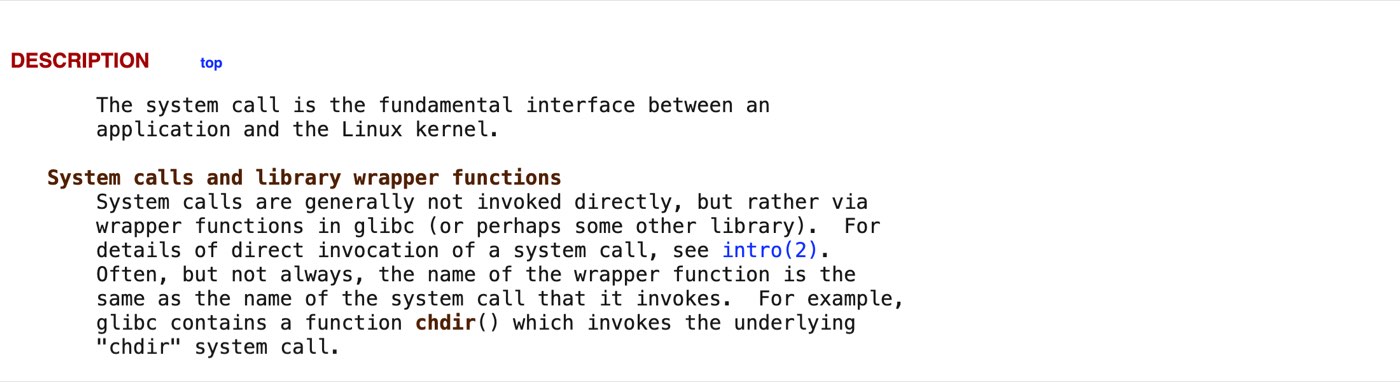
The Linux manual page for system calls on man7.org, October 9, 2026: the system call is "the fundamental interface" between a program and the kernel.
That crossing has a price, and it is measurable. On the test Mac a plain Python function call took 0.024 microseconds. Asking the kernel for the parent process's ID, the smallest system call we could find, took 0.128 microseconds, five times as much. Writing zero bytes to /dev/null, a system call that also passes through the file layer, took 0.563 microseconds, over twenty times a function call. The numbers are tiny, which is why programs make millions of calls. The ratio is why fast software batches its reads and writes instead of making a call per byte; the figures are in the measurements section below.
Kernels come in three designs. A monolithic kernel, like Linux, puts drivers, file systems and networking all in one privileged program: fast, because nothing has to cross a boundary. A microkernel, like QNX or seL4, keeps only scheduling, memory and messaging in the kernel and runs the rest as user-space services: safer, because a faulty driver cannot take the machine down. A hybrid kernel, which is what macOS's XNU and Windows NT are, borrows from both. On any Unix-like system uname -r prints the kernel version; here it printed 25.6.0.
What are the types of operating systems?
The types are really a history of what people needed the machine to do, which is why courses teach them as generations. Each solved the problem the one before left open.
Type | What it does | Where you meet it |
|---|---|---|
Batch | Runs jobs one after another from a queue, with no one interacting. The 1950s model; spooling let output go to a printer queue instead of waiting. | Mainframe job schedulers, overnight bank processing, render farms |
Multiprogramming | Keeps several jobs in memory so that when one waits for a disk, another uses the processor. | Every modern OS does this; it is the idea the rest build on |
Time-sharing (multitasking) | Switches between programs many times a second so several users, or several apps, each feel they have the machine. | Unix (1969) and everything descended from it, including the 637-process Mac above |
Multiprocessing | Uses several processors or cores at once, scheduling across all of them. | Every phone and laptop since the mid-2000s |
Real-time | Guarantees a response within a fixed time, which matters more than throughput. "Hard" real-time cannot miss a deadline; "soft" real-time degrades gracefully. | Car braking systems, pacemakers, aircraft, factory controllers: QNX, VxWorks, FreeRTOS |
Embedded | Built small for one device, often with no screen and a fixed set of programs. | Routers, printers, washing machines, cameras; usually Linux or an RTOS |
Distributed | Makes many machines on a network behave as one system. | Cluster schedulers and cloud platforms; the research systems of the 1980s and 90s |
Network | Manages shared files, printers and users for machines on a local network. | Windows Server, Linux file servers; the term is mostly historical |
Mobile | A general-purpose OS built for a battery, a touchscreen and a radio, with strict app sandboxing. | Android, iOS |
The dates help the table make sense. Unix arrived in 1969, MS-DOS in 1981, the Macintosh in 1984, Windows in 1985, Linux in 1991, Windows NT in 1993, the iPhone in 2007 and Android in 2008. A modern desktop OS is a multiprogramming, time-sharing, multiprocessing system with a network stack; a phone OS is the same with a battery budget and a sandbox around every app.
Examples of operating systems
For desktops and laptops: Windows (Microsoft, the NT kernel), macOS (Apple, the XNU kernel, Macs only), Linux in its distributions (Ubuntu, Debian, Fedora, Red Hat, Arch, Mint) and ChromeOS (Google, Linux underneath). For phones and tablets: Android, which runs on the Linux kernel, and iOS and iPadOS, which share macOS's kernel. For servers and the cloud, Linux dominates. For small and timing-critical devices, real-time systems such as FreeRTOS, Zephyr, QNX and VxWorks.
Which one people actually use depends on where you are. StatCounter's figures for India in September 2026 put Android at 74.63% of all devices, Windows at 16.79%, iOS at 4.92%, Linux at 2.15% and macOS at 0.84%. In India the operating system most people meet is the one in their pocket.
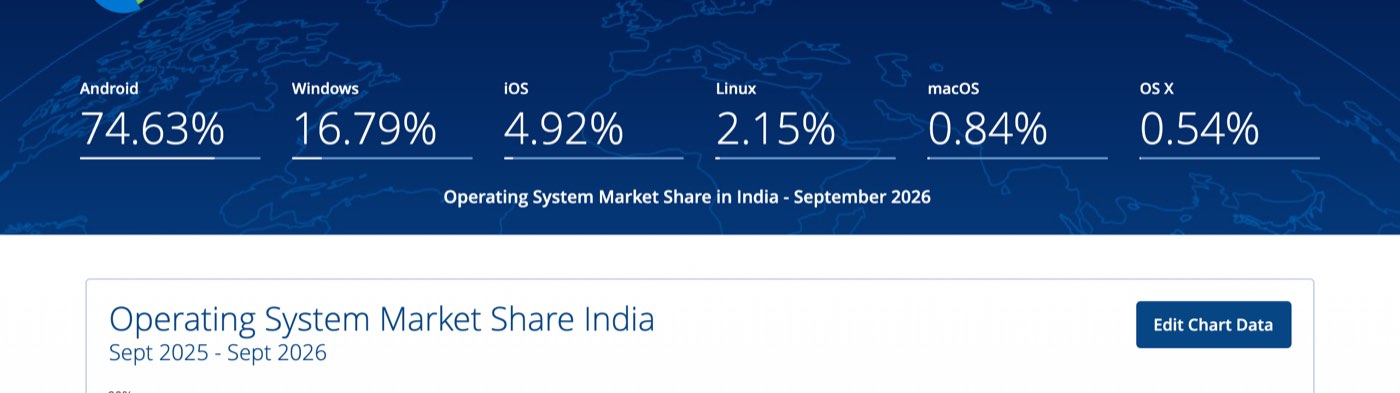
StatCounter Global Stats on October 9, 2026: operating system share across all devices in India for September 2026. Android 74.63%, Windows 16.79%, iOS 4.92%.
What is the Linux operating system?
Linux is, strictly, a kernel. Its own home page says so: "Linux is a clone of the operating system Unix, written from scratch by Linus Torvalds with assistance from a loosely-knit team of hackers across the Net." It was first released in 1991 and is free software under the GNU General Public License. The same page tells newcomers that what they want is not the kernel but "a distribution of Linux, which is a complete Linux system". That means the kernel plus the GNU tools, a shell, a package manager and usually a desktop. Ubuntu, Debian, Fedora and Arch are distributions; kernel.org is where the kernel itself lives.
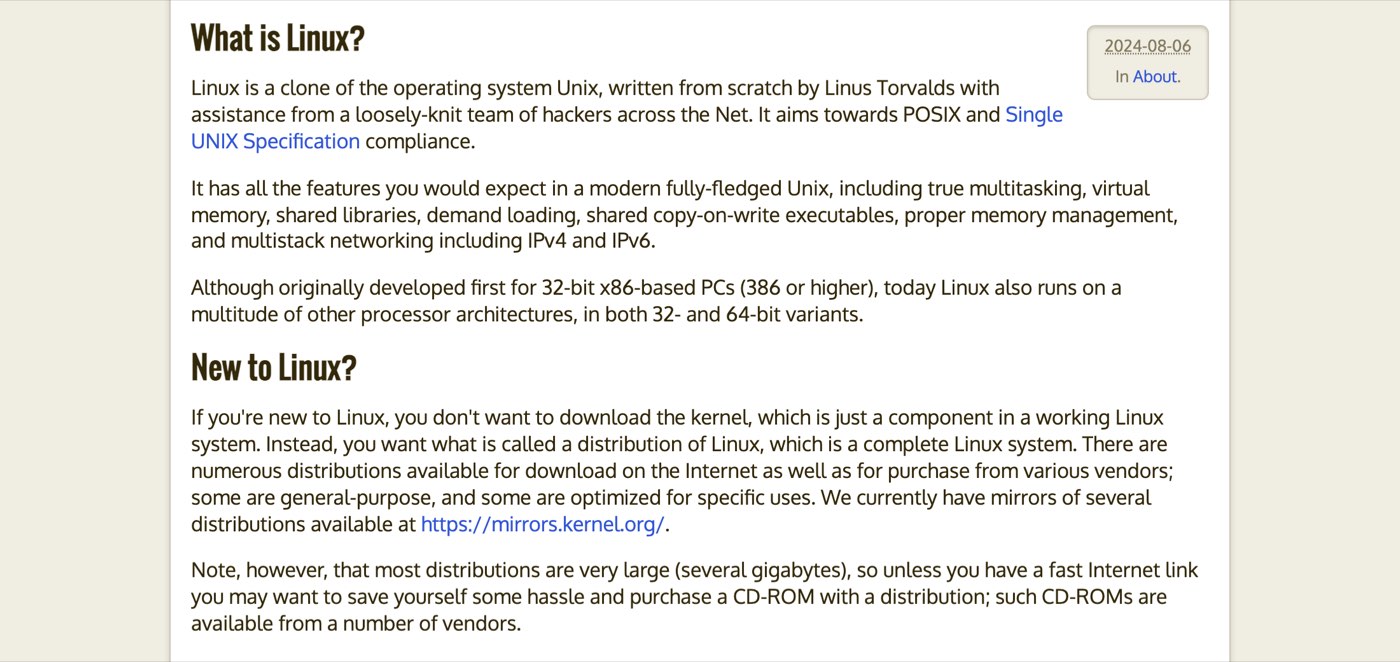
kernel.org's "About Linux Kernel" page on October 9, 2026. The kernel is "just a component in a working Linux system"; a distribution is the whole.
Linux runs most of the world's web servers and cloud machines, every Android phone, most routers and smart TVs, and the Raspberry Pi. For a student it has a particular advantage: everything in this article is visible. ps lists the processes, /proc exposes the kernel's own tables as files, and the source code of the scheduler and the memory manager can be read.
Windows vs macOS vs Linux: what actually differs
Windows | macOS | Linux | |
|---|---|---|---|
Kernel | Windows NT (hybrid) | XNU (hybrid) | Linux (monolithic) |
Licence | Proprietary, paid (usually bundled with the PC) | Proprietary, bundled with the Mac | Free and open source (GPL) |
Hardware | Almost any PC | Apple hardware only | Almost anything, from a Pi to a supercomputer |
Default file system | NTFS | APFS | ext4 (others available) |
Shell | PowerShell, cmd | zsh | bash (usually) |
Installing software | Installers, Microsoft Store, winget | App Store, Homebrew | Package manager: apt, dnf, pacman |
Where it dominates | Office desktops, PC gaming | Design, developers on Macs | Servers, cloud, Android, embedded devices |
For programming, all three work, and the choice follows the target: Windows apps and games on Windows, iPhone apps on a Mac, and servers, containers and most data work on Linux. Linux is also what Windows runs inside WSL, and what macOS most resembles at the command line.
The operating system at work, measured
Everything above was checked on one machine on 9 October 2026, and the script's output is below. The machine: macOS 26.6.2 on the Darwin 25.6.0 kernel, an Apple M2 with 8 cores and 8 GB of memory. The script counted processes with ps and timed calls with time.perf_counter, as the median of five rounds of 200,000. It launched busy processes with multiprocessing, summed each process's virtual size, and reserved 100 GB with mmap.
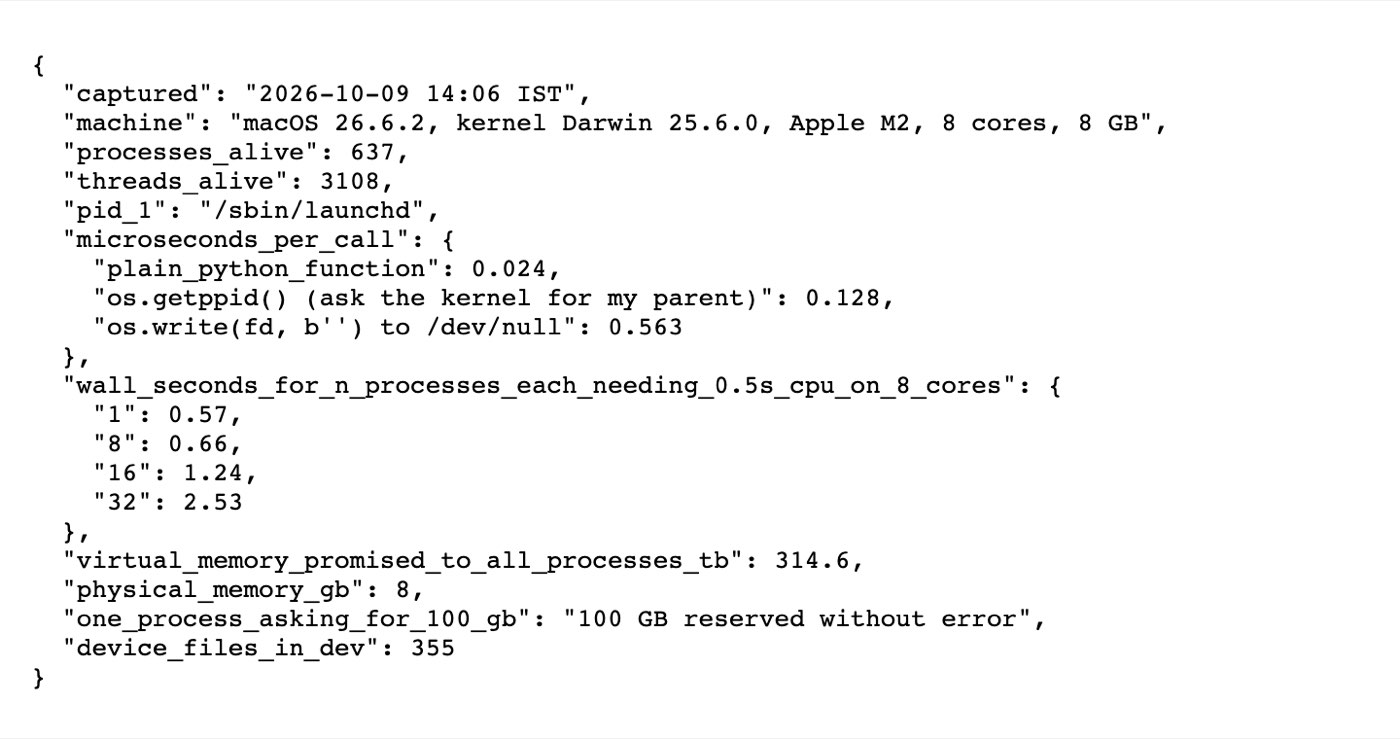
The observation script's own output file, summary.json, as written on October 9, 2026 on the test Mac. Every figure quoted in this article is in it.
What the OS was doing | Measured | Which function |
|---|---|---|
Programs alive at once | 637 processes, 3,108 threads, on 8 cores | Process management |
Sharing the cores (0.5 s of CPU each) | 1 process: 0.57 s · 8: 0.66 s · 16: 1.24 s · 32: 2.53 s | Scheduling |
Cost of asking the kernel for something | 0.024 µs plain call · 0.128 µs | System calls |
Memory promised vs memory present | 314.6 TB promised to 637 processes · 8 GB installed · 100 GB reserved by one process | Virtual memory |
Devices presented as files | 355 entries in | Device management |
Two notes on reading it. The 16- and 32-process runs took longer than a clean doubling, because the M2 has four fast cores and four efficient ones and the scheduler put work on both. The OS was still sharing, just not evenly. And the virtual-memory total is large partly because macOS reserves big regions in every process for its own libraries. The point is not the exact figure but that it is forty thousand times the RAM, and nothing broke.
How do you check which operating system you have?
Windows: press the Windows key, type
winver, press Enter. Or Settings, then System, then About.macOS: Apple menu, then About This Mac. In a terminal,
sw_versprints the OS version anduname -rthe kernel's.Linux:
cat /etc/os-releasefor the distribution,uname -rfor the kernel.Android: Settings, then About phone, then Android version.
iPhone: Settings, then General, then About.
To watch the OS doing its job, open Task Manager on Windows (Ctrl+Shift+Esc), Activity Monitor on a Mac, or run top on Linux or macOS. The process list, the CPU column and the memory column are the scheduler and the memory manager, live.
How these numbers were measured
The observation script is plain Python 3.12 using only the standard library, run on 9 October 2026. Processes and threads were counted from ps -axo pid,ppid,comm and ps -axM. Call costs are the median of five rounds of 200,000 calls each, timed with time.perf_counter. They compare a Python function that returns a constant with os.getppid() and with os.write() of an empty byte string to /dev/null. The scheduling test launched 1, 8, 16 and 32 processes with multiprocessing, each spinning until it had used 0.5 seconds of processor time, and timed the batch on the wall clock.
The virtual-memory total is the sum of the VSZ column of ps across every process; the 100 GB reservation used mmap.mmap(-1, 100 * 2**30) and touched none of the pages. The device count is the number of entries in /dev. The script, its raw output and the summary file in the screenshot are kept with the article's draft. All figures are for one machine on one day; your own will differ, and the script is written so you can see by how much.
Frequently asked questions
What is the full form of OS?
Operating System. In exam papers "OS" and "operating system" are used interchangeably.
What is an operating system in a computer, in one line?
The program that controls the hardware and lets all the other programs share it safely: processor time, memory, files, devices and the network.
What is the difference between an operating system and a kernel?
The kernel is the core that runs with full hardware access and handles processes, memory, files and devices. The operating system is the kernel plus everything shipped around it: the shell, the desktop, system services and the tools. Linux is a kernel; Ubuntu is an operating system built on it.
What is the difference between the OS and the BIOS or firmware?
Firmware (BIOS or UEFI) is a small program stored on the motherboard that starts the hardware and finds something to boot. It hands over to the operating system, which then runs everything. Firmware runs for seconds; the OS runs until you shut down.
Is Android an operating system?
Yes. It is a mobile operating system built by Google on the Linux kernel, with its own application framework, app sandbox and user interface on top.
Which operating system is best for programming?
The one that runs what you are building. Linux for servers, containers and most data and AI work. macOS if you also want a Unix command line with commercial apps, or you are writing for iPhone. Windows for Windows software and games, with WSL giving you Linux inside it. Learning any one of them deeply teaches the concepts in this article; they are the same underneath.
Is Linux free?
Yes. The kernel and most distributions are free to download, use, copy and modify under open-source licences. Some companies sell support and certified builds (Red Hat Enterprise Linux, for example), but the software itself is free.
What are the main functions of an operating system?
Process management (running and scheduling programs), memory management (giving each program its own protected space), file management (names, directories, permissions on top of raw storage) and device management (drivers, and a uniform way to use hardware). Add the user interface, security and networking. The first four are what the measurements in this article show.
The Writeouts editorial desk for computer science fundamentals and tech careers: operating systems, databases and data structures explained clearly, and honest guides to roles like data analyst. From the Writeouts editorial team.
See everything by @learn-desk
0 comments
Sign in to join the discussion.
Loading comments…