In JSON syntax, square brackets [ ] mark an array: an ordered list of values separated by commas, such as ["red", "green", "blue"]. Curly braces { } mark an object, a set of "name": value pairs. Inside square brackets you can put any JSON value, including objects and other arrays, and [] on its own is an empty array.
Every example on this page was run exactly as printed on 2 November 2026, in Node.js 26.8.1, Python 3.12.4, jq 1.7.1 and SQLite 3.51.0. Where those parsers disagree, we say so. The rules come from the JSON standard itself, RFC 8259.
Character | Name in RFC 8259 | What it does in JSON | Example |
|---|---|---|---|
| left and right square bracket | Starts and ends an array: values in order |
|
| left and right curly bracket | Starts and ends an object: name/value pairs |
|
| colon (name separator) | Separates a name from its value, inside objects only |
|
| comma (value separator) | Separates array elements and object members |
|
| quotation mark | Wraps strings and names; only double quotes |
|
| not used | Parentheses have no meaning in JSON | none |
What do square brackets mean in JSON?
Square brackets mean "this is an array". RFC 8259, section 5, defines it in one sentence: "An array structure is represented as square brackets surrounding zero or more values (or elements). Elements are separated by commas." It adds: "There is no requirement that the values in an array be of the same type." The json.org diagram shows the same rule as a railroad track.
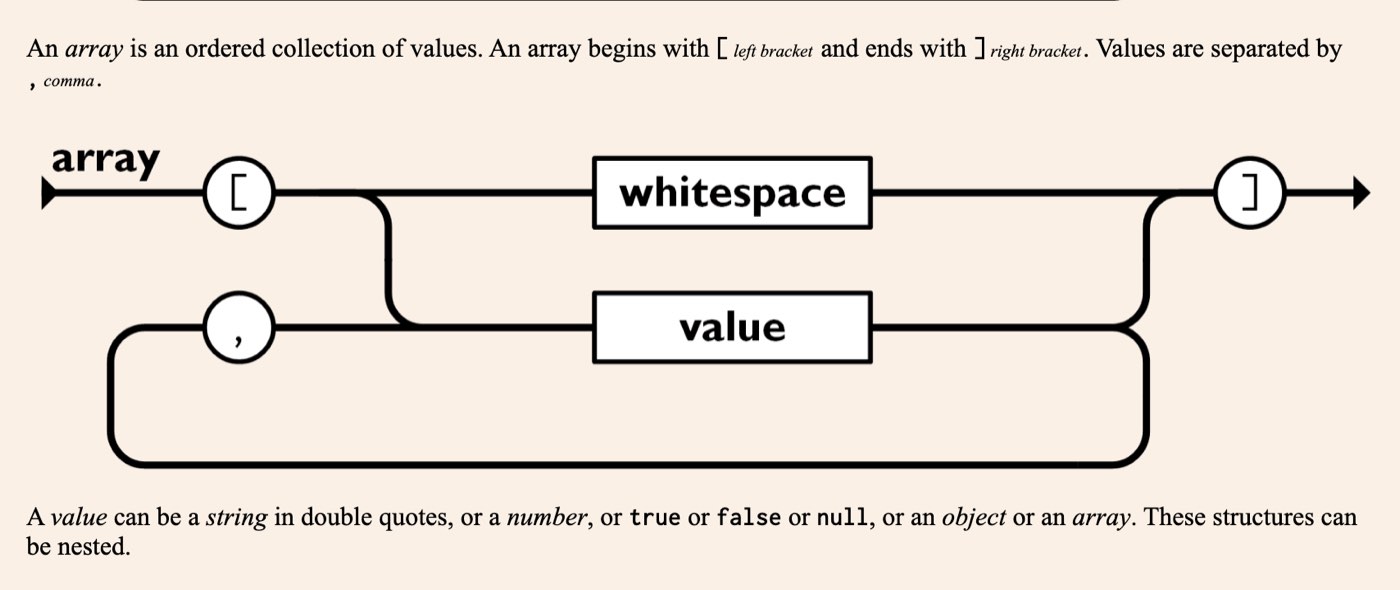
json.org's array diagram, captured on 2 November 2026. Follow the track: a left bracket, then either nothing or values with a comma between each, then a right bracket.
So when you see {"name": "John", "pets": ["cat", "dog"]}, read it as: an object with two members, "name", whose value is a string, and "pets", whose value is an array of two strings. Arrays are how JSON says "a list of things". Most APIs return them for search results, orders, comments or anything else that comes in more than one.
JSON syntax: square brackets vs curly braces
Use square brackets for a list and curly braces for one thing with named properties. The difference matters because code reads them differently: an array by position, an object by name.
Square brackets | Curly braces | |
|---|---|---|
Holds | Values only |
|
Order | Kept; position matters | Not guaranteed by the standard |
Read with | An index from 0: | A name: |
Becomes in JavaScript | Array | Object |
Becomes in Python | list | dict |
Typical use | Many things of the same kind | One thing and its properties |
The two combine all the time. A list of records is an array of objects:
[{"id": 1, "name": "John"}, {"id": 2, "name": "Jane"}]That is the shape a database query or a "list users" API usually returns: square brackets outside, one pair of curly braces per record. An array is the same data structure you meet in any programming language, written as text.
In JSON, what is held within square brackets?
Values, and only values: strings in double quotes, numbers, true, false, null, objects and other arrays, in any mix, separated by commas. Names with colons belong in curly braces. Each example below went through all three parsers:
JSON | What it tests | Node.js 26.8.1 | Python 3.12.4 | jq 1.7.1 |
|---|---|---|---|---|
| An array of strings | Valid | Valid | Valid |
| An empty array | Valid | Valid | Valid |
| Mixed types, an object and an array inside | Valid | Valid | Valid |
| Arrays inside an array | Valid | Valid | Valid |
| A name/value pair inside square brackets | Error | Error | Error |
| A comma after the last value | Error | Error | Error |
| Single quotes | Error | Error | Error |
| A comment | Error | Error | Error |
| A missing comma | Error | Error | Error |
| An array closed with a curly brace | Error | Error | Error |
| NaN | Error | Accepted (non-standard) | Accepted, turned into null |
The errors are worth knowing by sight. For [1, 2, 3,], Node.js says SyntaxError: Unexpected token ']', "[1, 2, 3,]" is not valid JSON, Python says JSONDecodeError: Expecting value: line 1 column 10 (char 9), and jq says jq: parse error: Expected another array element at line 1, column 10. A name/value pair inside square brackets, ["a": 1], gives SyntaxError: Expected ',' or ']' after array element in JSON at position 4 (line 1 column 5) in Node.js and jq: parse error: ':' not as part of an object at line 1, column 5 in jq.
NaN is the one disagreement. The standard has no NaN or Infinity, and Node.js rejects it. Python's json module accepts it by default, and jq quietly turns it into null. If one system writes NaN and another reads it, data changes or breaks on the way, so send null or a string instead.
Trailing commas and comments do work in some files that look like JSON, such as VS Code's settings (JSON with Comments) or JSON5. Plain JSON parsers reject both, as the table shows.
Can a JSON file start with a square bracket?
Yes. A JSON document can be any single value, and an array is the most common choice after an object. RFC 8259 defines a JSON text as JSON-text = ws value ws, and its predecessor RFC 7159 lists the change: "removing the constraint that it be an object or array". So [], ["red", "green", "blue"] and even a bare string are all complete JSON documents.
A top-level array catches people out in code, because the parser hands back a list, not a dictionary. This is the problem from a r/learnpython thread, run as written:
import json

z = json.loads('[{"certificateChain": "certdata", "resourceFqdn": "resourceFQDN"}]')
z.update({"certificateChain": "lotofdata"})
AttributeError: 'list' object has no attribute 'update'The data is a list holding one dictionary. Update the dictionary inside it, or append to the list:
import json

z = json.loads('[{"certificateChain": "certdata", "resourceFqdn": "resourceFQDN"}]')
z[0].update({"certificateChain": "lotofdata"})
print(json.dumps(z))
[{"certificateChain": "lotofdata", "resourceFqdn": "resourceFQDN"}]Use z.append(...) instead if you meant to add a second record.
How do you get a value out of square brackets?
By position, counting from 0. The first element is [0], the second [1]. In JavaScript:
const data = JSON.parse('{"name": "John", "pets": ["cat", "dog"]}');
console.log(data.pets[0]);
console.log(data.pets.length);
console.log(Array.isArray(data.pets));
cat
2
trueIn Python, the array becomes a list:
import json

data = json.loads('{"name": "John", "pets": ["cat", "dog"]}')
print(data["pets"][0])
print(len(data["pets"]))
print(type(data["pets"]).__name__)
cat
2
listOn the command line, jq uses the same brackets in its filters:
echo '{"name": "John", "pets": ["cat", "dog"]}' | jq -r '.pets[0]'
echo '{"name": "John", "pets": ["cat", "dog"]}' | jq '.pets | length'
cat
2How do you remove square brackets from JSON?
Take the value out of the array instead of deleting the characters. If an array holds one object, ask for element 0. In JavaScript, destructuring does it in one line:
const [order] = JSON.parse('[{"id": 7, "total": 12.5}]');
console.log(order.id, order.total);
7 12.5With jq, .[0] returns the first element and .[] returns every element on its own line:
echo '[{"id": 7, "total": 12.5}]' | jq -c '.[0]'
echo '[{"id": 7}, {"id": 8}]' | jq -c '.[]'
{"id":7,"total":12.5}
{"id":7}
{"id":8}SQLite's json_each does the same inside SQL, one row per element:
SELECT value FROM json_each('[{"id": 7}, {"id": 8}]');{"id":7}
{"id":8}SQL Server adds the brackets itself: FOR JSON always returns an array. Microsoft's option to drop them is WITHOUT_ARRAY_WRAPPER, and its documentation warns that it is only for one row.
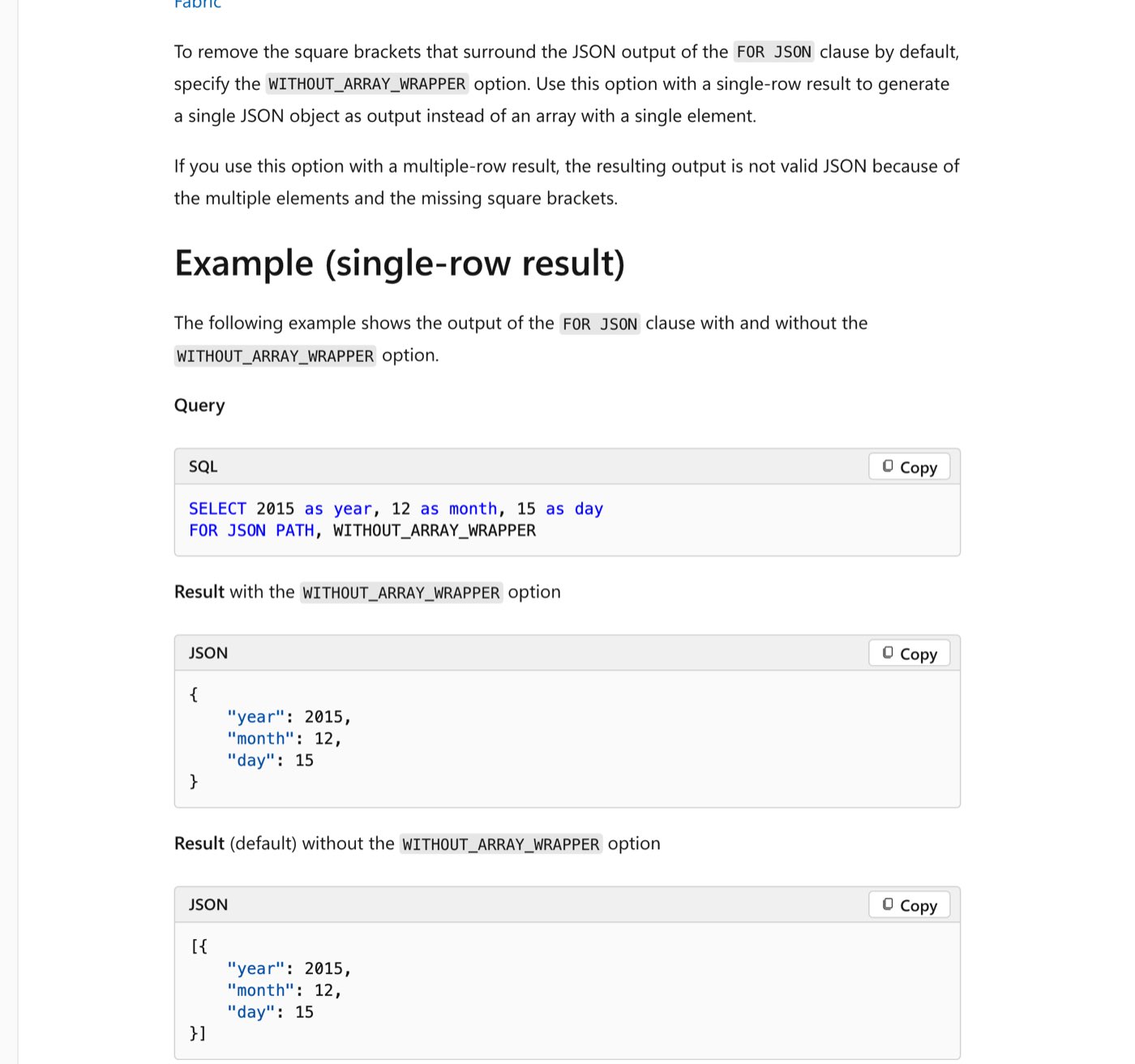
Microsoft Learn on 2 November 2026: the same query with and without the WITHOUT_ARRAY_WRAPPER option. The page warns that with more than one row "the resulting output is not valid JSON".
That warning applies to any find-and-replace too. Strip the brackets from a two-element array and you get {"id": 7}, {"id": 8}, which every parser rejects: Node.js with SyntaxError: Unexpected non-whitespace character after JSON at position 9 (line 1 column 10), Python with JSONDecodeError: Extra data: line 1 column 10 (char 9).
How do you add square brackets around JSON?
Parse the JSON first, put the parsed value in an array, then turn the array back into text. Wrapping the raw text gives you an array holding one string. That is exactly what happened in a SitePoint forum thread, where a token response came out as ["{\"refresh_token\":…}"]. Both versions, run:
const response = '{"token_type": "bearer", "expires_in": 172800}';
console.log(JSON.stringify([response]));
console.log(JSON.stringify([JSON.parse(response)]));
["{\"token_type\": \"bearer\", \"expires_in\": 172800}"]
[{"token_type":"bearer","expires_in":172800}]The first line is the mistake: brackets around a string, with every quote escaped. The second is what you want. Python behaves the same way:
import json

response = '{"token_type": "bearer", "expires_in": 172800}'
print(json.dumps([response]))
print(json.dumps([json.loads(response)]))
["{\"token_type\": \"bearer\", \"expires_in\": 172800}"]
[{"token_type": "bearer", "expires_in": 172800}]The SitePoint poster fixed it in PHP the same way: decode the response, put it in a new array, then encode once. If you have one JSON object per line, a log or an export in JSON Lines format, jq's -s (slurp) collects them into a single array:
printf '{"id": 1}\n{"id": 2}\n' | jq -s -c '.'[{"id":1},{"id":2}]Why do square brackets show up as part of a string?
Usually because the JSON was encoded twice. Turning an array into text, then turning that text into JSON again, gives a string that merely contains brackets:
const text = JSON.stringify(JSON.stringify(["a", "b"]));
console.log(text);
const once = JSON.parse(text);
console.log(typeof once);
console.log(JSON.parse(once)[0]);
"[\"a\",\"b\"]"
string
aOne JSON.parse gives back a string; a second gives the array. The real fix is to encode once at the source.
The opposite case, brackets you want to keep inside text, needs nothing special. JSON keeps [ and ] inside a string as ordinary characters:
const line = JSON.parse('{"text": "[Narrator] The door opens."}').text;
console.log(line);
[Narrator] The door opens.Do not escape them. A GDevelop forum thread suggested writing \[, but {"text": "\[Narrator\]"} is invalid: Node.js reports SyntaxError: Bad escaped character in JSON at position 11 (line 1 column 12) and Python JSONDecodeError: Invalid \escape: line 1 column 11 (char 10). If brackets vanish on screen, look at the program displaying the text: text that understands BBCode, for instance, treats [b] and [i] as formatting tags.
When to use [] vs ()?
In JSON, never use parentheses: they are not part of the syntax, so use [ ] for lists. In code the two do different jobs. In JavaScript and Python, square brackets build arrays or lists and read an element by index (pets[0]); parentheses call functions and group expressions. In Python, parentheses also make tuples, and a tuple becomes a JSON array that comes back as a list:
import json

print(json.dumps(("a", "b")))
print(type(json.loads('["a", "b"]')).__name__)
["a", "b"]
listWhat are () {} and [] called?
( ): parentheses, or round brackets in British English.[ ]: square brackets, often just "brackets" in American English.{ }: curly brackets or braces.< >: angle brackets.
RFC 8259 uses the long names: "left square bracket" and "right square bracket" for arrays, "left curly bracket" and "right curly bracket" for objects. json.org says "left bracket" and "left brace". In JSON only the square and curly kinds mean anything.
How do I type a square bracket?
US, UK and Indian keyboards: the
[and]keys sit to the right of P. With Shift, the same keys type{and}.Windows, any layout: hold Alt and type 91 for
[or 93 for]on the numeric keypad.German layout: AltGr+8 and AltGr+9 on Windows and Linux; Option+5 and Option+6 on a Mac.
iPhone: tap 123, then #+=; the brackets are on that page.
Android: open the numbers and symbols keyboard and go to its second page of symbols.
How do you format JSON with square brackets so it is readable?
Run it through a formatter. Python ships one; each array element lands on its own line, indented inside the brackets:
echo '{"name":"John","pets":["cat","dog"]}' | python3 -m json.tool{
"name": "John",
"pets": [
"cat",
"dog"
]
}jq . does the same with two-space indents, and JSON.stringify(data, null, 2) does it in JavaScript.
How this was tested
On 2 November 2026 every JSON example and code block on this page was run exactly as printed, on macOS on Apple silicon (Darwin arm64): Node.js 26.8.1, Python 3.12.4, jq 1.7.1 and SQLite 3.51.0. A script feeds each JSON example to Node.js's JSON.parse, Python's json.loads and jq -c ., runs each snippet with its own runtime, and saves the output; the text above is generated from that saved output. Error messages are copied from it word for word, and other versions may word them differently. The rules are quoted from RFC 8259 and RFC 7159; the screenshots were taken the same day.
Frequently asked questions
What do square brackets mean in JSON?
They mark an array: an ordered list of values separated by commas, such as ["cat", "dog"]. RFC 8259 defines an array as "square brackets surrounding zero or more values". Curly braces, by contrast, mark an object of name/value pairs.
What is the difference between [] and {} in JSON?
[ ] is an array, a list read by position from 0. { } is an object, a set of "name": value pairs read by name. Arrays hold values only; a colon inside square brackets is a syntax error.
Can a JSON array hold different types?
Yes. RFC 8259 says "There is no requirement that the values in an array be of the same type", and [1, "two", true, null, {"three": 3}, [4]] parsed without error in Node.js, Python and jq.
Is an empty array valid JSON?
Yes. [] is a valid value and a valid document on its own, and {"tags": []} is a valid object with an empty list.
Can JSON start with a square bracket?
Yes. Since RFC 7159, a JSON document can be any value, so a file can start with [. In Python it loads as a list, so read items with [0] rather than calling dictionary methods on it.
How do I remove the square brackets from JSON?
Read the element out of the array: data[0] in JavaScript or Python, .[0] or .[] in jq, json_each in SQLite, WITHOUT_ARRAY_WRAPPER for one row in SQL Server. Deleting the characters breaks any array with more than one element.
Are trailing commas allowed in JSON arrays?
No. [1, 2, 3,] failed in Node.js, Python and jq. Formats such as JSON5 and VS Code's JSON with Comments allow them, but standard JSON does not.
Do square brackets need escaping inside a JSON string?
No. {"text": "[Narrator] The door opens."} is valid as written. Writing \[ is an invalid escape and Node.js, Python and jq all rejected it.
The Writeouts editorial desk for developer tools: cheat sheets, references and tool comparisons you can keep open while you work, checked against official documentation. From the Writeouts editorial team.
See everything by @devtools-deskEdited by Rajat Chauhan. How articles here are written and edited.
0 comments
Sign in to join the discussion.
Loading comments…