This regex cheat sheet lists every symbol you will use day to day, with an example for each, and 17 copy-paste patterns. Every example was run on September 28, 2026 in JavaScript, Python, Java, PCRE2 (the engine behind PHP) and Go. Where those engines disagree, and they do on named groups, lookbehind and Unicode, the tables say so.
Regular expressions, regex for short, are patterns for finding and replacing text. The cheat sheets that rank for this search are each written for one engine: Go, SQL Server, Python, .NET or JavaScript. That matters, because the same pattern can mean something different in each, or fail to compile. This sheet shows the differences instead of hiding them.
Regex cheat sheet: the quick version
These sixteen cover most patterns anyone writes. The example column is real output, copied from the test run.
Symbol | Means | Example and what it matched |
|---|---|---|
| Any character except a newline |
|
| A digit |
|
| A letter, digit or underscore |
|
| Whitespace: a space character, tab or newline |
|
| One of the listed characters |
|
| Any character not listed |
|
| Start of the string |
|
| End of the string |
|
| Edge of a word |
|
| Zero or more |
|
| One or more |
|
| Zero or one (optional) |
|
| Between 2 and 4 times |
|
| Group, and capture what matched |
|
| Either side |
|
| Take the next character literally |
|
The rest of the sheet goes symbol by symbol, then covers the parts that trip people up: how the engines differ, replacements, and patterns that take seconds to fail.
Characters and escapes
Pattern | Matches | Notes |
|---|---|---|
| The text "abc", exactly | Case-sensitive unless you add the |
| Any single character except a line break | With the |
| The literal character | Escape any of |
| Tab, newline, carriage return |
|
| The character with hex code 41 ("A") |
|
| "é" by its Unicode code point | JavaScript, Python and Java |
| "é" by its Unicode code point | PCRE2, Go and Java |
In a JavaScript regex literal such as /a\/b/, the forward slash needs escaping too, because it ends the literal. Written as a string passed to new RegExp(), it doesn't.
Character classes
Pattern | Matches | Engine differences |
|---|---|---|
| a, b or c | None |
| Any character from a to z | None. |
| Anything except a digit | None |
| A digit / not a digit | Python also matches other scripts' digits: "٤٢" matched in Python, not in JavaScript, Java, PCRE2 or Go |
| Letter, digit or underscore / anything else | Python counts accented letters: "naïve café_2" gave |
| Whitespace / not whitespace | None in the test |
| POSIX class for a digit (also | PCRE2 and Go only. JavaScript, Python and Java matched nothing and raised no error. Java spells it |
| A Unicode uppercase letter ( | PCRE2, Go and Java. JavaScript only with the |
The \w row is the one that bites. A JavaScript username check written as ^\w+$ rejects "José", while the same pattern in Python accepts it. If you mean ASCII, write [A-Za-z0-9_]. If you mean any letter, use [\p{L}\p{N}_] with the u flag in JavaScript.
Anchors and word boundaries
Pattern | Matches the position | Tested example |
|---|---|---|
| At the start of the string, or of each line with the |
|
| At the end of the string, or of each line with |
|
| A word boundary: between a word character and a non-word character |
|
| Anywhere | The "cat" inside "concat" |
| Start and end of the whole string, even with | PCRE2, Go, Java and Python 3.14. Not JavaScript |
| End of the string (Python's older spelling) | Python, PCRE2 and Java. Go rejects it |
JavaScript has no \A. Without the u flag it reads \A as a plain letter A, so \Aabc\z silently matched nothing instead of raising an error. Use ^ and $ without the m flag. Python only gained \z in 3.14: in the test, Python 3.12 rejected it with "bad escape \z", as the Python documentation explains.
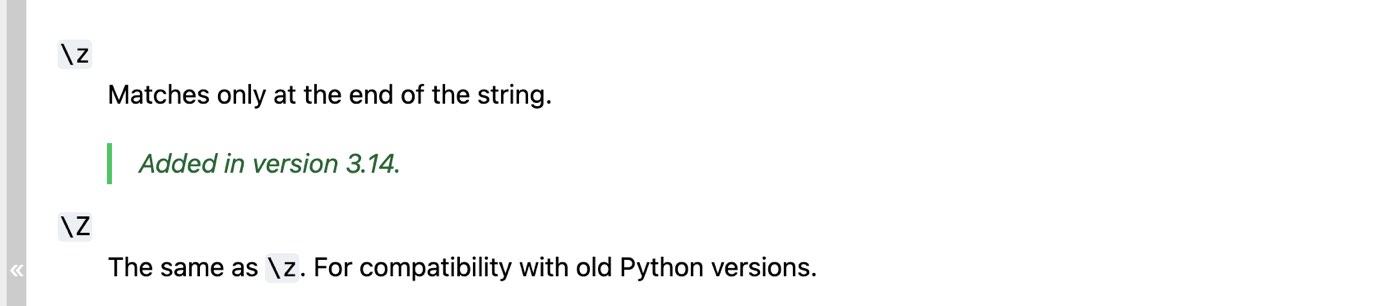
Python's re documentation on September 28, 2026: \z was added in Python 3.14, and \Z stays for older versions.
Quantifiers: greedy, lazy and possessive
Pattern | Repeats the item before it | Tested example |
|---|---|---|
| 0 or more times |
|
| 1 or more times |
|
| 0 or 1 time |
|
| Exactly 3 times |
|
| 3 or more times |
|
| 2 to 4 times |
|
| Lazy: as few times as possible |
|
| Possessive: as many as possible, never gives any back | Python 3.11+, PCRE2 and Java |
Quantifiers are greedy by default. <.+> run on "<b>bold</b> text" returned the whole of <b>bold</b>, because .+ ran to the last ">" it could find. Adding ? made it stop at the first, giving two tags. All five engines agreed on that.
Possessive quantifiers never hand characters back. \d+5 matched "12345", because \d+ gave back the 5. \d++5 found nothing in Python, PCRE2 and Java, and JavaScript and Go refused to compile it. One more trap: a{,3} means "zero to three a's" in Python and PCRE2, JavaScript and Go treat it as the literal text "a{,3}", and Java rejects it as an "Illegal repetition". Write a{0,3}, which every engine reads as zero to three.
Groups, alternation and backreferences
Pattern | Does | Works in |
|---|---|---|
| Capturing group: saves each part as group 1, 2… | All five |
| Groups without capturing. "ababab abc" → | All five |
| Named group | JavaScript, Java, PCRE2, Go. Python rejects it |
| Named group, Python's spelling | Python, PCRE2, Go. JavaScript and Java reject it |
| Either alternative | All five |
| Backreference: the same text again. "the the cat sat sat" → | JavaScript, Python, Java, PCRE2. Not Go |
| Named backreference. "bookkeeper" → | JavaScript, Java and PCRE2. Python writes it |
| Atomic group: like a possessive quantifier for a whole group | Python 3.11+, PCRE2 and Java |
If a pattern has to run in both JavaScript and Python, named groups are the catch. Neither accepts the other's spelling, and Java sides with JavaScript. PCRE2 and Go accept both.
Lookahead and lookbehind assertions
Lookarounds are assertions, like ^ and \b: they check what comes before or after a position without including it in the match.
Pattern | Means | Tested example |
|---|---|---|
| X, if Y follows |
|
| X, if Y doesn't follow |
|
| X, if Y comes before it |
|
| X, if Y doesn't come before it |
|
Go supports none of the four; every one failed to compile. Lookbehind also differs in how long the look back may be. JavaScript accepts any pattern inside a lookbehind, so (?<=\$\s*)\d+ worked, and Java 25 ran it too. PCRE2 needs a known maximum length: it accepted (?<=\$|USD ) but rejected the open-ended \s*. Python needs a fixed width and rejected both with "look-behind requires fixed-width pattern".
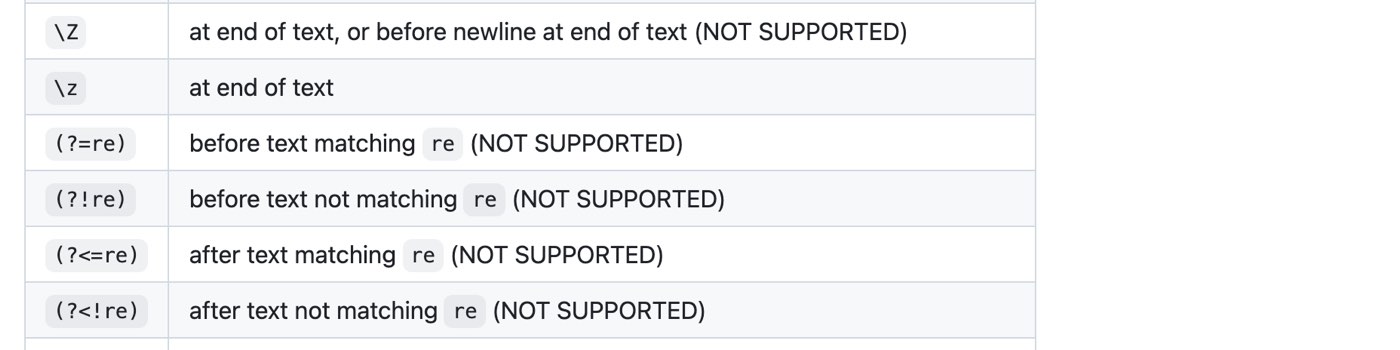
RE2's syntax reference on GitHub, September 28, 2026. RE2 is the engine family behind Go, Google Sheets and SQL Server 2025, and it lists all four lookarounds as not supported.
Flags
Flag | Effect | How to set it |
|---|---|---|
| Case-insensitive |
|
|
|
|
|
|
|
| Find every match, not just the first | JavaScript only. Python uses |
| Unicode mode | JavaScript only. Needed for |
| Ignore spaces in the pattern and allow comments |
|
JavaScript rejected (?i)hello as an "Invalid group". It does accept the scoped form (?i:hello) world, which lowers case for "hello" only. That form reached every major browser in 2025, according to MDN's page on modifiers, and it worked in all five engines here.
Does regex work the same in every language?
No. The basics are shared, but every engine adds, drops or reinterprets some syntax, usually without warning. This table is the result of running the same 51 cases through each of five engines. A ✗ means the engine refused to compile the pattern or matched something different.
Feature | JavaScript | Python 3.14 | Java 25 | PCRE2 (PHP) | Go (RE2) |
|---|---|---|---|---|---|
| ✓ | ✗ Unicode | ✓ | ✓ | ✓ |
Named group | ✓ | ✗ | ✓ | ✓ | ✓ |
Named group | ✗ | ✓ | ✗ | ✓ | ✓ |
Backreference | ✓ | ✓ | ✓ | ✓ | ✗ |
Lookahead | ✓ | ✓ | ✓ | ✓ | ✗ |
Lookbehind, fixed length | ✓ | ✓ | ✓ | ✓ | ✗ |
Lookbehind, | ✓ | ✗ | ✓ | ✓ | ✗ |
Lookbehind, unbounded | ✓ | ✗ | ✓ | ✗ | ✗ |
Possessive | ✗ | ✓ | ✓ | ✓ | ✗ |
Unicode property | With | ✗ | ✓ | ✓ | ✓ |
POSIX class | ✗ | ✗ | ✗ | ✓ | ✓ |
Inline flag | ✗ | ✓ | ✓ | ✓ | ✓ |
Scoped flag | ✓ | ✓ | ✓ | ✓ | ✓ |
| ✗ | ✓ | ✓ | ✓ | ✓ |
| With | ✓ | ✓ | ✓ | ✓ |
Catastrophic backtracking | Yes | Yes | Not on the five tried | Stops at a limit | Never |
The quietest failures were in JavaScript without the u flag. \p{Lu} returned no matches and no error, and ^.$ didn't match a single emoji, because JavaScript counts it as two UTF-16 code units. Both work once the flag is added:
console.log(/^.$/.test("😀"), /^.$/u.test("😀"));
console.log("naïve café".match(/\w+/g));
console.log("naïve café".match(/[\p{L}\p{N}_]+/gu));
false true
[ 'na', 've', 'caf' ]
[ 'naïve', 'café' ]Which regex engine does my tool use?
JavaScript: browsers, Node.js and anything built on them.
Python: the built-in
remodule.Java:
java.util.regex, with extras of its own such as class intersection:[a-c&&[b-c]]+matched "bc" in "abc".PCRE2: PHP's
preg_functions, which use a bundled copy of the PCRE2 library,grep -P, and Excel's REGEXTEST, REGEXEXTRACT and REGEXREPLACE.RE2: Go's
regexppackage, which accepts the syntax accepted by RE2, Google Sheets, and the REGEXP functions in SQL Server 2025.R: POSIX-style extended regex by default. R's documentation says
perl = TRUEingrepl,suband the rest "switches to the PCRE library", so use it for lookarounds. R was not run for this article.POSIX:
grep -Eandsed -E. No\d(write[0-9]), no lazy quantifiers and no lookaround. GNU grep's manual adds\w,\s,\band backreferences on top.
Copy-paste regex patterns, tested
Each pattern below was checked against its strings in all five engines: 107 strings, 535 checks. Every one gave the expected answer, with the exceptions noted underneath.
Use | Pattern | Accepts | Rejects |
|---|---|---|---|
Email (shape only) |
| ana@example.com, first.last+tag@sub.example.co.uk | ana@example, @example.com, ana@@example.com |
URL |
| https://www.writeouts.com/blog, http://localhost:3000/path?q=1#top | ftp://example.com, www.example.com, https:// |
IPv4 address |
| 192.168.1.1, 0.0.0.0, 255.255.255.255 | 256.1.1.1, 01.2.3.4, 1.2.3.4.5 |
Date, YYYY-MM-DD |
| 2026-09-28, 1999-12-31 | 2026-13-01, 2026-9-28, 2026-00-10 |
Time, 24-hour |
| 00:00, 09:30, 23:59 | 24:00, 9:30, 12:60 |
Hex colour |
| #fff, #1A2b3C | fff, #ffff, #12345g |
US ZIP code |
| 90210, 10001-1234 | 9021, 10001-123 |
US phone number |
| (555) 123-4567, 555.123.4567, 5551234567 | 555-1234, (555) 123-45678 |
UUID |
| 123e4567-e89b-42d3-a456-426614174000 | The same without hyphens, or with 0 as the version digit |
URL slug |
| regex-cheat-sheet, a1 | Regex-Cheat-Sheet, regex--cheat, regex_cheat |
Number with commas |
| 1,234 and 12,345,678.90 and -1,000 | 1,23 and 1234,567 and 1,234, |
Strong password |
| Correct9HorseBattery | short1A, alllowercase123, NoDigitsAtAllHere |
Leading or trailing space |
| " padded", "padded " | "tight", "in side" |
Doubled word |
| the the cat | this is the theme |
Hashtag |
| learn #javascript | issue#42, # heading |
HTML tag |
| <p>hi</p> | plain text |
Semantic version | The official pattern, below | 1.0.0, 16.3.4, 1.0.0-alpha.1 | 1.0, 01.0.0, v1.0.0 |
The semantic version pattern is the one semver.org publishes in its FAQ, unchanged:
^(0|[1-9]\d*)\.(0|[1-9]\d*)\.(0|[1-9]\d*)(?:-((?:0|[1-9]\d*|\d*[a-zA-Z-][0-9a-zA-Z-]*)(?:\.(?:0|[1-9]\d*|\d*[a-zA-Z-][0-9a-zA-Z-]*))*))?(?:\+([0-9a-zA-Z-]+(?:\.[0-9a-zA-Z-]+)*))?$What the test turned up about these patterns:
The HTML pattern has a false positive. It matched inside "2 < 3 and 5 > 4 is false", in all five engines, because it has no idea what a tag is. For real HTML, use a parser such as the browser's
DOMParser.The date pattern checks shape, not the calendar. It accepted 2026-02-31. Parse the result as a date afterwards if the day has to exist.
The email pattern checks shape, not ownership. Whether an address can receive mail, or is already registered, is a job for a confirmation email and for your database, which is the only thing that knows if a value is taken.
Go refused two of them. The password pattern needs lookahead and the doubled-word pattern needs a backreference, and Go supports neither. The other four ran both. The Go version of the password check is ordinary code:
var (
	lower = regexp.MustCompile(`[a-z]`)
	upper = regexp.MustCompile(`[A-Z]`)
	digit = regexp.MustCompile(`\d`)
)

// Go has no lookahead, so each rule is its own check.
func strong(p string) bool {
	return utf8.RuneCountInString(p) >= 12 &&
		lower.MatchString(p) && upper.MatchString(p) && digit.MatchString(p)
}

fmt.Println(strong("Correct9HorseBattery"), strong("alllowercase123"))
true falseHow do you use regex in JavaScript, Python, Java and Go?
The same three jobs in each language: find every date in a string, read a named group, and rewrite the dates. The outputs are pasted from the run.
JavaScript
const text = "Invoices 2026-09-28 and 2026-10-05";

console.log(text.match(/\d{4}-\d{2}-\d{2}/g));

const m = text.match(/(?<year>\d{4})-(?<month>\d{2})/);
console.log(m.groups.year, m.groups.month);

console.log(text.replace(/(\d{4})-(\d{2})-(\d{2})/g, "$3/$2/$1"));
[ '2026-09-28', '2026-10-05' ]
2026 09
Invoices 28/09/2026 and 05/10/2026Python regex cheat sheet: re.search, re.match, re.sub
import re

text = "Invoices 2026-09-28 and 2026-10-05"

print(re.findall(r"\d{4}-\d{2}-\d{2}", text))

m = re.search(r"(?P<year>\d{4})-(?P<month>\d{2})", text)
print(m["year"], m["month"])

print(re.sub(r"(\d{4})-(\d{2})-(\d{2})", r"\3/\2/\1", text))
['2026-09-28', '2026-10-05']
2026 09
Invoices 28/09/2026 and 05/10/2026Write Python patterns as raw strings, r"…", so that \d reaches the regex engine instead of being read as a string escape. Then pick the function for the job:
Function | Does | Result on "Order 66 shipped 2026-09-28" |
|---|---|---|
| First match anywhere |
|
| A match at the start only |
|
| The whole string must match |
|
| Every match, as strings |
|
| Every match, as match objects | Spans |
| Replace every match |
|
| Split on the pattern |
|
| Compile once, reuse | The same methods, called on the compiled pattern |
The flags are re.I (ignore case), re.M (multiline), re.S (dot matches newline), re.X (verbose) and re.A. That last one makes \w and \d ASCII-only, like every other engine here: re.findall(r"\w+", "naïve café") returned ['naïve', 'café'], and with re.A it returned ['na', 've', 'caf'].
Java
String text = "Invoices 2026-09-28 and 2026-10-05";
Pattern date = Pattern.compile("(?<year>\\d{4})-(?<month>\\d{2})-(\\d{2})");

Matcher m = date.matcher(text);
while (m.find()) {
    System.out.println(m.group() + " year=" + m.group("year"));
}

System.out.println(text.replaceAll("(\\d{4})-(\\d{2})-(\\d{2})", "$3/$2/$1"));
System.out.println("PIN 4821".matches("PIN \\d{4}"));
2026-09-28 year=2026
2026-10-05 year=2026
Invoices 28/09/2026 and 05/10/2026
trueEvery backslash is doubled in a Java string, so \d is written "\\d". String.matches must match the whole string, like Python's fullmatch. Use Matcher.find to search.
Go
date := regexp.MustCompile(`(\d{4})-(\d{2})-(\d{2})`)
text := "Invoices 2026-09-28 and 2026-10-05"

fmt.Println(date.FindAllString(text, -1))
fmt.Println(date.ReplaceAllString(text, "${3}/${2}/${1}"))
[2026-09-28 2026-10-05]
Invoices 28/09/2026 and 05/10/2026grep and sed
echo "Invoices 2026-09-28 and 2026-10-05" | grep -oE '[0-9]{4}-[0-9]{2}-[0-9]{2}'
echo "Invoices 2026-09-28" | sed -E 's/([0-9]{4})-([0-9]{2})-([0-9]{2})/\3\/\2\/\1/'
2026-09-28
2026-10-05
Invoices 28/09/2026How do you reference a group in a replacement?
Where | Group 1 | Named group |
|---|---|---|
JavaScript |
|
|
Python |
|
|
PHP |
| Numbered only |
Java |
|
|
Go |
|
|
|
| Numbered only |
In the test, JavaScript, Python, Java, Go, sed -E and PCRE2's own substitution all turned "Due 2026-09-28" into "Due 28/09/2026". Go has one trap. Its documentation says that in a template "$1x is equivalent to ${1x}, not ${1}x", so the letters, digits and underscores after a $ all count as the group name. The template $3_$2_$1 returned "Due 2026", because groups called "3_" and "2_" don't exist. ${3}_${2}_${1} returned "Due 28_09_2026". Always use the braces in Go. PHP's form is from the preg_replace manual.
Why is my regex so slow? Catastrophic backtracking
A regex that looks harmless can take seconds to fail. The classic case is a quantifier inside a quantifier, like ^(a+)+$. On a run of a's followed by "!", a backtracking engine tries every way of splitting the a's between the two plus signs before it gives up, and the number of ways doubles with each extra a. Here is how long one failed match took on an Apple M2, with the pattern warmed up first:
Input | JavaScript | Python 3.14 | Java 25 | PCRE2 | Go |
|---|---|---|---|---|---|
20 a's and "!" | 7 ms | 33 ms | 0.1 ms | No match | 0.02 ms |
24 a's and "!" | 110 ms | 0.56 s | 0.1 ms | Gave up: "match limit exceeded" | 0.002 ms |
26 a's and "!" | 0.41 s | 2.2 s | 0.1 ms | Gave up | 0.002 ms |
28 a's and "!" | 1.6 s | 8.6 s | 0.1 ms | Gave up | 0.015 ms |
Java 25 was the exception among the backtracking engines. It finished this pattern, and four other textbook cases including ^(a|aa)+$ and (x+x+)+y, in under a millisecond at 28 characters. It still backtracks in general, since it supports backreferences, so cap input length there too.
Two extra characters made JavaScript and Python about four times slower, every time. In a fresh Node.js process, a single call on 28 a's took 17.3 seconds, because V8 interprets a regex the first time and only compiles it to machine code once it is used again. On a server, one request with a crafted string can hold a whole thread for that long. That attack is called ReDoS.
PCRE2 protects itself with a match limit and returns error -47 instead of running on. In PHP that limit is the pcre.backtrack_limit setting, 1,000,000 by default, and hitting it makes preg_match return false rather than 0. Code that only checks for a match reads that as "no match".
Go never backtracks, which is why its column is flat. Its engine cannot express backreferences or lookaround, and that is the price of the guarantee in its documentation:

Go's regexp package documentation on pkg.go.dev, September 28, 2026: RE2 syntax, and matching guaranteed to run in time linear in the size of the input.
How to fix a slow pattern, each checked against the 28-character input in Python 3.14, where the original took 8.5 seconds:
Remove the nesting.
^(a+)+$matches exactly what^a+$does. The simple version took 0.001 ms.Make the inner part possessive or atomic.
^(a++)+$took 0.001 ms and^(?>a+)+$took 0.02 ms. Both forms work in Python 3.11+, PCRE2 and Java.Keep alternatives from overlapping. In
^(\w|\d)+$, a digit matches both branches. On 28 digits and a "!", JavaScript took 2.8 seconds to fail. Python (0.2 ms) and Java (under 1 ms) got through it, most likely by merging the two branches, but that is a courtesy to be grateful for, not to rely on.^\w+$means the same thing.Use a linear-time engine for patterns or text you don't control, such as Go's
regexp, and cap the input length either way.
Regex in Excel, Google Sheets and SQL Server
Spreadsheets and databases now have regex functions too, and they don't share an engine. Microsoft's documentation for Excel's REGEXTEST function says it and its two siblings use PCRE2, so the PCRE2 column above applies, lookarounds included.

Microsoft Support's REGEXTEST page, September 28, 2026: REGEXTEST, REGEXEXTRACT and REGEXREPLACE use the PCRE2 flavour of regex.
Before reaching for REGEXTEST to police what people type into a cell, consider whether the allowed values are a fixed list. If they are, an Excel drop-down list stops bad entries before they happen and needs no pattern at all.
Google's help page for REGEXMATCH says "Google products use RE2 for regular expressions" and that Sheets supports RE2 "except Unicode character class matching". Going by those two pages, a pattern with a lookahead that Excel accepts will not work in Sheets. SQL Server 2025 is RE2 too:

Microsoft Learn's page on regular expressions in SQL Server, September 28, 2026: the REGEXP functions are based on the RE2 library.
In practice the Go column predicts what REGEXP_LIKE in SQL Server and REGEXMATCH in Sheets will accept. Neither was run for this article; that is what their documentation states.
How this cheat sheet was tested
Every example and table entry above comes from a test run on September 28, 2026 on an Apple M2 Mac, using these versions:
JavaScript: Node.js 26.8.1 (V8 14.6)
Python 3.14.7, plus Python 3.12.4 to see what changed
PCRE2 10.46, through its own
pcre2testtoolJava 25.0.4.1 (Temurin),
java.util.regexGo 1.27.1, the
regexppackagegrep 2.6.0 on macOS, for the POSIX examples
The run covered 51 syntax cases, 349 engine runs in total, and 107 strings for the 17 patterns, checked in five engines each: 535 checks. Every example printed in the text was also run exactly as printed, in all five. Every result in the tables is what the engine returned, including its own error text. .NET, Rust, Ruby and R were not tested; their regex engines differ again. Where a claim rests on documentation rather than a run, such as Excel, Google Sheets and SQL Server, the article links it.
Frequently asked questions
What does .* mean in regex?
Any characters, any number of times, including none. . is any character except a line break and * repeats it. It is greedy, so a.*b runs to the last "b" on the line. Use .*? to stop at the first.
What is the difference between * and + in regex?
* allows zero repeats and + needs at least one. ab*c matches "ac", but ab+c doesn't.
How do I match a literal dot or bracket?
Put a backslash in front: \., \[, \(. Inside square brackets most characters are already literal, so [.] also matches a dot.
What does ?: mean in regex?
It makes a group that doesn't capture. (?:ab)+ repeats "ab" without saving it as group 1, which keeps the group numbers of the groups you do care about stable.
How do I make a regex case-insensitive?
Add the i flag: /hello/i in JavaScript, re.I in Python, Pattern.CASE_INSENSITIVE in Java, or (?i) at the start of the pattern anywhere but JavaScript. To make only part of a pattern case-insensitive, (?i:…) works in all five.
Can a regex validate an email address?
Only its shape. A simple pattern like the one in the table catches typos. Whether the mailbox exists, and belongs to the person typing it, only a confirmation email can tell you.
Is regex the same as the * in *.txt?
No. That is a glob, used by shells and file pickers, where * means "any characters". In regex, * repeats the item before it, so the regex equivalent of *.txt is ^.*\.txt$.
Can I use regex to read JSON or HTML?
Not reliably. Both allow nesting that a regex can't follow, as the HTML tag pattern's false positive shows. Parse them instead: JSON.parse for the JSON an API sends back, and a real HTML parser for pages.
Every example on this page was run on September 28, 2026. Engines change: Python 3.14 added \z, and JavaScript gained scoped flags in 2025, so check the version you run against the one tested here.
The Writeouts editorial desk for developer tools: cheat sheets, references and tool comparisons you can keep open while you work, checked against official documentation. From the Writeouts editorial team.
See everything by @devtools-desk
0 comments
Sign in to join the discussion.
Loading comments…