The best Instagram post size in 2026 is 1080 × 1350 pixels, a 4:5 ratio, for a portrait post that works everywhere. The tallest post Instagram accepts is 1080 × 1440 pixels (3:4), which matches the profile grid exactly. Square is 1080 × 1080, landscape is 1080 × 566, and Reels and Stories are 1080 × 1920.
Each figure here was checked against Instagram's and Meta's own pages on September 30, 2026. Most size guides still stop at 4:5. Instagram's Help Center now lists 3:4 as the tallest photo it keeps uncropped, and the profile grid shows every post in a 3:4 tile. This guide gives every size in pixels, as a ratio and in inches, each traced to its source. It also reports two things measured on live Instagram pages that the official documents don't tell you.
Instagram post size: every dimension in one table
Use this as your Instagram size chart. The sections after it explain each row.
Format | Size in pixels | Ratio | Where the figure comes from |
|---|---|---|---|
Portrait post, safest | 1080 × 1350 | 4:5 | Inside the Help Center's range; also Meta's ad ratio |
Portrait post, tallest | 1080 × 1440 | 3:4 | Instagram Help Center |
Square post | 1080 × 1080 | 1:1 | Inside the Help Center's range |
Landscape post, widest | 1080 × 566 | 1.91:1 | Instagram Help Center |
Carousel | Any of the above, one shape for every slide | 1.91:1 to 3:4 | Instagram Help Center: up to 20 photos and videos |
Reel | 1080 × 1920 | 9:16 | Help Center allows 1.91:1 to 9:16, at least 720 pixels and 30 FPS |
Reel cover | 420 × 654 | 1:1.55 | Instagram Help Center |
Story | 1080 × 1920 (minimum 600 × 1067) | 9:16 | Meta's requirements for Stories ads |
Feed ad image | 1440 × 1800 | 4:5 | Meta Ads Guide |
Story or Reel ad image | 1440 × 2560 | 9:16 | Meta Ads Guide |
Profile picture | No official size | 1:1, shown as a circle | Served at 150 × 150 on the web profile when measured |
The photo rules are on Instagram's Help Center page about image resolution, the Reel rules on its page about Reel size and aspect ratios, and the carousel limit on its page about posts with multiple photos or videos. Instagram publishes no size for ordinary Stories, so the Story figures are from Meta's design requirements for Stories ads.
What is the Instagram post size ratio?
A ratio compares width to height. A 4:5 post is 4 units wide for every 5 units tall, so at 1080 pixels wide it is 1350 tall. Instagram keeps a photo uncropped when its ratio is anywhere between 1.91:1, the widest, and 3:4, the tallest. The Help Center says so in one sentence:

Instagram's Help Center on September 30, 2026: photos between 1.91:1 and 3:4 are kept as they are, and anything outside that range is cropped to fit.
Ratio | Shape | Height at 1080 pixels wide | Use it for |
|---|---|---|---|
1.91:1 | Landscape | 566 | Wide photos and link-style graphics |
1:1 | Square | 1080 | Logos and product shots |
4:5 | Portrait | 1350 | The default for posts and carousels |
3:4 | Portrait, tallest | 1440 | Posts that should fill the grid tile exactly |
9:16 | Full screen | 1920 | Reels and Stories only |
A 9:16 photo is outside the range for a feed post, so Instagram crops it. If you want the full frame to show, post it as a Reel or a Story instead.
What is the Instagram post size in pixels?
In short, the image size for Instagram posts is 1080 pixels wide and between 566 and 1440 pixels tall. Make every post at least 1080 pixels wide. The Help Center says Instagram uploads a photo "at the best quality resolution possible (up to a width of 1080 pixels)", enlarges anything under 320 pixels wide, and sizes anything larger down to 1080.
That last part is not what Instagram's website did on September 30, 2026. The first photo posts on the grids of five large accounts (@instagram, @natgeo, @nasa, @nike and @apple) were opened in a desktop browser without logging in, and the largest image Instagram served for each was recorded. Of 30 posts:
Width Instagram served | Posts | Examples |
|---|---|---|
Exactly 1080 pixels | 10 | 1080 × 1350, 1080 × 1440 |
1439 or 1440 pixels | 10 | 1440 × 1800, 1440 × 1440 |
Other widths above 1080 | 9 | 2160 × 2700, 3000 × 4000, 4096 × 2308 |
Under 1080 pixels | 1 | 640 × 427 |
So 19 of the 30 were wider than the documented limit. Two of the largest files were downloaded and checked in a separate tool, and they were 4096 × 2308 and 3000 × 4000 pixels. The practical reading: 1080 wide is the minimum, not the ceiling. Exporting at 1440 wide, or at your camera's full size, is not wasted on the web. What the phone app displays was not measured.
What is the Instagram post size in inches and centimetres?
Pixels have no fixed size in inches. The answer depends on the pixels per inch (PPI) your design tool assumes: inches = pixels ÷ PPI. Instagram ignores PPI completely and reads only the pixel count, so set your document in pixels if the tool allows it. If it only takes inches, use the row that matches the tool.
Post | Pixels | Inches at 96 PPI | Centimetres at 96 PPI | Inches at 72 PPI | Inches at 300 PPI (print) |
|---|---|---|---|---|---|
Portrait 4:5 | 1080 × 1350 | 11.25 × 14.06 | 28.6 × 35.7 | 15 × 18.75 | 3.6 × 4.5 |
Portrait 3:4 | 1080 × 1440 | 11.25 × 15 | 28.6 × 38.1 | 15 × 20 | 3.6 × 4.8 |
Square | 1080 × 1080 | 11.25 × 11.25 | 28.6 × 28.6 | 15 × 15 | 3.6 × 3.6 |
Landscape | 1080 × 566 | 11.25 × 5.9 | 28.6 × 15 | 15 × 7.86 | 3.6 × 1.89 |
Reel or Story | 1080 × 1920 | 11.25 × 20 | 28.6 × 50.8 | 15 × 26.67 | 3.6 × 6.4 |
Web-based design tools usually work at 96 PPI, because the CSS standard defines one inch as 96 pixels. You can see it in a thread that ranks for this search: an Adobe Express user reports a 927 × 1200 pixel page shown as 9.6 × 12.5 inches, which is those pixel counts divided by 96. Some desktop tools work at 72 PPI instead, and 300 PPI is the usual setting for print.
How does the profile grid crop each post size?
The grid on a profile no longer shows squares. On September 30, 2026, all 60 tiles measured on those five profiles were 3:4: on a 1280-pixel-wide desktop window each tile was 310.7 pixels wide and 414.2 tall. Instagram fills the tile with the middle of the image and hides whatever doesn't fit.
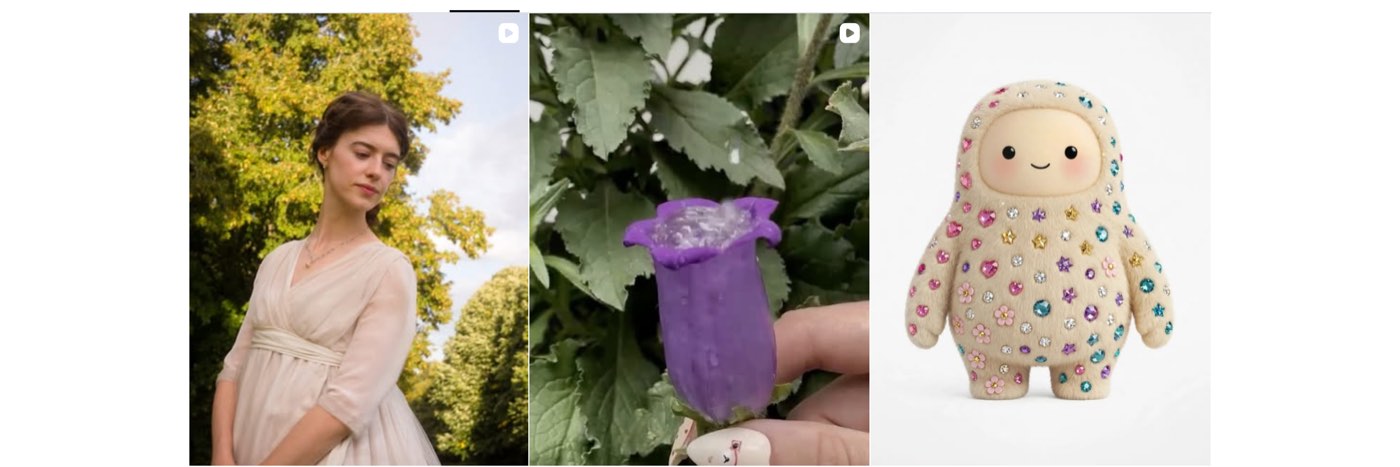
The first row of the grid on Instagram's own profile, captured on September 30, 2026. Each tile is 3:4, and two of the three are Reels whose 9:16 covers are cropped to fit.
That makes the crop easy to work out for a post 1080 pixels wide:
Post shape | What the grid shows | What it hides |
|---|---|---|
3:4 (1080 × 1440) | All of it | Nothing |
4:5 (1080 × 1350) | The middle 1012 × 1350 | 34 pixels on each side |
1:1 (1080 × 1080) | The middle 810 × 1080 | 135 pixels on each side, a quarter of the image |
1.91:1 (1080 × 566) | The middle 424 × 566 | 328 pixels on each side, about three fifths of the image |
9:16 Reel cover (1080 × 1920) | The middle 1080 × 1440 | 240 pixels at the top and at the bottom |
The rule that follows: keep faces, text and logos inside the central 3:4 area of whatever you post. This is the default crop. A post whose owner repositioned its grid preview could not be told apart from outside, so that case was not tested.
What size are Instagram Reels and Stories?
The Instagram Reel size in pixels is 1080 × 1920, and a Story is the same. Both are 9:16, which fills a phone screen held upright. For Reels, the Help Center allows anything from 1.91:1 to 9:16, asks for at least 30 frames per second and a resolution of at least 720 pixels, and recommends a cover photo of 420 × 654 pixels.
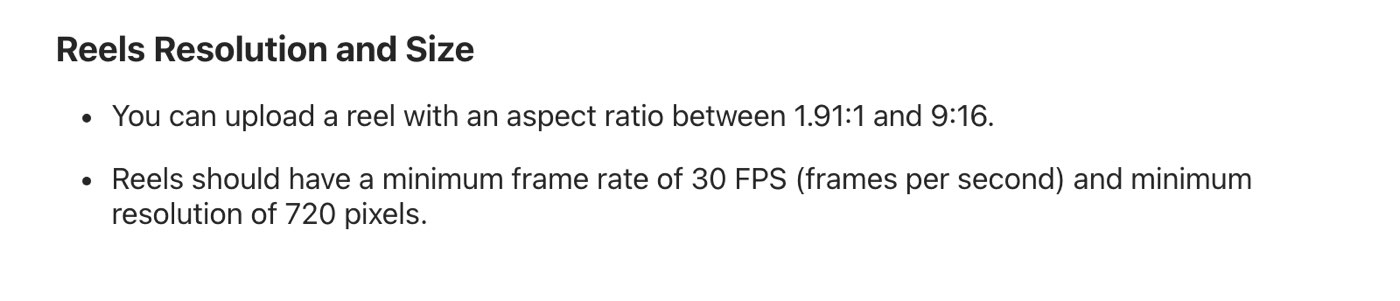
Instagram's Help Center on September 30, 2026: Reels can be anything from 1.91:1 to 9:16, at 30 FPS and 720 pixels or more.
The edges of a Reel or Story are covered by the caption, your username and the buttons. Meta publishes margins for this in its Ads Guide for Reels: leave roughly 14% of the top, 35% of the bottom and 6% of each side free of text and logos. It gives no such figures for ordinary Reels, so treat these as the closest official guide.
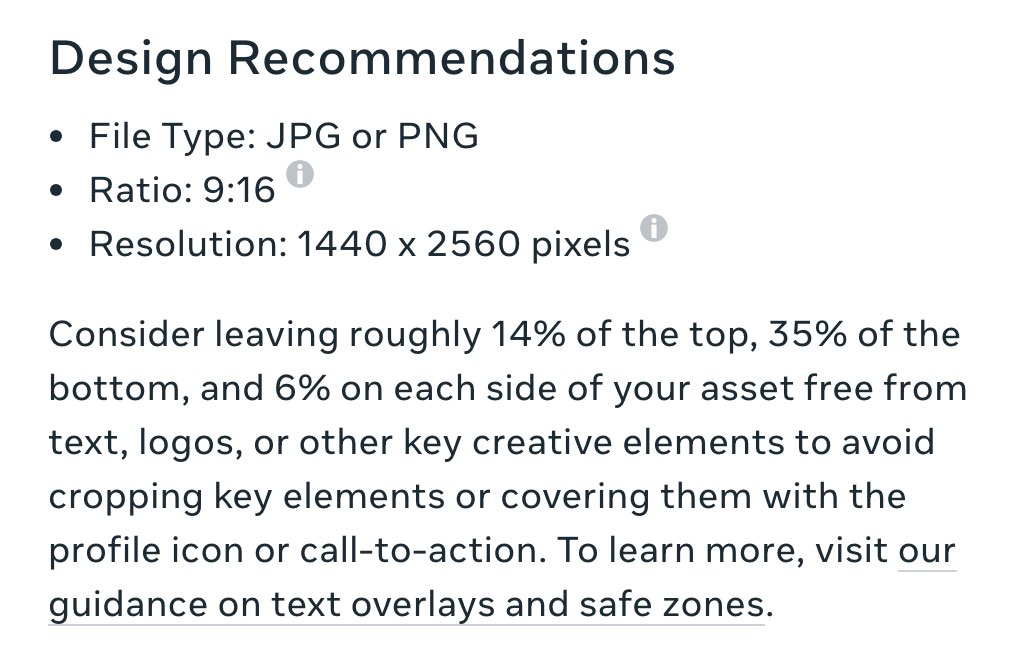
Meta's Ads Guide for Reels on September 30, 2026: 9:16 at 1440 x 2560 pixels, with 14% of the top, 35% of the bottom and 6% of each side kept clear.
Canvas | Keep clear at the top | Keep clear at the bottom | Keep clear on each side | Safe area left |
|---|---|---|---|---|
1080 × 1920 | 269 pixels | 672 pixels | 65 pixels | 950 × 979 |
1440 × 2560 | 358 pixels | 896 pixels | 86 pixels | 1267 × 1306 |
What size is an Instagram carousel?
A carousel uses the same sizes as a single post, with one condition: every slide takes the same shape. Instagram's Help Center says you can share "up to 20 photos and videos as a single post" and that "the orientation you choose (square, portrait or landscape) affects all of the photos or videos in your post". Design every slide at 1080 × 1350 and none of them will be cropped to match the first.
What size are Instagram ads?
Ads ask for more pixels than ordinary posts. Meta's Ads Guide for the Instagram feed recommends a 4:5 image at 1440 x 1800 pixels, in JPG or PNG. Its technical requirements are a width of at least 500 pixels, a file of at most 30 MB, and a ratio between 4:5 and 1.91:1. Story and Reel ads are 9:16 at 1440 x 2560.
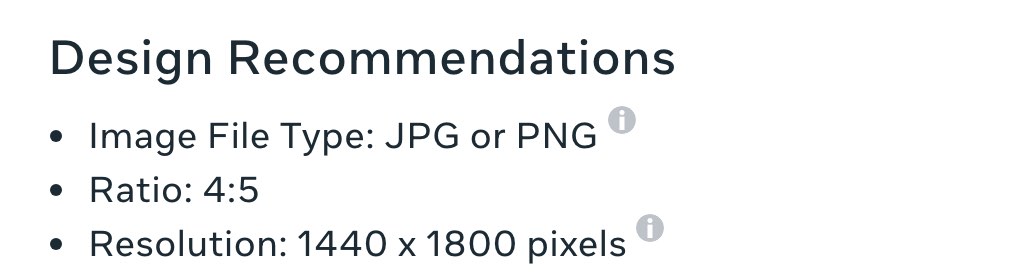
Meta's Ads Guide for Instagram feed image ads on September 30, 2026: ratio 4:5, resolution 1440 x 1800 pixels.
Note what is missing: ads stop at 4:5. A 3:4 image that works as an ordinary post is taller than the feed ad format allows.
Why does a scheduling tool reject or crop my post?
Apps that publish for you, such as schedulers and design tools, do it through Instagram's publishing API, and the API is stricter than the app. Meta's developer documentation lists the limits for an image:
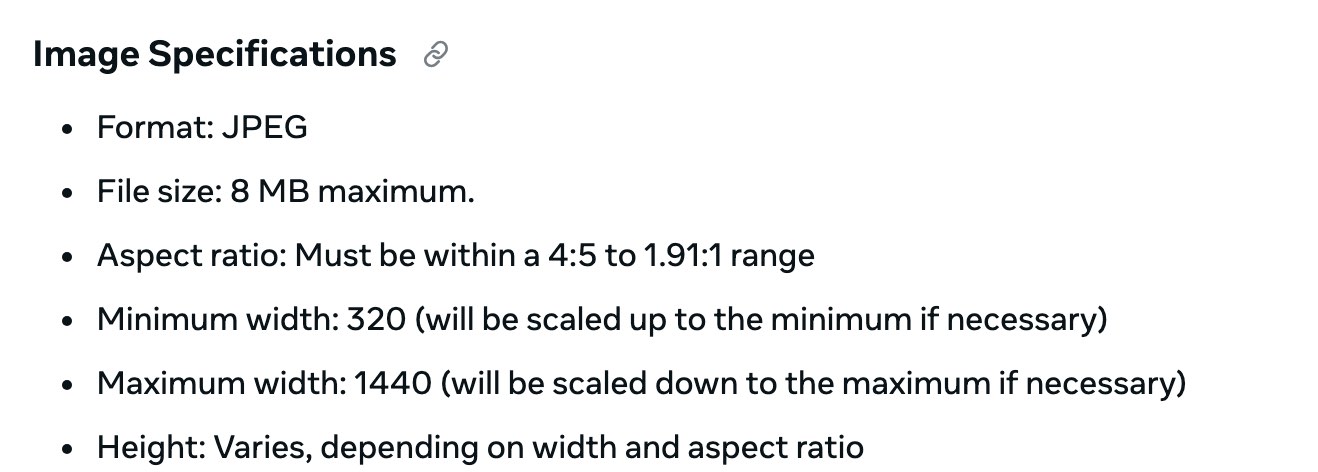
Meta's developer documentation on September 30, 2026: images published through the API must be JPEG, 8 MB at most, and between 4:5 and 1.91:1.
Three differences from the app cause most of the trouble:
3:4 is not accepted. The API's range ends at 4:5, so a 1080 × 1440 post has to be published from the Instagram app itself.
JPEG only. Meta's content publishing guide says "JPEG is the only image format supported", so a PNG has to be converted first.
10 slides, not 20. The same guide says "Carousels are limited to 10 images, videos, or a mix of the two."
If a tool refuses a post that the app accepts, check those three before anything else.
Which Instagram post size should you use?
For almost everything: 1080 × 1350 (4:5). It is accepted by the app, by scheduling tools and by ads, and the grid trims only 34 pixels from each side.
For a perfect grid: 1080 × 1440 (3:4). Nothing is cropped on your profile, but you must post from the app.
Square (1080 × 1080) only when the artwork is square. The grid hides a quarter of it.
Landscape (1080 × 566) only when the photo needs it. The grid shows about two fifths of it.
Reels and Stories: 1080 × 1920, with the important parts inside the safe area.
The large accounts measured for this guide lean the same way. Of their 30 photo posts, 16 were 4:5, five were 3:4, four were square and five were landscape. Size is only one part of how a profile looks to a visitor. What they can see of your account is another, covered in the guide to hiding followers on Instagram.
How these sizes were checked
Every figure attributed to Instagram or Meta was read on its own page on September 30, 2026, and the screenshots above were taken that day. Nothing was copied from another size guide.
The measurements used a desktop browser, 1280 pixels wide, not logged in. For @instagram, @natgeo, @nasa, @nike and @apple, the first 12 grid tiles of each profile were measured, 60 in all: 33 photo posts and 27 Reels. Up to eight photo posts per profile were then opened, and the largest image Instagram served for each was recorded, which gave sizes for 30 posts. Some of those posts are collaborations that appear on the grid of the account measured.
Not tested: what the phone app displays, uploading (no account was used), and posts whose grid preview had been repositioned by their owner. The profile picture figure comes from one account, @instagram, whose picture was served at 150 × 150 pixels.
Frequently asked questions
What is the best Instagram post size in 2026?
1080 × 1350 pixels, a 4:5 portrait. It takes up the most screen of any size that the app, scheduling tools and ads all accept.
Is the Instagram post size 4:5 or 3:4?
Both work. 3:4 (1080 × 1440) is the tallest photo Instagram keeps uncropped and it matches the grid tile. 4:5 (1080 × 1350) is slightly shorter and is the tallest shape accepted through scheduling tools and in ads.
What is the Insta post size for a square photo?
1080 × 1080 pixels. It shows in full in the feed, but the profile grid crops it to the middle 810 × 1080.
What is the Instagram post size in cm?
At 96 pixels per inch, a 1080 × 1350 post is 28.6 × 35.7 cm and a 1080 × 1440 post is 28.6 × 38.1 cm. Instagram reads pixels, not centimetres, so the pixel size is the one that matters.
What size is an Instagram Reel?
1080 × 1920 pixels at 9:16. Instagram accepts Reels from 1.91:1 to 9:16 with at least 720 pixels and 30 FPS, and recommends a 420 × 654 cover.
Does Instagram reduce photo quality?
Its Help Center says photos wider than 1080 pixels are sized down to 1080. On its website, though, 19 of 30 posts measured for this guide were served wider than that, up to 4096 pixels. Uploading at 1080 wide or more is the safe choice either way.
What size should an Instagram profile picture be?
Instagram's help page on profile pictures gives no size. Upload a square image, such as 1080 × 1080, and keep the subject in the centre, because it is shown as a small circle.
Can I post a 9:16 photo in the feed?
Not in full. The tallest photo Instagram keeps is 3:4, and anything taller is cropped to fit. Share a 9:16 image as a Story or a Reel to show all of it.
Instagram changes its formats without notice. Everything here was read or measured on September 30, 2026, so check the linked Help Center pages if a size looks different when you read this.
The Writeouts editorial desk for everyday tech: guides and comparisons of AI tools, social media tools and the software people use to get work done. From the Writeouts editorial team.
See everything by @tech-desk
0 comments
Sign in to join the discussion.
Loading comments…