Port 53 is the port the Domain Name System (DNS) uses. Every time a device turns a name such as writeouts.com into an IP address, it sends the question to a DNS server on that port, over UDP first and over TCP when the answer is too big for one packet. Both the UDP and the TCP side are reserved for DNS in the IANA port registry.
This guide was checked on 24 November 2026 from a home broadband connection in Delhi. We read the IANA registry, the DNS standards (RFC 1035, 1123, 6891, 7766, 7858, 8484 and 9250), Microsoft's and Cloudflare's documentation and the CISA alert on DNS amplification. We also ran DNS queries over UDP, TCP, TLS and HTTPS from a Mac, and every command and its output is printed below. The sections cover what the port is used for, whether DNS is TCP or UDP, what happens when TCP 53 is blocked, and which other ports DNS uses. Then: why it is attacked, and whether it should be open on your router.
Port 53 at a glance | Checked 24 November 2026 |
|---|---|
Service | "domain", Domain Name Server, registered to Paul Mockapetris for both TCP and UDP in the IANA registry |
Defined by | RFC 1035 (November 1987): "name server access using TCP on server port 53 as well as datagram access using UDP on UDP port 53" |
UDP or TCP? | UDP first for every ordinary query (RFC 1123). TCP when the reply is truncated, for zone transfers, and as a requirement for every DNS implementation since RFC 7766 (March 2016) |
UDP size limit | 512 bytes in RFC 1035; larger with EDNS(0), where 1,232 bytes is the safe default since DNS Flag Day 2020. Cloudflare's 1.1.1.1 advertised 1,232 and our router 4,096 in the tests |
Other DNS ports | 853 TCP for DNS over TLS, 853 UDP for DNS over QUIC, 443 for DNS over HTTPS, 5353 UDP for multicast DNS |
Why it is attacked | UDP replies can be sent to a forged address (amplification), a forged reply can poison a cache if the ID and port are guessed, and almost every firewall lets port 53 out (tunnelling) |
Open on a router? | Inbound from the internet: no, unless you run a public DNS server. Outbound from your devices, UDP and TCP: yes |
What we found at home | The router answers UDP 53 in 3 ms and refuses TCP 53. Large answers still arrive, because it ignores the 512-byte limit and sends 1,435 bytes over UDP |
What is port 53 used for?
Port 53 is used for DNS, the service that turns domain names into IP addresses and back. A port is a number from 0 to 65,535 that tells a computer which program a packet is for. It is one of the "well-known" ports, below 1,024, that IANA assigns to one service. In the registry the service name is "domain", described as "Domain Name Server", and the entry is held by Paul Mockapetris, who designed DNS.

The IANA port registry on 24 November 2026: port 53 is "domain", Domain Name Server, on both TCP and UDP.
The assignment goes back to RFC 1035, the DNS specification Mockapetris published in November 1987. Its transport section says: "The Internet supports name server access using TCP on server port 53 (decimal) as well as datagram access using UDP on UDP port 53 (decimal)." Nothing in that sentence has changed in 39 years. What has changed is how much traffic each transport carries, which the next section covers.
A lookup looks like this. On the Mac used for this article, the operating system's resolver points at the home router, 192.168.0.1, which scutil --dns lists as the only nameserver. Asking it for writeouts.com takes one 47-byte reply:
$ dig +noall +answer +stats writeouts.com
writeouts.com.		3	IN	A	76.76.21.21
;; Query time: 3 msec
;; SERVER: 192.168.0.1#53(192.168.0.1)
;; WHEN: Tue Nov 24 23:45:27 IST 2026
;; MSG SIZE  rcvd: 47
The #53 after the server address is the port. The router did not know the answer itself. It forwarded the question, on port 53 again, to the ISP's resolver. That resolver asked the servers for the .com zone and then the servers for writeouts.com, all of them listening on port 53. The stub resolver that starts this chain is part of the operating system, which is why every program on the machine gets the same answer. The 3-millisecond time is the router answering from its cache; the first query of the day takes longer.
Only the server side of a DNS conversation uses the port. A client sends from a random high-numbered port and the server replies from port 53 back to that port. Microsoft's table of DNS network ports puts the client range at 49,152 to 65,535, which is the range IANA recommends for dynamic ports. That detail matters later, when we get to why randomising that port protects you.
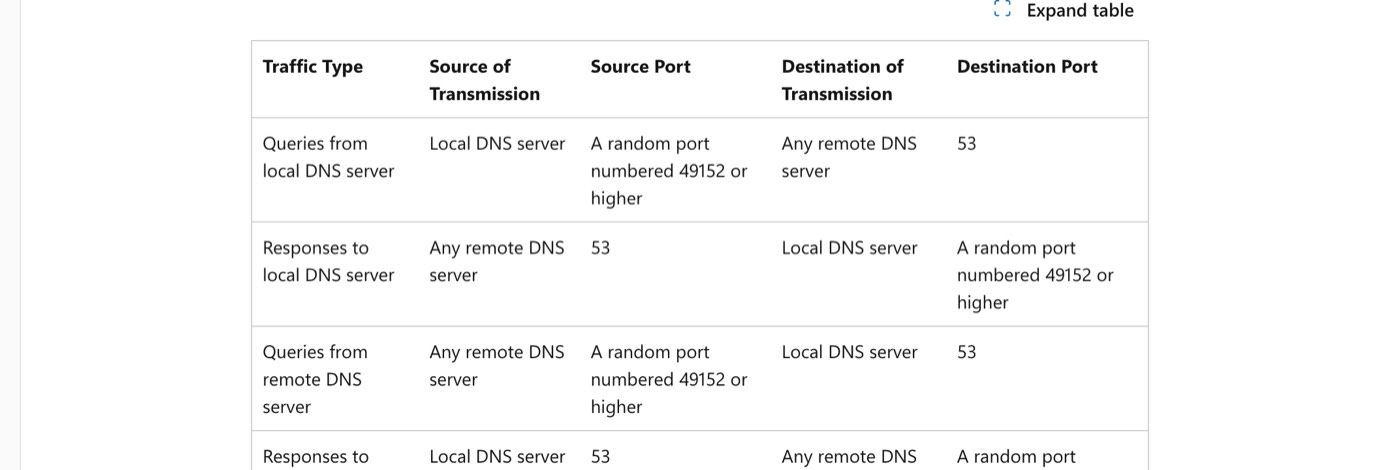
Microsoft Learn, "Network Ports Used by DNS", on 24 November 2026. Queries leave from a random port of 49,152 or higher and arrive at port 53; responses travel the other way.
Is DNS port 53 TCP or UDP?
DNS uses both. UDP carries almost every ordinary query. TCP is used when a reply does not fit in a UDP packet, for copying whole zones between servers, and by any client that prefers a connection. Since RFC 7766 in March 2016 the rule has been blunt: "All general-purpose DNS implementations MUST support both UDP and TCP transport."
The reason UDP comes first is speed. A UDP query is one packet out and one packet back, with no handshake. RFC 1035 set the trade-off in 1987: UDP replies are limited to 512 bytes, and a server that cannot fit its answer sets a flag, the TC bit, to say the reply was cut short.
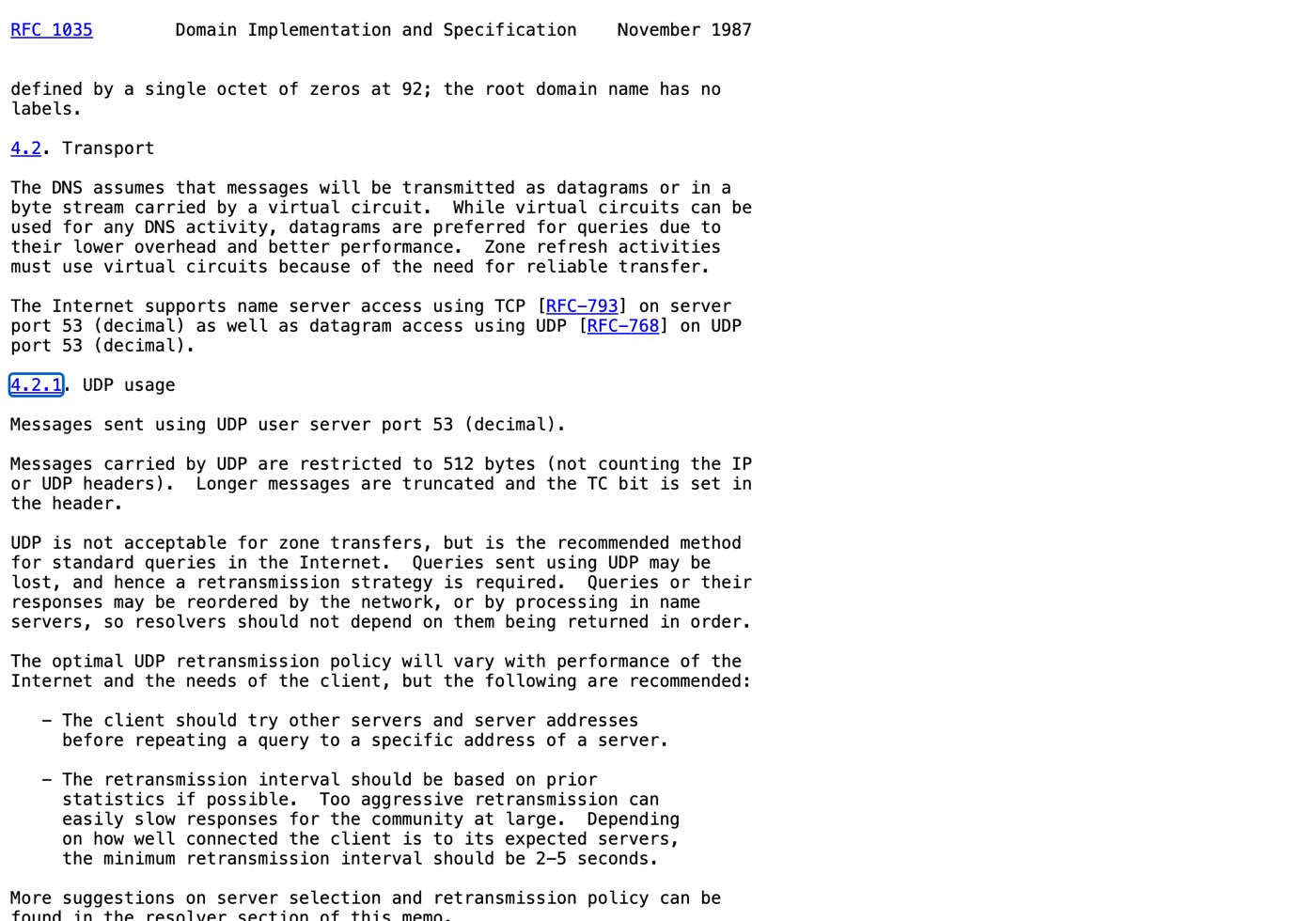
RFC 1035, section 4.2, on rfc-editor.org on 24 November 2026. Both transports use port 53; a UDP message is limited to 512 bytes and a longer one is truncated with the TC bit set.
RFC 1123 (1989) made the order mandatory: a resolver "MUST send a UDP query first", and if the answer comes back truncated it "SHOULD try the query again using TCP". That is the behaviour you can watch with dig. We asked Cloudflare's resolver for google.com's TXT records, which are long, while telling it our buffer was only 512 bytes and asking dig not to retry:
$ dig +bufsize=512 +ignore +noall +comments TXT google.com @1.1.1.1
;; Got answer:
;; ->>HEADER
The tc in the flags is the truncation bit, and the reply carries no answers at all. Run the same query without +ignore and dig retries over TCP on its own, and the full set arrives:
$ dig +noall +comments +stats TXT google.com @1.1.1.1
;; Got answer:
;; ->>HEADER
Seventeen records in 1,187 bytes, more than twice the old limit. The line udp: 1232 is the modern fix for that limit. EDNS(0), standardised in RFC 6891 in 2013, lets a client announce how big a UDP reply it can take, with 4,096 bytes suggested as a starting point. In practice UDP packets over about 1,500 bytes get split into fragments that firewalls drop. So in 2020 the DNS software vendors agreed on DNS Flag Day 2020: advertise 1,232 bytes by default and switch to TCP for anything bigger. Cloudflare's resolver sends exactly that figure.
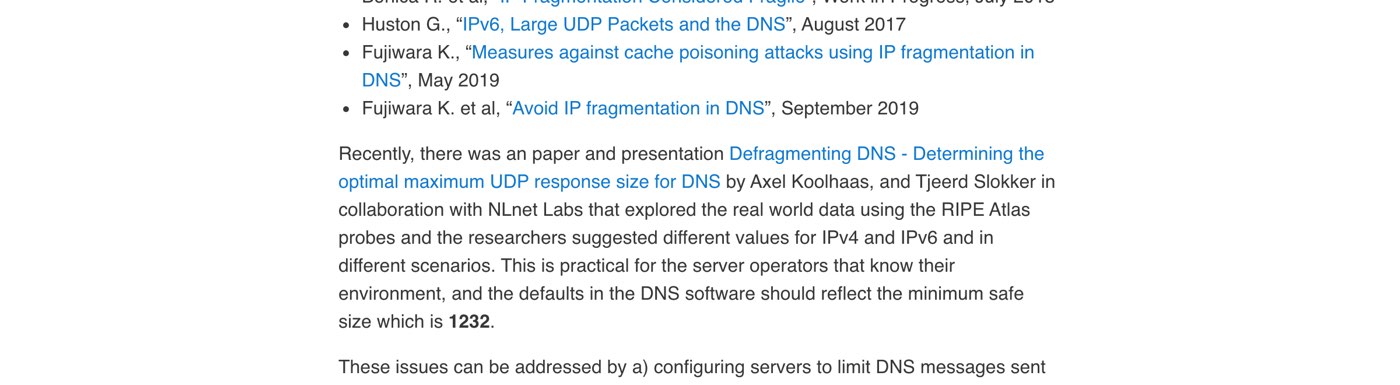
dnsflagday.net on 24 November 2026: the defaults in DNS software "should reflect the minimum safe size which is 1232".
Situation | Transport on port 53 | Set by |
|---|---|---|
An ordinary lookup (A, AAAA, MX, TXT) | UDP first, always | RFC 1123 |
Reply larger than the client's UDP buffer | Server sets TC; client repeats the query over TCP | RFC 1035, RFC 1123 |
Zone transfer (AXFR, IXFR) between servers | TCP; RFC 1035 calls UDP "not acceptable" for it | RFC 1035 |
DNSSEC-signed answers | Often over 512 bytes, so EDNS(0) over UDP or TCP | RFC 7766 (it notes NSEC3 "does not exist" replies are "almost invariably larger than 512 bytes") |
Any client or server written since 2016 | Must support both | RFC 7766 |
What happens if TCP port 53 is blocked?
If TCP is blocked on the DNS port, ordinary small lookups keep working and large ones can fail or slow down, because the TCP retry after a truncated reply has nowhere to go. We did not have to set this up: the home router used for this article refuses TCP on it while answering UDP.
$ nc -vz -w 3 192.168.0.1 53
nc: connectx to 192.168.0.1 port 53 (tcp) failed: Connection refused

$ nc -vzu -w 3 192.168.0.1 53
Connection to 192.168.0.1 port 53 [udp/domain] succeeded!

$ dig +tcp +noall +answer +stats example.com @192.168.0.1
;; Connection to 192.168.0.1#53(192.168.0.1) for example.com failed: connection refused.
Both public resolvers accepted TCP (nc -vz -w 3 1.1.1.1 53 printed "succeeded", and dig +tcp to 1.1.1.1 and 8.8.8.8 answered in 53 and 7 milliseconds). So this router is the odd one out, and it hides the problem in a second way. When we repeated the 512-byte test against it, the router ignored our buffer size and pushed the whole answer out over UDP anyway:
$ dig +bufsize=512 +ignore +noall +comments +stats TXT google.com @192.168.0.1
;; Got answer:
;; ->>HEADER
No truncation bit, 1,435 bytes in one UDP reply, and a 4,096-byte buffer advertised back. On a home network with a laptop that works, so nobody notices. It breaks in three cases. A client that cannot take replies over 512 bytes gets a truncated answer with no way to retry. A zone transfer to a secondary server cannot happen at all. And a DNSSEC-validating resolver behind a TCP-blocking firewall will see signed answers fail when they exceed the path's packet size. Infoblox's FAQ on the same question describes the symptom as "slow DNS resolution, or inability to resolve certain domain names at all".
The rule for any firewall, then: allow port 53 on both UDP and TCP, from your devices to the resolvers they use. Filtering one transport and not the other is a misconfiguration, not a security setting.
Which ports does DNS use besides 53?
Classic DNS travels in plain text, so anyone on the path can read which names you look up. Three newer transports encrypt it, and each has its own port. The DNS over TLS standard, RFC 7858, is specific: a server "MUST listen for and accept TCP connections on port 853", and that port "MUST NOT" be used for cleartext DNS.
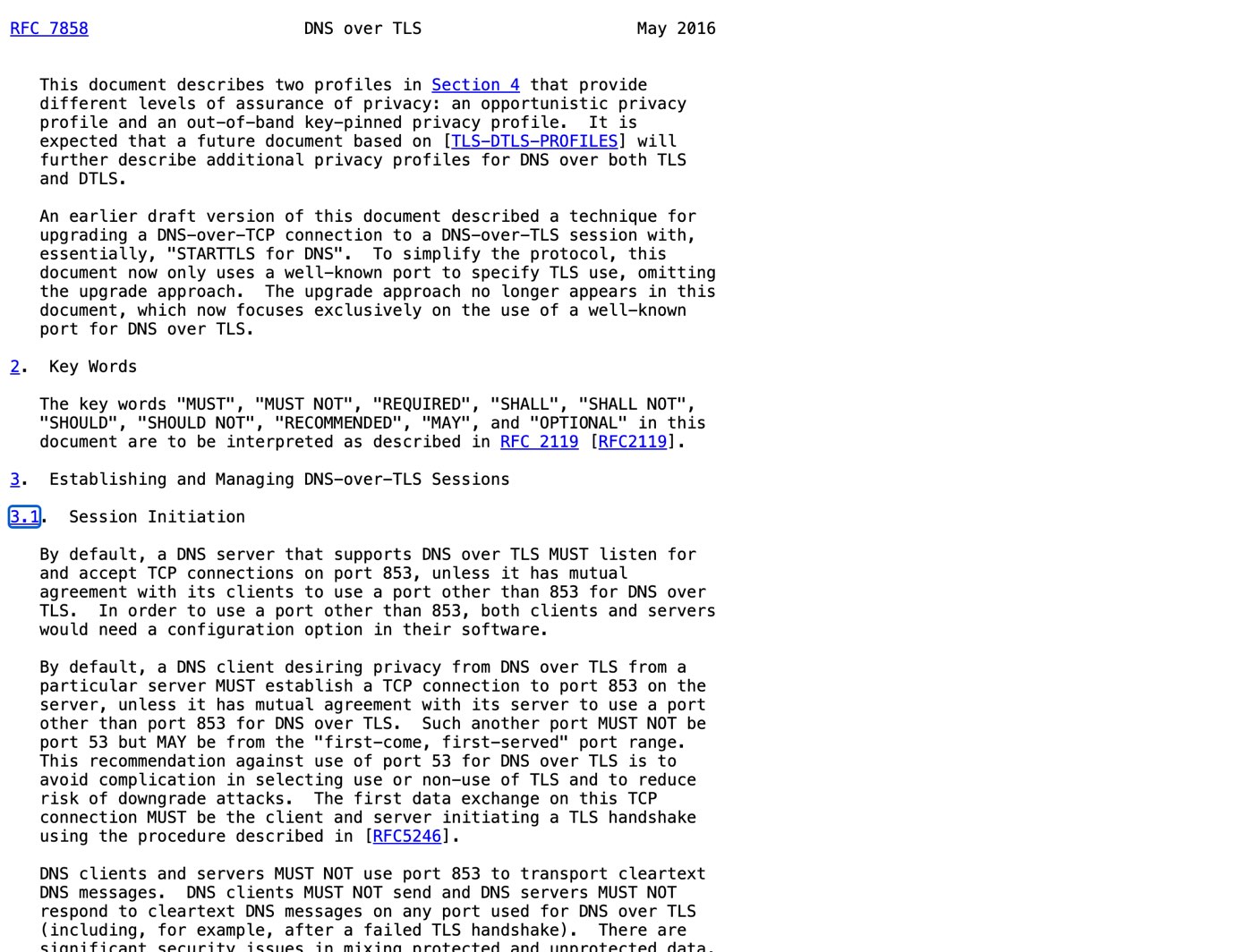
RFC 7858, section 3.1, on rfc-editor.org on 24 November 2026. DNS over TLS runs on TCP port 853, and port 53 is ruled out for it to avoid downgrade attacks.
Port | Transport | Protocol | Standard | What it is for |
|---|---|---|---|---|
53 | UDP and TCP | DNS ("Do53") | RFC 1035 | Every ordinary lookup, in plain text |
853 | TCP | DNS over TLS (DoT) | RFC 7858 | Encrypted DNS; what Android's "Private DNS" setting uses |
853 | UDP | DNS over QUIC (DoQ) | Encrypted DNS over QUIC; the IANA registry added the UDP side of 853 for it in April 2022 | |
443 | TCP (HTTPS) | DNS over HTTPS (DoH) | DNS inside ordinary web traffic; what browsers use | |
5353 | UDP | Multicast DNS (mDNS) | Names ending in | |
49152 to 65535 | UDP and TCP | Client side of any of the above | IANA dynamic range | The random port a query leaves from, per Microsoft's table |
Cloudflare's resolver documentation lists the first two for 1.1.1.1 in the same words: DNS over TLS "on a dedicated TLS connection on port 853" and DNS over HTTPS "inside regular HTTPS traffic on port 443".
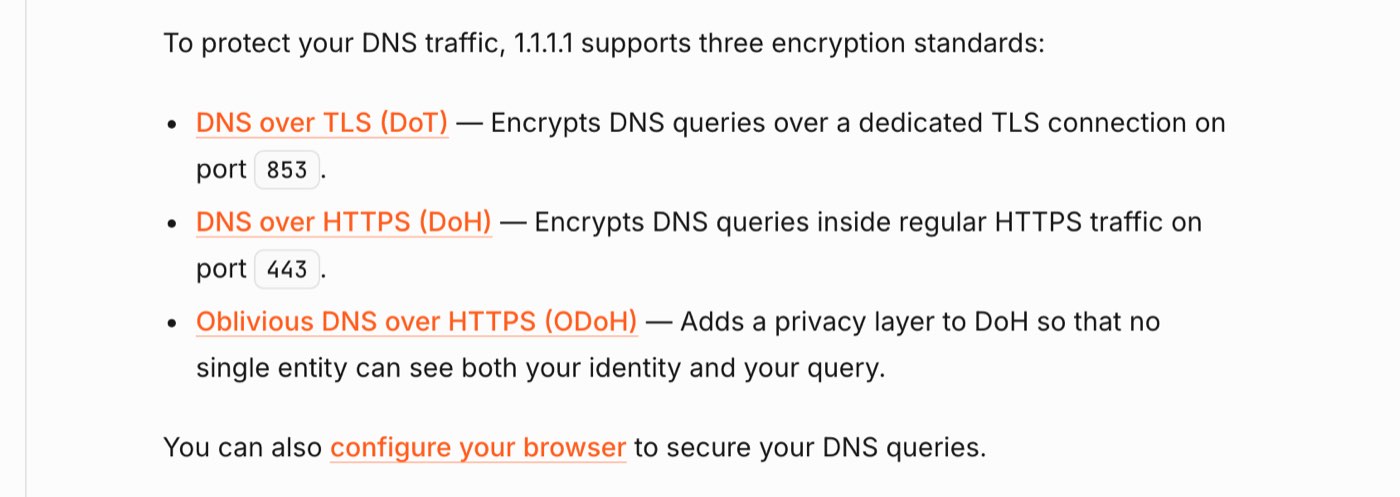
Cloudflare's 1.1.1.1 documentation on 24 November 2026: DNS over TLS on port 853 and DNS over HTTPS on port 443.
Both work from Delhi. A TLS handshake to 1.1.1.1 on port 853 completes with a certificate for cloudflare-dns.com. A DNS over HTTPS request to the same resolver is an ordinary web request, like any API call, and returns writeouts.com's address as JSON (if the square brackets are new to you, see our JSON syntax guide):
$ openssl s_client -connect 1.1.1.1:853 -servername one.one.one.one -brief </dev/null | head -4
CONNECTION ESTABLISHED
Protocol version: TLSv1.3
Ciphersuite: TLS_AES_256_GCM_SHA384
Peer certificate: C=US, ST=California, L=San Francisco, O=Cloudflare, Inc., CN=cloudflare-dns.com

$ curl -s -H 'accept: application/dns-json' 'https://cloudflare-dns.com/dns-query?name=writeouts.com&type=A'
{"Status":0,"TC":false,"RD":true,"RA":true,"AD":false,"CD":false,"Question":[{"name":"writeouts.com","type":1}],"Answer":[{"name":"writeouts.com","type":1,"TTL":14400,"data":"76.76.21.21"}]}
Encrypted DNS changes what rules on the classic port can do. A firewall or ad-blocker that watches only port 53 sees none of the queries a browser sends over port 443. The paper "No Port 53, Who Dis?", presented at the NDSS symposium, describes a home network where the author blocked all outbound port 53 and 853 traffic at the firewall for a year. Every name was resolved over DNS over HTTPS through Tor instead. Nothing on the network needed port 53 to leave the house.
Why is port 53 vulnerable?
The DNS port is vulnerable for three reasons that follow from how it works: UDP has no handshake, a reply is trusted if two numbers match, and nearly every network lets port 53 through.
Amplification and reflection. Because a UDP query carries no proof of who sent it, an attacker can write a victim's address as the source and send small queries to thousands of DNS servers that answer anyone. Every server then sends its much larger reply to the victim.
CISA's alert on DNS amplification, first published on 29 March 2013 and still current, describes the method. The source address is "spoofed to be the target's address". Attackers "typically submit a request for as much zone information as possible", usually the ANY query type, "to maximize the amplification effect". The servers that make this possible are open resolvers: DNS servers on port 53 that answer queries from the whole internet rather than their own users. That is the real reason the question "should port 53 be open on my router" matters.
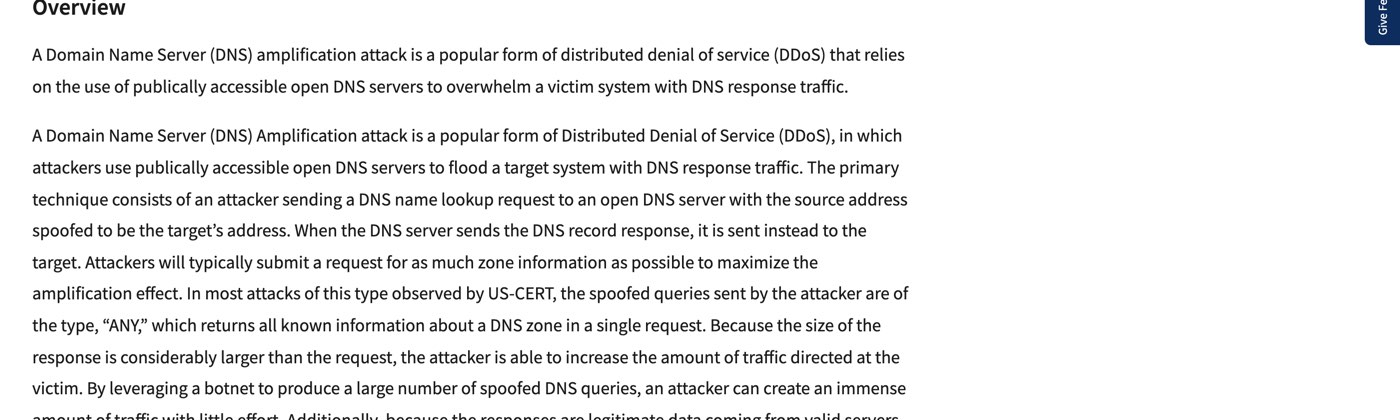
CISA's alert "DNS Amplification Attacks" on 24 November 2026. A small query with a forged source address makes an open DNS server send its large reply to the victim.
Forged answers and cache poisoning. A DNS client accepts a UDP reply if its 16-bit transaction ID matches and it arrives on the port the query left from. RFC 5452 (2009) spells out the arithmetic. If a resolver always sends from port 53, an attacker only has to guess the ID, and "using 1 source port, the spoofing chance rises to 50% within 7 seconds" for a busy name.
Randomising the source port across the dynamic range adds about 64,512 possibilities per guess. That is why the client side of DNS uses a random high port, and why a NAT router that rewrites every query to the same outside port undoes the protection.
Tunnelling and exfiltration. Firewalls that block almost everything still allow port 53 out, because without it nothing resolves. Malware uses that gap: it encodes stolen data as the labels of DNS queries to a domain the attacker controls, and the attacker's name server records them. A Spiceworks thread that ranks for this query asks how to stop exfiltration over ports 53 and 123. The answer the DNS community gives is the one in the next section: let port 53 out only to the resolvers you run or trust, and log what goes through them.
On top of these, the port is simply always being probed. The SANS Internet Storm Center keeps a live page for port 53 listing the addresses scanning it each day. Its port information table still carries two old TCP port 53 trojans, the ADM worm and Lion, from the years when the BIND name server had a run of remotely exploitable bugs.
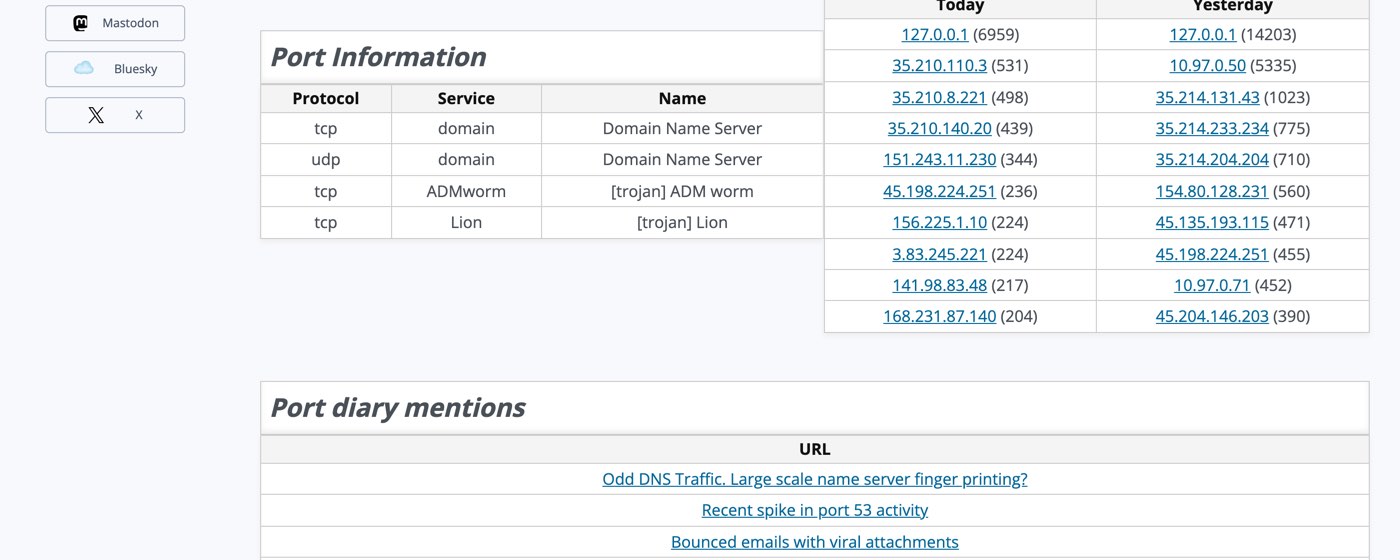
SANS Internet Storm Center, port 53, on 24 November 2026: the service table and the day's top scanning addresses.
Should port 53 be open on my router?
From the internet side, no. A home router should not accept DNS queries from strangers. A router that does is an open resolver, and it will be used in the amplification attacks above, with your connection paying for the traffic. From the inside, yes: your devices send their queries to the router on port 53, and the router passes them on. Leaving the port open outbound, on both UDP and TCP, is normal and necessary.
The confusion comes from what "open" means in a port scan. A scanner on the internet reports the port open on your public address only if the router answers DNS from outside. Most consumer routers do not, but some models and some Pi-hole or AdGuard Home installs do when a port-forward rule has been added. The question that ranks for this search, a Reddit thread titled "My port 53 is open. Should I be worried?", is exactly that case.
Direction | Port 53 rule | Why |
|---|---|---|
Inbound, from the internet to the router or any home device | Block, both UDP and TCP | Prevents your network being an open resolver used for amplification; nothing at home needs it |
Outbound, from your devices to your chosen resolver | Allow, both UDP and TCP | DNS fails or degrades if either transport is missing |
Outbound, from your devices to any other address on port 53 | Optional: block or redirect to your resolver | Stops devices and malware bypassing a Pi-hole or a parental filter; many routers call this "DNS redirection" |
Outbound on 853 and 443 | Allow | Encrypted DNS; blocking 443 breaks the web, and blocking 853 only pushes clients to DoH |
Inbound, if you run an authoritative DNS server at home | Allow 53 UDP and TCP to that server only, with recursion disabled | An authoritative server that also recurses for the public is the open resolver problem again |
If you run Pi-hole, its documentation lists 53 on TCP and UDP as the port its resolver needs, which is fine inside the house. To use it from outside, run a VPN such as WireGuard to your home and send DNS through that, rather than forwarding the port from the router to the Pi.
Checking your own router from the inside takes two commands, and the results above are what they printed here: nc -vzu -w 3 192.168.0.1 53 for UDP and nc -vz -w 3 192.168.0.1 53 for TCP. The UDP "succeeded" line is weaker evidence than it looks. nc reports success for UDP unless an error packet comes back, so a dig against the same address, which did answer, is the real proof.
To check from the outside, use any online port checker from a phone on mobile data, or a friend's connection, and look up port 53 on your public address. We did not run an external scan for this article.
How do you check whether port 53 is in use on your own machine?
On a Mac or Linux machine, lsof -nP -i:53 lists any program bound to port 53. On the Mac used here it printed nothing, because the operating system's resolver is a client, not a server, and sends its queries from the dynamic range. Something would appear only if you ran a DNS server such as Pi-hole, dnsmasq or Unbound, or a developer tool such as Docker's embedded resolver on a non-loopback address. The other useful checks:
dig +short example.com @1.1.1.1anddig +tcp +short example.com @1.1.1.1: UDP and TCP to a public resolver. If the first works and the second does not, something between you and the internet blocks TCP 53.dig +bufsize=512 +ignore TXT google.com @1.1.1.1: forces the truncated reply shown above, which tells you whether your resolver honours the buffer size a client asks for. The home router here did not.dig +short CHAOS TXT version.bind @192.168.0.1: asks a server which software it runs. Public resolvers and this router return nothing, which is the configuration security guides recommend.
On Linux, ss -ulpn 'sport = :53' lists listeners the same way, per the ss manual. On Windows, netstat -ano | findstr :53 does, and PowerShell's Test-NetConnection -ComputerName 1.1.1.1 -Port 53 tests TCP 53 the way nc -vz does. Those two were not run for this article; the Mac commands were.
How this was tested
Every command printed above was run on 24 November 2026 on an Apple M2 Mac running macOS 26.6.2. The tools were the dig that macOS ships (BIND 9.10.6), macOS nc and curl, and LibreSSL's openssl. The network was a home broadband connection in Delhi whose router is 192.168.0.1; Cloudflare's 1.1.1.1 and Google's 8.8.8.8 were the public resolvers. The script that runs the commands and its full output are kept with the draft, and the article's code blocks are pasted from that output.
The standards quoted were read in their published text on rfc-editor.org the same day; the IANA registry was read in its CSV export. Our router's TCP refusal is one router on one connection. Yours may behave differently, and the commands above will tell you how.
Frequently asked questions
Is port 53 TCP or UDP?
Both. DNS sends every ordinary query over UDP port 53 first and uses TCP port 53 when the reply is truncated, for zone transfers, and wherever a client chooses a connection. Every DNS implementation has had to support both since RFC 7766 in 2016.
What is port 53 used for?
Only for DNS, the lookup service that turns names such as writeouts.com into IP addresses. IANA registers it as the "domain" service on both UDP and TCP, and RFC 1035 has specified it since 1987.
Can DNS use a port other than 53?
Yes, but only when both sides agree. A DNS server can be configured to listen on another port, and clients then have to be told that port, which most operating systems make hard. The standard alternatives are the encrypted transports: TCP 853 for DNS over TLS, UDP 853 for DNS over QUIC and 443 for DNS over HTTPS.
Why does my ISP or office block port 53?
Usually to force every device onto the network's own resolver, for filtering, logging or parental controls, or to stop infected machines talking to attackers' name servers. Public Wi-Fi and corporate networks do it most. The proper form of the rule redirects port 53 to the local resolver rather than dropping it, and it should cover UDP and TCP alike.
What port does DNS over HTTPS use?
Port 443, the same port as every HTTPS website, which is the point: a DNS over HTTPS query is indistinguishable from web traffic to a firewall that only looks at ports. DNS over TLS uses a dedicated port, 853, which is easier to block and easier to allow deliberately.
Is an open port 53 dangerous?
An open port 53 on the public side of your router is dangerous if the server behind it answers anyone. It can then be used to amplify attacks on other people, and your bandwidth pays for it. Port 53 open on your home network, between your devices and your router, is how DNS is supposed to work.
The Writeouts editorial desk for networking and security: how ports, DNS and IP addressing actually work, and how to fix them when they don’t. From the Writeouts editorial team.
See everything by @security-deskEdited by Rajat Chauhan. How articles here are written and edited.
0 comments
Sign in to join the discussion.
Loading comments…