This SQL cheat sheet covers the statements you write most days: selecting and filtering rows, grouping, every kind of join, subqueries, window functions, creating and changing tables, inserting and updating data, and transactions. Every statement was run on November 11, 2026 in PostgreSQL 18, MySQL 9 and SQLite 3.51, and the output under each one is what the database returned.
Where the three engines disagree, and they do on more than most sheets admit, the sheet says which one does what.
Most SQL cheat sheets that rank for this search are a list of statement shapes with no results, and each is written for one database. This one uses a small shop database (customers, products, orders) so every example has a visible answer, and the same statement was tried in all three engines so you learn which habits travel and which don't. The DBMS explainer covers what a database is; this page is for when you already have one open.
SQL cheat sheet: the quick version
Sixteen statements cover most of what anyone writes. Each one is expanded, with its output, further down.
Task | Statement |
|---|---|
Pick columns |
|
Filter rows |
|
Sort and limit |
|
Remove duplicates |
|
Pattern match |
|
Test for missing values |
|
Count, total, average per group |
|
Filter groups |
|
Combine tables |
|
Keep unmatched rows |
|
Name a subquery |
|
Number or rank rows |
|
Create a table |
|
Add rows |
|
Change rows |
|
Remove rows |
|
The sample data every example uses
Three tables, small enough to check by eye. customers has 8 people, three of them with no phone number. products has 7 items, two of them priced the same, one never ordered. orders has 12 rows linking the two; one customer, Hugo Martin, has never ordered. Those gaps are deliberate, because they are what joins, NULL tests and outer joins are for. The full CREATE TABLE and INSERT statements are in the test folder described at the end.
customers (id, name, country, city, phone, signed_up)
products  (id, name, category, price)
orders    (id, customer_id, product_id, qty, ordered_at, status)
Querying data: how do you select and filter rows in SQL?
SELECT names the columns, FROM names the table, WHERE keeps the rows that pass a test, ORDER BY sorts, and LIMIT cuts the result short. Outputs below are PostgreSQL's, laid out the way its psql shell prints them; SQLite and MySQL returned the same rows unless the text says otherwise.
Pick columns and rows
SELECT name, price FROM products WHERE price < 50 ORDER BY price; name | price
-----------+-------
Mouse | 15.00
Keyboard | 25.00
Desk Lamp | 25.00
Webcam | 40.00
(4 rows)SQLite printed the prices as 15, 25, 25, 40: it has no fixed-point decimal type, so a DECIMAL(8,2) column holds a plain number. PostgreSQL and MySQL keep the two decimal places. Use SELECT * to get every column, but name the columns in anything you keep, so the query still works when a column is added.
Remove duplicates
SELECT DISTINCT country FROM customers ORDER BY country; country
---------
Brazil
China
France
India
Israel
Nigeria
USA
(7 rows)Sort and take the top N
SELECT name, price FROM products ORDER BY price DESC LIMIT 3; name | price
---------+--------
Laptop | 950.00
Monitor | 180.00
Headset | 60.00
(3 rows)LIMIT is what PostgreSQL, MySQL and SQLite all accept. The standard spelling, FETCH FIRST 3 ROWS ONLY, worked only in PostgreSQL; SQLite answered near "FETCH": syntax error and MySQL rejected it too. SQL Server uses SELECT TOP 3 instead and was not part of this test.
Page through results
SELECT name FROM customers ORDER BY id LIMIT 3 OFFSET 3; name
-------------
Dana Levi
Emeka Obi
Fatima Khan
(3 rows)Always pair OFFSET with an ORDER BY. Without one, the database is free to return rows in any order, so page two can repeat rows from page one.
Rename and compute columns
SELECT name AS product, price * 1.18 AS price_with_tax FROM products WHERE id = 1; product | price_with_tax
----------+----------------
Keyboard | 29.5000
(1 row)PostgreSQL and MySQL show 29.5000 because multiplying a two-decimal column by 1.18 produces four decimals; SQLite shows 29.5. Wrap it in ROUND(..., 2) for display. AS is optional in all three, but it makes the alias easier to spot.
Filter with AND, OR, IN, BETWEEN and NOT
SELECT name, country FROM customers WHERE country IN ('India', 'Brazil') ORDER BY id; name | country
---------------+---------
Aarav Mehta | India
Beatriz Costa | Brazil
Fatima Khan | India
(3 rows)SELECT name, price FROM products WHERE price BETWEEN 30 AND 100 ORDER BY price; name | price
---------+-------
Webcam | 40.00
Headset | 60.00
(2 rows)BETWEEN includes both ends. AND binds tighter than OR, so a OR b AND c means a OR (b AND c); add the brackets yourself rather than remembering that. NOT IN ('India', 'USA') returned the five customers from other countries, but if the list contains a NULL, NOT IN returns nothing at all, which is one reason to prefer NOT EXISTS for subqueries.
Match patterns with LIKE
SELECT name FROM customers WHERE name LIKE '%an%' ORDER BY id; name
-------------
Dana Levi
Fatima Khan
(2 rows)% stands for any run of characters and _ for exactly one. Whether LIKE cares about case depends on the database, and this is the first place the three disagree:
SELECT name FROM customers WHERE name LIKE 'a%';Engine | Result of |
|---|---|
PostgreSQL | No rows. |
MySQL | Aarav Mehta. The default collation ignores case. |
SQLite | Aarav Mehta. |
For anything beyond % and _, the regex cheat sheet covers the pattern syntax, which PostgreSQL exposes as ~ and MySQL as REGEXP.
Test for NULL
SELECT name FROM customers WHERE phone IS NULL ORDER BY id; name
-------------
Chen Wei
Emeka Obi
Hugo Martin
(3 rows)NULL means "no value", and it is not equal to anything, not even itself. phone = NULL is never true; only IS NULL and IS NOT NULL work. NULL also swallows arithmetic and is skipped by COUNT(column):
SELECT COUNT(*) AS all_rows, COUNT(phone) AS with_phone, 10 + NULL AS ten_plus_null FROM customers; all_rows | with_phone | ten_plus_null
----------+------------+---------------
8 | 5 |
(1 row)Eight customers, five phone numbers, and 10 + NULL is NULL, shown here as an empty cell. MySQL's shell prints the word NULL instead; the value is the same.
How do you group and aggregate in SQL?
Aggregate functions collapse many rows into one value: COUNT, SUM, AVG, MIN, MAX. GROUP BY makes one output row per distinct value, and HAVING filters those groups after they are formed.
SELECT status, COUNT(*) AS orders, SUM(qty) AS units FROM orders GROUP BY status ORDER BY orders DESC; status | orders | units
-----------+--------+-------
shipped | 9 | 12
pending | 2 | 2
cancelled | 1 | 3
(3 rows)SELECT customer_id, COUNT(*) AS orders FROM orders GROUP BY customer_id HAVING COUNT(*) >= 2 ORDER BY customer_id; customer_id | orders
-------------+--------
1 | 2
2 | 2
3 | 2
6 | 2
7 | 2
(5 rows)SELECT category, ROUND(AVG(price), 2) AS avg_price, MIN(price) AS cheapest, MAX(price) AS dearest FROM products GROUP BY category ORDER BY category; category | avg_price | cheapest | dearest
-------------+-----------+----------+---------
Accessories | 26.67 | 15.00 | 40.00
Audio | 60.00 | 60.00 | 60.00
Computers | 950.00 | 950.00 | 950.00
Displays | 180.00 | 180.00 | 180.00
Lighting | 25.00 | 25.00 | 25.00
(5 rows)COUNT(DISTINCT customer_id) returned 7, the number of different people who have ordered, against COUNT(*) of 12 orders. Note that WHERE runs before grouping and HAVING after, so a condition on an aggregate such as COUNT(*) >= 2 can only go in HAVING.
Every column in the SELECT list must be either grouped or aggregated. Ask for country, name, COUNT(*) grouped by country alone and PostgreSQL answers column "customers.name" must appear in the GROUP BY clause or be used in an aggregate function, and MySQL rejects it as well. SQLite ran it and picked one arbitrary name per country, which is worse, because nothing tells you the number next to it is unrelated to that name.
SQL joins cheat sheet
A join matches rows from two tables on a condition. The ON clause says how; the kind of join says what happens to rows with no match.
Join | Keeps | Works in |
|---|---|---|
| Only rows that match on both sides | All three |
| Every left row, with NULLs where the right side has no match | All three |
| Every right row, with NULLs where the left side has no match | All three (SQLite since 3.39) |
| Every row from both sides | PostgreSQL, SQLite 3.39+; not MySQL |
| Every combination (8 customers × 7 products = 56 rows here) | All three |
Self join | A table joined to itself under two aliases | All three |
INNER JOIN across three tables
SELECT o.id, c.name, p.name AS product, o.qty FROM orders o JOIN customers c ON c.id = o.customer_id JOIN products p ON p.id = o.product_id ORDER BY o.id LIMIT 4; id | name | product | qty
----+---------------+----------+-----
1 | Aarav Mehta | Laptop | 1
2 | Aarav Mehta | Keyboard | 2
3 | Beatriz Costa | Monitor | 1
4 | Chen Wei | Mouse | 3
(4 rows)The aliases o, c and p are declared in FROM and used everywhere else, including the SELECT list. Without them, SELECT id FROM orders JOIN customers ... fails in all three engines with the same complaint, because both tables have an id: PostgreSQL says column reference "id" is ambiguous.
LEFT JOIN: find the rows with no match
SELECT c.name, o.id AS order_id FROM customers c LEFT JOIN orders o ON o.customer_id = c.id WHERE o.id IS NULL; name | order_id
-------------+----------
Hugo Martin |
(1 row)Hugo Martin has never ordered, so the LEFT JOIN keeps his row with an empty order_id, and WHERE o.id IS NULL keeps only such rows. This is the standard "customers without orders" query. The same shape with RIGHT JOIN found the product nobody has bought, Desk Lamp.
FULL OUTER JOIN
SELECT c.name, p.name AS product FROM customers c FULL OUTER JOIN orders o ON o.customer_id = c.id FULL OUTER JOIN products p ON p.id = o.product_id WHERE o.id IS NULL ORDER BY c.name; name | product
-------------+-----------
Hugo Martin |
| Desk Lamp
(2 rows)Both unmatched rows in one result: the customer with no orders and the product with no orders. MySQL has no FULL OUTER JOIN and answered with a syntax error; the usual workaround is a LEFT JOIN and a RIGHT JOIN glued together with UNION. SQLite only gained RIGHT and FULL OUTER JOIN in version 3.39.0, released in June 2022, so an older SQLite rejects them too.
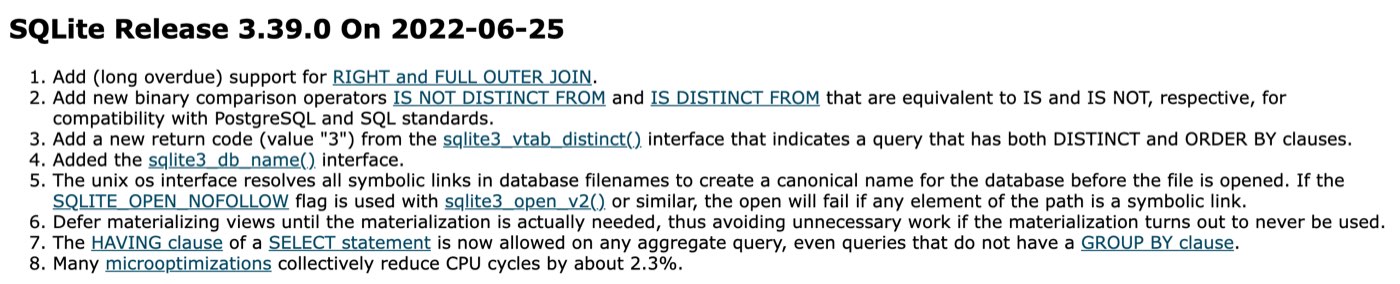
SQLite's release log for 3.39.0, captured on November 11, 2026. RIGHT and FULL OUTER JOIN arrived in that release, in June 2022.
One more difference showed up in the sort order of that result. The query orders by customer name, and the row with no customer has a NULL name. SQLite and MySQL put NULL first; PostgreSQL put it last. Add NULLS FIRST or NULLS LAST (PostgreSQL and SQLite 3.30+) when it matters.
Self join
SELECT a.name, b.name AS same_country FROM customers a JOIN customers b ON a.country = b.country AND a.id < b.id; name | same_country
-------------+--------------
Aarav Mehta | Fatima Khan
(1 row)The a.id < b.id condition stops each pair appearing twice and stops a customer being paired with themselves.
Subqueries and CTEs
A subquery is a SELECT inside another statement. It can return one value, a list, or a whole table. A CTE (WITH ... AS) is a subquery with a name, declared before the main query, which is easier to read and can be referred to more than once.
SELECT name, price FROM products WHERE price > (SELECT AVG(price) FROM products) ORDER BY price; name | price
--------+--------
Laptop | 950.00
(1 row)SELECT name FROM customers WHERE id IN (SELECT customer_id FROM orders WHERE status = 'pending') ORDER BY id; name
---------------
Beatriz Costa
Emeka Obi
(2 rows)SELECT name FROM customers c WHERE NOT EXISTS (SELECT 1 FROM orders o WHERE o.customer_id = c.id); name
-------------
Hugo Martin
(1 row)NOT EXISTS gives the same answer as the LEFT JOIN ... IS NULL pattern above, and unlike NOT IN it behaves when the inner query contains NULLs.
WITH totals AS (
  SELECT o.customer_id, SUM(o.qty * p.price) AS spent
  FROM orders o JOIN products p ON p.id = o.product_id
  GROUP BY o.customer_id
)
SELECT c.name, t.spent FROM totals t JOIN customers c ON c.id = t.customer_id ORDER BY t.spent DESC LIMIT 3;
name | spent
-------------+---------
Grace Lee | 1310.00
Aarav Mehta | 1000.00
Emeka Obi | 950.00
(3 rows)The CTE computes what each customer has spent, then the main query attaches names and sorts. All three engines ran it unchanged. The same thing written as a subquery in FROM (a derived table) also worked in all three; MySQL requires the alias after the closing bracket, PostgreSQL requires it too, and SQLite doesn't mind either way, so always add one.
Window functions
A window function computes a value across a set of rows without collapsing them the way GROUP BY does. The OVER clause defines the set: ORDER BY inside it gives the rows a sequence, PARTITION BY restarts the calculation for each group. All three engines support them (SQLite since 3.25, MySQL since 8.0).
SELECT name, price, ROW_NUMBER() OVER (ORDER BY price) AS row_num, RANK() OVER (ORDER BY price) AS rnk, DENSE_RANK() OVER (ORDER BY price) AS dense FROM products ORDER BY price, name; name | price | row_num | rnk | dense
-----------+--------+---------+-----+-------
Mouse | 15.00 | 1 | 1 | 1
Desk Lamp | 25.00 | 2 | 2 | 2
Keyboard | 25.00 | 3 | 2 | 2
Webcam | 40.00 | 4 | 4 | 3
Headset | 60.00 | 5 | 5 | 4
Monitor | 180.00 | 6 | 6 | 5
Laptop | 950.00 | 7 | 7 | 6
(7 rows)Keyboard and Desk Lamp both cost 25, and the three functions treat the tie differently. RANK gives both 2 and skips to 4. DENSE_RANK gives both 2 and continues with 3. ROW_NUMBER gives them 2 and 3 in an order the engine chooses: PostgreSQL put Desk Lamp first, SQLite and MySQL put Keyboard first. Add a second column to the window's ORDER BY if the tie-break must be stable.
SELECT id, ordered_at, qty, SUM(qty) OVER (ORDER BY id) AS running_units FROM orders ORDER BY id LIMIT 5; id | ordered_at | qty | running_units
----+------------+-----+---------------
1 | 2025-08-01 | 1 | 1
2 | 2025-08-01 | 2 | 3
3 | 2025-08-03 | 1 | 4
4 | 2025-08-05 | 3 | 7
5 | 2025-08-07 | 1 | 8
(5 rows)SELECT id, ordered_at, LAG(ordered_at) OVER (ORDER BY id) AS previous_order FROM orders WHERE customer_id = 2 ORDER BY id; id | ordered_at | previous_order
----+------------+----------------
3 | 2025-08-03 |
10 | 2025-08-20 | 2025-08-03
(2 rows)LAG reads the previous row's value and LEAD the next one; the first row has no previous value, hence the empty cell. PARTITION BY category in a RANK ranked the three accessories 1, 2, 3 by price without touching the other categories.
Set operations: UNION, INTERSECT, EXCEPT
These combine the rows of two queries that have the same columns. UNION removes duplicates, UNION ALL keeps them and is faster for that reason.
SELECT name FROM customers WHERE country = 'India' UNION ALL SELECT name FROM customers WHERE city = 'Delhi'; name
-------------
Aarav Mehta
Fatima Khan
Fatima Khan
(3 rows)Fatima Khan is in India and in Delhi, so UNION ALL lists her twice; plain UNION returned just Aarav Mehta and Fatima Khan. INTERSECT keeps rows present in both results (the one customer with a shipped and a pending order) and EXCEPT removes the second result from the first (the one customer with no orders). Oracle spells EXCEPT as MINUS. MySQL only added INTERSECT and EXCEPT in 8.0.31, so they fail on anything older; MySQL 9.7 ran both here.
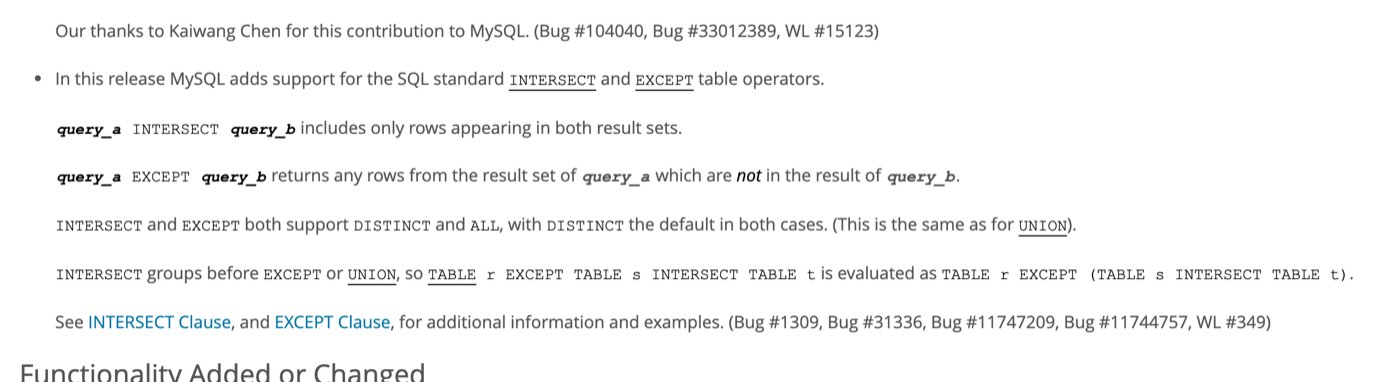
MySQL's 8.0.31 release notes, captured on November 11, 2026: INTERSECT and EXCEPT arrived in that release, in October 2022.
CASE, COALESCE and other everyday functions
SELECT name, price, CASE WHEN price >= 500 THEN 'premium' WHEN price >= 50 THEN 'mid' ELSE 'budget' END AS tier FROM products ORDER BY price DESC LIMIT 4; name | price | tier
---------+--------+---------
Laptop | 950.00 | premium
Monitor | 180.00 | mid
Headset | 60.00 | mid
Webcam | 40.00 | budget
(4 rows)CASE is SQL's if-else and works in the SELECT list, in WHERE, and in ORDER BY. COALESCE returns its first non-NULL argument, which is how you substitute a default: COALESCE(phone, 'no phone') printed no phone for Chen Wei.
String functions
SELECT UPPER(name) AS upper_name, LENGTH(name) AS chars, SUBSTR(name, 1, 5) AS first_five FROM customers WHERE id = 1; upper_name | chars | first_five
-------------+-------+------------
AARAV MEHTA | 11 | Aarav
(1 row)UPPER, LOWER, LENGTH, SUBSTR, REPLACE and TRIM all worked unchanged in the three engines. Joining strings did not:
SELECT name || ' (' || country || ')' AS label FROM customers WHERE id = 1;Engine | Result |
|---|---|
PostgreSQL |
|
SQLite |
|
MySQL |
|
In MySQL || means logical OR unless the PIPES_AS_CONCAT mode is on, so the expression quietly became "is any of these true?" and returned 0. CONCAT(name, ' (', country, ')') returned the right label in all three (SQLite added CONCAT in 3.44), so it is the portable spelling.
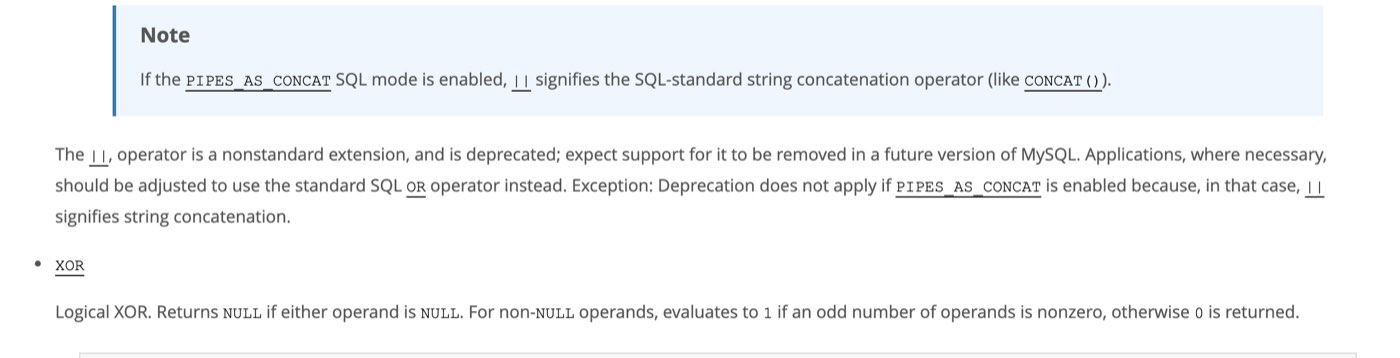
MySQL's manual on the || operator, captured on November 11, 2026. Without PIPES_AS_CONCAT it is logical OR, which is why the concatenation above returned 0.
Numbers
SELECT 7 / 2 AS quotient, 7 / 2.0 AS decimal_quotient;Engine |
|
|
|---|---|---|
PostgreSQL |
|
|
SQLite |
|
|
MySQL |
|
|
Dividing two integers truncates in PostgreSQL and SQLite and does not in MySQL. Write 7 / 2.0, or cast one side, when you want the fraction. ROUND(2.567, 2) gave 2.57 and ABS(-4) gave 4 everywhere.
Dates
Dates are where the dialects differ most, so the same three tasks are shown per engine. CURRENT_DATE returned 2026-11-11 in all three.
Task | PostgreSQL | MySQL | SQLite |
|---|---|---|---|
Month of a date |
|
|
|
Add 30 days |
|
|
|
Days between |
|
|
|
SELECT TO_CHAR(ordered_at, 'YYYY-MM') AS month, COUNT(*) AS orders FROM orders GROUP BY month ORDER BY month; month | orders
---------+--------
2025-08 | 11
2025-09 | 1
(2 rows)All three gave 11 orders in August and 1 in September. Adding 30 days to 2025-08-01 gave 2025-08-31 everywhere, though PostgreSQL returned it as a timestamp, 2025-08-31 00:00:00, because date plus interval produces a timestamp; cast with ::date to keep a date. The day count came back as 31 in PostgreSQL and MySQL and 31.0 in SQLite, whose julianday returns a fraction.
How do you create and change tables?
Data definition statements: CREATE, ALTER, DROP. The sample schema was declared three times, because the auto-numbered primary key is spelled differently in each engine:
Engine | Auto-increment primary key |
|---|---|
PostgreSQL |
|
MySQL |
|
SQLite |
|
CREATE TABLE reviews (
  id         INTEGER PRIMARY KEY GENERATED BY DEFAULT AS IDENTITY,
  product_id INTEGER NOT NULL REFERENCES products(id),
  rating     INTEGER NOT NULL CHECK (rating BETWEEN 1 AND 5),
  body       TEXT,
  created_at TIMESTAMP NOT NULL DEFAULT CURRENT_TIMESTAMP
);
INSERT INTO reviews (product_id, rating, body) VALUES (3, 5, 'Fits my hand');
SELECT id, product_id, rating, body FROM reviews;
id | product_id | rating | body
----+------------+--------+--------------
1 | 3 | 5 | Fits my hand
(1 row)The constraints in that statement are the ones you will use: PRIMARY KEY identifies the row, NOT NULL forbids a missing value, REFERENCES products(id) is a foreign key that forbids a review of a product that doesn't exist, CHECK limits a value, and DEFAULT fills a column in when the INSERT leaves it out. The CHECK did its job in all three: inserting a rating of 9 was refused, with PostgreSQL saying new row for relation "reviews" violates check constraint "reviews_rating_check". UNIQUE, used on products.name, forbids two rows with the same value.
ALTER TABLE
ALTER TABLE customers ADD COLUMN email TEXT;
ALTER TABLE customers RENAME COLUMN phone TO mobile;
ALTER TABLE customers DROP COLUMN city;
SELECT name, mobile, email FROM customers WHERE id = 1;
name | mobile | email
-------------+-----------------+-------
Aarav Mehta | +91 98200 11111 |
(1 row)Add, rename and drop a column, all three engines, no changes needed. SQLite's DROP COLUMN dates from 3.35 and RENAME COLUMN from 3.25; before that you rebuilt the table.
Indexes and views
CREATE INDEX idx_orders_customer ON orders (customer_id);
SELECT COUNT(*) AS orders FROM orders WHERE customer_id = 1;
An index makes lookups on a column fast at the cost of slightly slower writes. Create one on every foreign key and on any column you filter by often. To see whether a query uses it, put EXPLAIN in front; PostgreSQL's answer for a primary-key lookup was:
 QUERY PLAN
---------------------------------------------------------------------------------
 Index Scan using customers_pkey on customers  (cost=0.15..8.17 rows=1 width=32)
   Index Cond: (id = 1)
(2 rows)
A view is a saved query that behaves like a table:
CREATE VIEW order_totals AS
  SELECT o.id, c.name AS customer, o.qty * p.price AS total
  FROM orders o JOIN customers c ON c.id = o.customer_id JOIN products p ON p.id = o.product_id;
SELECT * FROM order_totals WHERE total > 500 ORDER BY id;
id | customer | total
----+-------------+--------
1 | Aarav Mehta | 950.00
6 | Emeka Obi | 950.00
12 | Grace Lee | 950.00
(3 rows)DROP and TRUNCATE
DROP TABLE IF EXISTS reviews; removes the table and its data and does not complain if it is already gone; all three accept it. TRUNCATE TABLE orders; empties a table fast and worked in PostgreSQL and MySQL, but SQLite has no TRUNCATE (near "TRUNCATE": syntax error); use DELETE FROM orders;, which it optimises the same way.
How do you insert, update and delete rows?
INSERT INTO products (id, name, category, price) VALUES (8, 'USB hub', 'Accessories', 22.00);
INSERT INTO products (id, name, category, price) VALUES
  (9, 'Speaker', 'Audio', 45.00),
  (10, 'Tablet', 'Computers', 400.00);
SELECT id, name, price FROM products WHERE id >= 8 ORDER BY id;
id | name | price
----+---------+--------
8 | USB hub | 22.00
9 | Speaker | 45.00
10 | Tablet | 400.00
(3 rows)One INSERT can carry many rows, separated by commas, and INSERT INTO cheap_products (id, name) SELECT id, name FROM products WHERE price < 30; copies rows from a query. Both ran in all three engines.
UPDATE products SET price = price * 0.9 WHERE category = 'Accessories';
SELECT name, price FROM products WHERE category = 'Accessories' ORDER BY id;
name | price
----------+-------
Keyboard | 22.50
Mouse | 13.50
Webcam | 36.00
(3 rows)An UPDATE or DELETE without a WHERE touches every row in the table. Run the matching SELECT first to see what the condition catches. DELETE FROM orders WHERE status = 'cancelled'; left 11 of the 12 orders.
Upsert: insert or update if the row exists
Engine | Statement |
|---|---|
| |
SQLite | The same |
|
Each one changed the Keyboard's price to 29.00 instead of failing on the duplicate key. MySQL's older form, price = VALUES(price), still runs but has been deprecated since 8.0.20.
RETURNING: get the rows a write touched
DELETE FROM customers WHERE id = 8 RETURNING id, name; id | name
----+-------------
8 | Hugo Martin
(1 row)PostgreSQL and SQLite (since 3.35) return the deleted, inserted or updated rows straight from the write, which saves a second query for a generated id. MySQL has no RETURNING and answered with a syntax error; use LAST_INSERT_ID() after an insert there.

SQLite's RETURNING documentation, captured on November 11, 2026: the clause follows PostgreSQL's and dates from 3.35.0.
Transactions
BEGIN;
UPDATE products SET price = 0 WHERE id = 4;
ROLLBACK;
SELECT name, price FROM products WHERE id = 4;
name | price
--------+--------
Laptop | 950.00
(1 row)The update set the laptop's price to 0, the ROLLBACK undid it, and the price is still 950. With COMMIT in place of ROLLBACK the change stays. BEGIN worked in all three; MySQL also accepts START TRANSACTION. Wrap any group of writes that must succeed or fail together, such as moving money between two rows, in one transaction. SAVEPOINT name and ROLLBACK TO name undo part of one.
Does SQL work the same in every database?
No. The core (SELECT, joins, grouping, subqueries, window functions, constraints) ran unchanged in all three engines here. The edges did not. This table collects every difference the test run hit, so you can tell a portability problem from a typo.
Feature | PostgreSQL 18 | MySQL 9.7 | SQLite 3.51 |
|---|---|---|---|
Limit rows |
|
|
|
Join strings |
|
|
|
| Case-sensitive; | Ignores case | Ignores case (ASCII) |
|
|
|
|
| The column | The string | The column |
| Error: | Works | Works |
| Yes | No (syntax error) | Since 3.39 |
| Yes | Since 8.0.31 | Yes |
| Yes | No | Since 3.35 |
| Yes | Yes | No; use |
Upsert |
|
|
|
Auto-increment |
|
|
|
NULL in | Last (ascending) | First | First |
Alias in | Error | Error | Allowed |
Ungrouped column with | Error | Error | Allowed, picks a row |
Decimal display of 25.00 |
|
|
|
The quoting rows deserve a sentence. Standard SQL uses single quotes for strings and double quotes for identifiers. PostgreSQL enforces that: WHERE country = "India" fails because it looks for a column called India. MySQL treats double quotes as a second string delimiter, so SELECT "name" FROM customers returned the word name on every row instead of the column, with no error. Use single quotes for text and you never meet either problem.
In what order does SQL run a query?
Not in the order you write it. The database evaluates FROM and joins first, then WHERE, then GROUP BY, then HAVING, then the SELECT list, then ORDER BY, then LIMIT. That explains two errors that catch everyone once.
SELECT name, price * 2 AS doubled FROM products WHERE doubled > 100 ORDER BY doubled;PostgreSQL: ERROR: column "doubled" does not exist. MySQL: Unknown column 'doubled' in 'where clause'. The alias is created in SELECT, which runs after WHERE, so WHERE cannot see it; repeat the expression or move the query into a CTE. SQLite accepts this as an extension and returned Headset, Monitor and Laptop, which is convenient until the query is moved to another database. ORDER BY doubled is fine everywhere, because sorting runs after SELECT. The same order is why WHERE cannot contain an aggregate and HAVING can.
How this cheat sheet was tested
Every statement on this page is in a claims file, exactly as printed, and a script ran each one on November 11, 2026 against a fresh copy of the sample database on an Apple M2 Mac:
PostgreSQL 18.6, the official
postgres:18Docker image, throughpsqlMySQL 9.7.4, the official
mysql:9Docker image, through themysqlclientSQLite 3.51.0, the
sqlite3shell that ships with macOS
72 statements ran on the three engines. Where the page prints an output, it is PostgreSQL's result set rendered as psql aligns it, with NULL as an empty cell; the other two engines returned the same rows except where the text says so. Where the page quotes an error, it is the engine's own message. The test folder holds the schema, the data, the claims file, the runner and the recorded results, so the run can be repeated on newer versions.
Frequently asked questions
What are the 5 types of SQL commands?
Textbooks group SQL into five families: DDL for defining structure (CREATE, ALTER, DROP), DML for changing data (INSERT, UPDATE, DELETE), DQL for reading it (SELECT), DCL for permissions (GRANT, REVOKE), and TCL for transactions (BEGIN, COMMIT, ROLLBACK). Day to day you will write SELECT far more than the rest combined.
Is this cheat sheet for MySQL, PostgreSQL or SQLite?
All three. Every statement was run in each, and the table above lists every place they disagreed. If you use SQL Server or Oracle, the core statements still apply; the limit syntax (TOP, FETCH FIRST), string concatenation (+ in SQL Server) and date functions are the parts to check against their docs.
What is the difference between WHERE and HAVING?
WHERE filters rows before they are grouped; HAVING filters groups after aggregation. WHERE status = 'shipped' keeps individual orders; HAVING COUNT(*) >= 2 keeps customers with at least two of them. A condition on an aggregate can only go in HAVING.
What is the difference between UNION and UNION ALL?
UNION removes duplicate rows from the combined result and UNION ALL keeps them. In the test, the same two queries returned 2 rows with UNION and 3 with UNION ALL. Use UNION ALL unless you need the deduplication, because it skips the sort that deduplication costs.
What is the difference between a JOIN and a subquery?
A join combines columns from two tables into wider rows; a subquery uses one query's result inside another, usually to filter. "Customers who have never ordered" can be written both ways (LEFT JOIN ... WHERE o.id IS NULL or WHERE NOT EXISTS (...)), and both returned Hugo Martin. Use a join when you need columns from both tables, a subquery when you only need the test.
Which SQL should a beginner learn first?
Start with SELECT, WHERE, ORDER BY, then GROUP BY with COUNT and SUM, then JOIN. Those five sections cover most questions anyone asks a database. SQLite is the easiest place to practise, because it is a single file with no server, and everything in those sections behaves the same in PostgreSQL and MySQL when you move on.
Is SQL case-sensitive?
Keywords are not: select, SELECT and Select are the same. Whether table and column names are depends on the engine and operating system (MySQL on Linux treats table names as case-sensitive). String comparisons depend on the engine, as the LIKE 'a%' test above showed: PostgreSQL distinguishes case, MySQL and SQLite do not by default.
The Writeouts editorial desk for developer tools: cheat sheets, references and tool comparisons you can keep open while you work, checked against official documentation. From the Writeouts editorial team.
See everything by @devtools-deskEdited by Rajat Chauhan. How articles here are written and edited.
0 comments
Sign in to join the discussion.
Loading comments…